
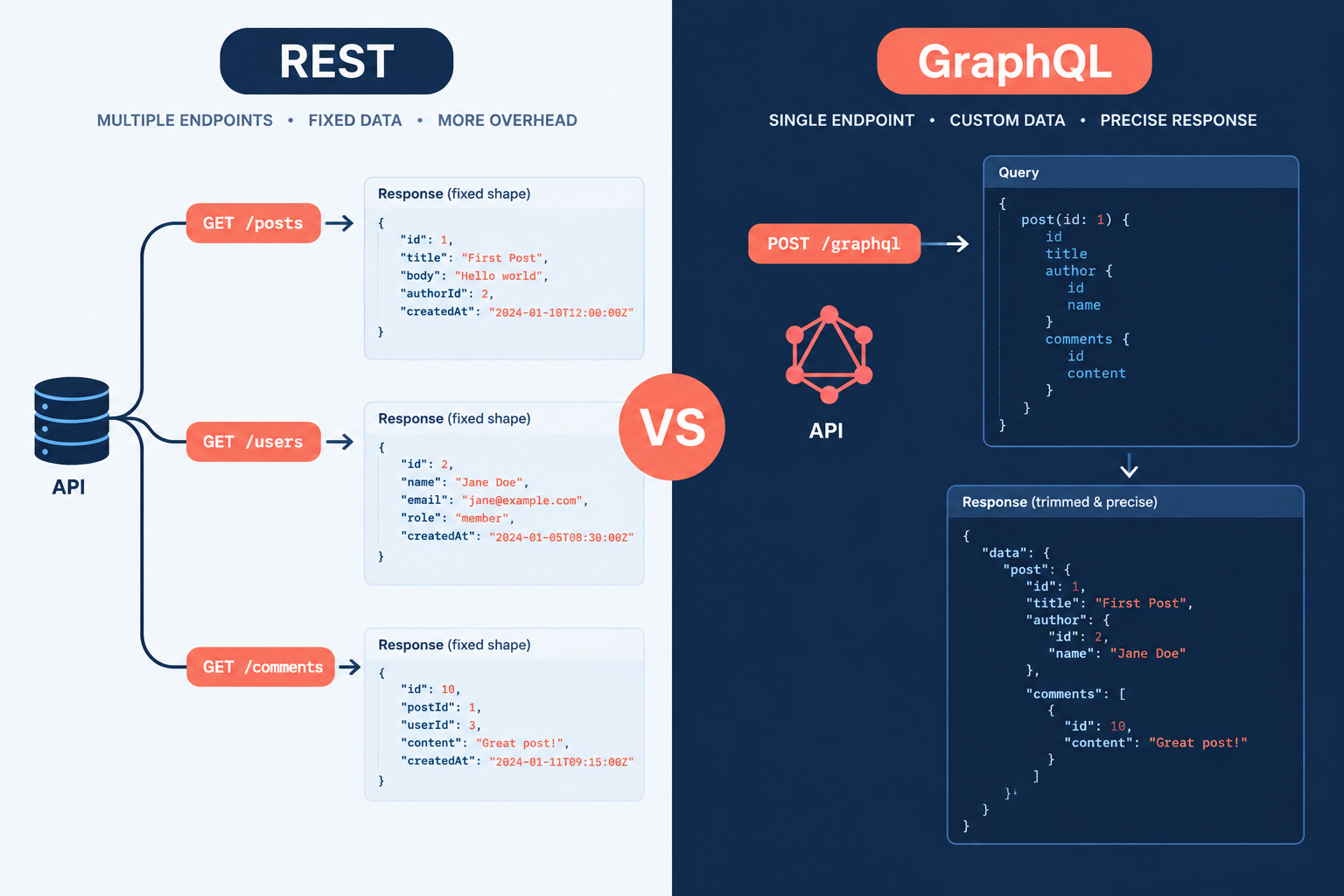
GraphQL and REST both move data between a server and whatever is asking for it, but they disagree on who decides the shape of that data. REST gives you fixed endpoints that return fixed responses. GraphQL gives you one endpoint and lets the client ask for exactly the fields it wants. This guide compares the two on performance, caching, security, cost and real platform support, so you can pick the right one for your next build.
Last updated: October 30, 2026
What REST actually is
REST (Representational State Transfer) is an architectural style that Roy Fielding described in his 2000 doctoral dissertation. It is a set of constraints for building on top of HTTP. It isn’t a library or a protocol.
In practice, a REST API exposes each resource at its own URL. You use standard HTTP methods to act on it: GET to read, POST to create, PUT or PATCH to update, DELETE to remove. The server decides what each response contains.
WordPress is the example most site owners have already used, even without realising it. Since WordPress 4.7 shipped in December 2016, every install has had a REST API in core. Posts live at /wp-json/wp/v2/posts, pages at /wp-json/wp/v2/pages, users at /wp-json/wp/v2/users, and so on.
What GraphQL actually is
GraphQL is a query language and runtime for APIs. Facebook built it internally in 2012 to feed its mobile apps, open-sourced it in 2015, and handed it to the GraphQL Foundation under the Linux Foundation in 2018.
Instead of many URLs, a GraphQL API usually has a single endpoint, often /graphql. Behind it sits a strongly typed schema that describes every type, field and relationship available. The client sends a query naming the fields it wants, and the server returns JSON in exactly that shape.
Reads are called queries, writes are called mutations, and real-time updates are called subscriptions. The schema is self-describing, so tools like GraphiQL can autocomplete your queries as you type.
GraphQL vs REST side by side
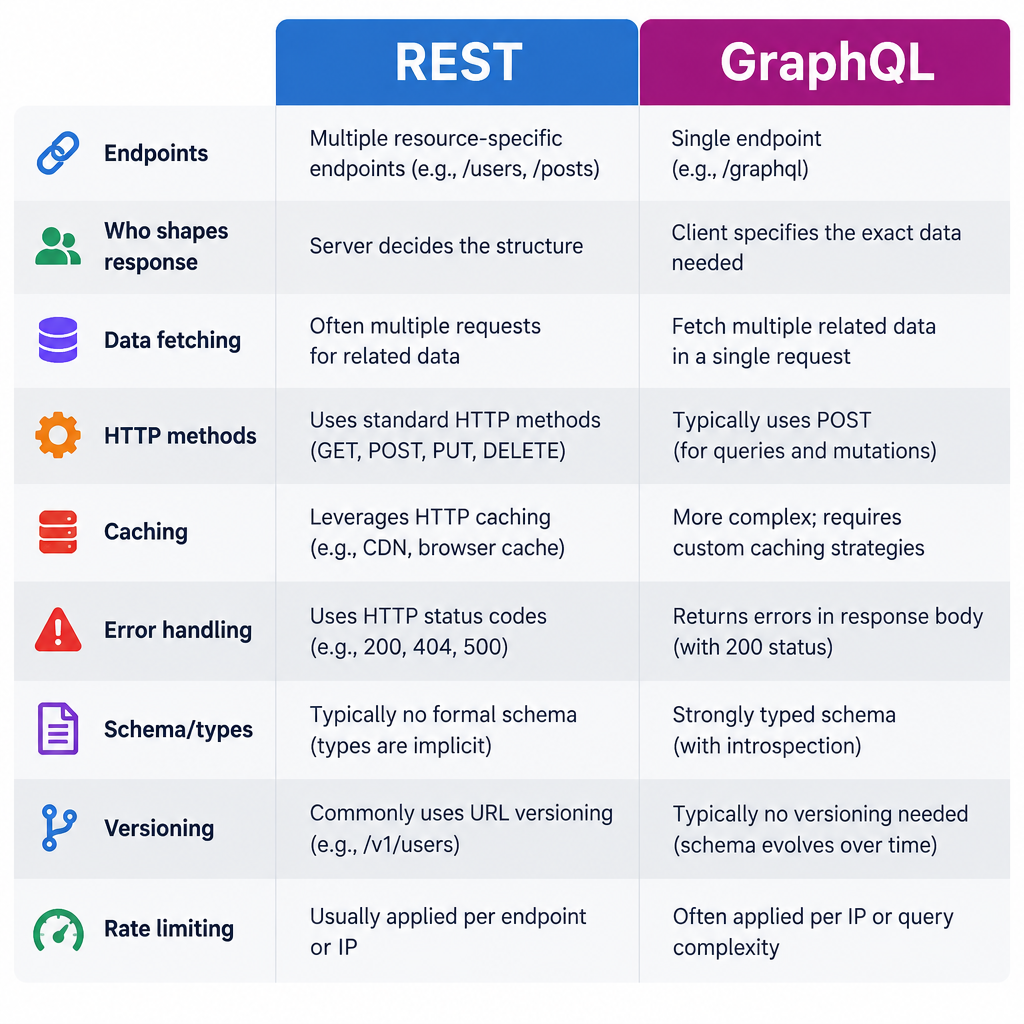
Here are the nine differences that matter most when you build and run real systems.
| REST | GraphQL | |
|---|---|---|
| 1. Endpoints | One URL per resource | Usually a single endpoint |
| 2. Who shapes the response | Server | Client |
| 3. Data fetching | Often multiple requests, fixed payloads | One request, only requested fields |
| 4. HTTP methods | GET, POST, PUT, PATCH, DELETE | Mostly POST (GET possible for queries) |
| 5. Caching | Native HTTP and CDN caching on GET | Needs persisted queries or client-side cache |
| 6. Error handling | HTTP status codes (404, 401, 500) | Often HTTP 200 with an errors array |
| 7. Schema and types | Optional (OpenAPI is common) | Required, strongly typed |
| 8. Versioning | /v1/, /v2/ URLs are common |
Evolve the schema, deprecate fields |
| 9. Rate limiting | Count requests | Score query cost or complexity |
None of these makes one option “better” across the board. Each difference is a trade-off, and the rest of this article is about which trade-offs hurt in which projects.
The same request, two ways
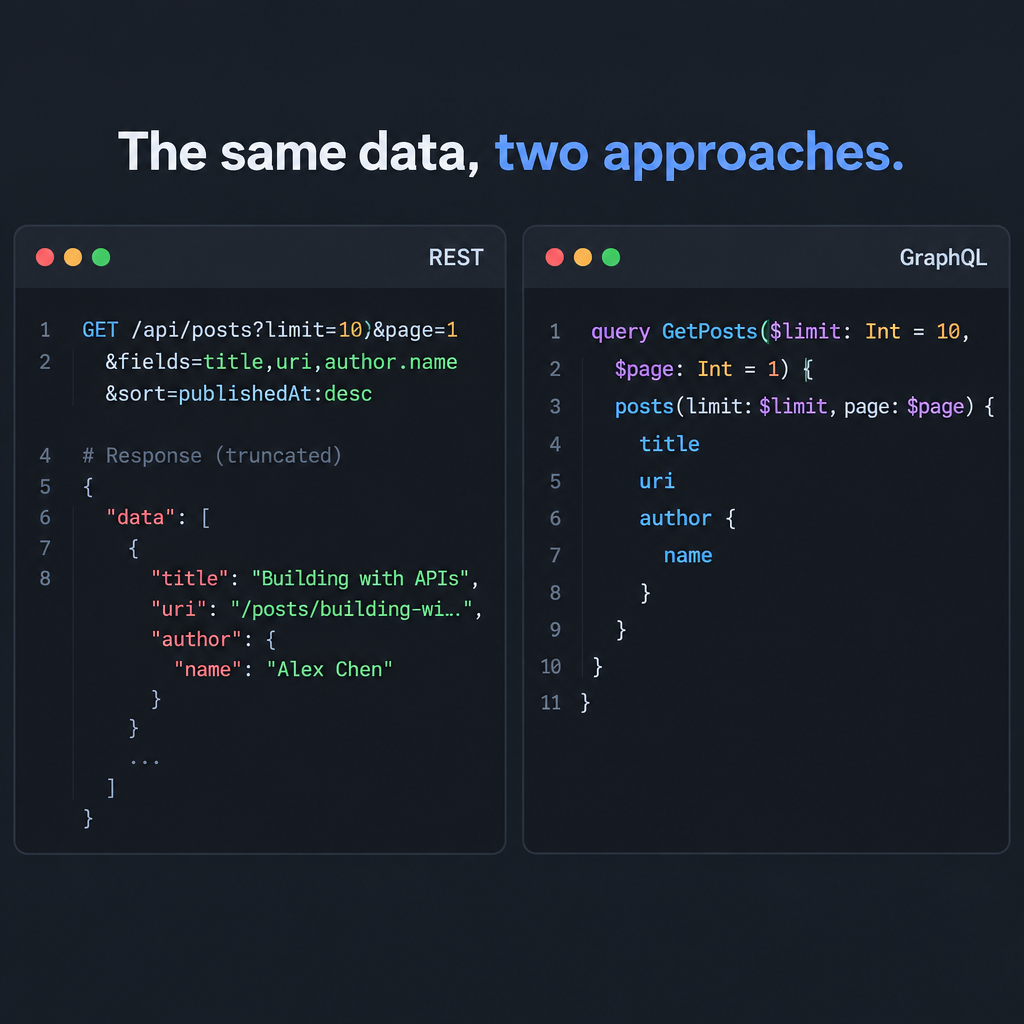
Say your front end needs the five latest posts, each with its title, link and author name.
With the WordPress REST API, the default response for a post is large. It includes content, excerpt, meta, featured media IDs and more. You can trim it with the _fields parameter, but the author only arrives as an ID, so you either make a second request or embed it:
GET /wp-json/wp/v2/posts?per_page=5&_embed=author&_fields=id,title,link,_embedded
That works, but _embed pulls in the full author object, and you are now bending a REST endpoint to fit one screen.
With the WPGraphQL plugin installed, the same need is one query:
query RecentPosts {
  posts(first: 5) {
    nodes {
      title
      uri
      author {
        node {
          name
        }
      }
    }
  }
}
The response contains those fields and nothing else. Multiply that by a homepage that also needs menus, categories, a featured product and site settings. REST might make five or six round trips for that page. GraphQL can do it in one.
That is the core of the graphql vs rest debate. The rest of the decision is about what that flexibility costs you.
Where the differences actually bite
Over-fetching and under-fetching
REST endpoints return what the server designer decided. If the response carries more than you need, you are over-fetching and paying for it in bandwidth and parse time. If it carries less, you are under-fetching and must make another request.
On a fast desktop connection this rarely matters. On a mid-range phone over a weak mobile signal, three sequential round trips can add a visible delay before the page renders. This exact problem drove Facebook to build GraphQL.
Caching
This is where REST pulls ahead. Every GET /posts/42 has a unique URL, so browsers, reverse proxies and CDNs can cache it with ordinary Cache-Control headers. Most web hosts and CDNs do this with zero configuration.
GraphQL requests usually go to one URL as a POST with the query in the body. Shared caches can’t see what is being asked for, so they don’t cache it by default. The common fixes are:
- Persisted queries: the client sends a hash of a pre-registered query, often over
GET, which makes it cacheable at the edge. - Client-side normalised caches: libraries like Apollo Client and urql store results by object ID and reuse them.
- Server or response caching: caching resolved data on the server, keyed by query and variables.
All of these work, but each is something you build and maintain. With REST, you mostly get caching for free.
Errors and status codes
A REST API tells you what went wrong through standard HTTP status codes. A 404 means not found, a 401 means unauthenticated, a 429 means too many requests (the client has exceeded a rate limit). Monitoring tools, uptime checkers and logs all understand these.
Many GraphQL servers return HTTP 200 even when part of the query failed, with details in an errors array alongside any partial data. That is genuinely useful, because one broken field doesn’t sink the whole page. But it also means your monitoring has to parse response bodies, or a dashboard full of green 200s can hide real failures.
Versioning and changes over time
REST APIs often version through the URL, as in /v1/orders and /v2/orders, and run both for a while. It is blunt but clear.
GraphQL encourages one evolving schema. You add new fields freely, because existing queries never ask for them. You mark old fields with @deprecated and remove them once usage drops to zero. This works well when you control the clients. Third-party integrators still need dated release cycles; Shopify runs both its APIs on quarterly versions for exactly that reason.
Security and rate limiting
A REST endpoint does a known amount of work, so limiting requests per minute is a reasonable defence. A GraphQL endpoint can be asked for deeply nested data in a single request, such as authors, their posts, each post’s comments, each commenter’s posts, and so on. One request can cost the server thousands of database calls.
That is why large GraphQL APIs score queries by cost rather than counting them. Here is how two well-known platforms handle it:
| API | Rate limit model | Published limit |
|---|---|---|
| GitHub REST API | Requests per hour | 5,000/hour authenticated, 60/hour unauthenticated |
| GitHub GraphQL API | Points per hour, based on query cost | 5,000 points/hour per user |
| Shopify REST Admin API | Leaky bucket, requests per second | 2 requests/second on standard plans, 20 on Shopify Plus |
| Shopify GraphQL Admin API | Calculated query cost, leaky bucket of points | Single query capped at 1,000 points; restore rate rises with plan |
Security note
A public GraphQL endpoint without depth and cost limits invites denial-of-service through nested queries. Set a maximum query depth and complexity, and consider disabling introspection in production for private APIs.
How CMS and commerce platforms use each
If you build on a CMS rather than writing an API from scratch, the platform has often made the choice for you, or at least nudged it.
| Platform | REST | GraphQL |
|---|---|---|
| WordPress | Built into core since 4.7 (2016) | WPGraphQL plugin, now a canonical community plugin on WordPress.org |
| WooCommerce | Built-in REST API (/wp-json/wc/v3/) |
Via community extensions built on WPGraphQL |
| Shopify | REST Admin API is legacy since October 1, 2024 | GraphQL Admin API required for new public apps since April 1, 2025; Storefront API is GraphQL only |
| Drupal | JSON:API module in core since 8.7 | Contributed GraphQL module |
| Strapi | REST enabled by default | Official GraphQL plugin |
| Contentful | Content Delivery and Management REST APIs | GraphQL Content API |
| Sanity | HTTP API | GROQ is the native query language; GraphQL API can be deployed |
| Hygraph | Not the primary interface | GraphQL native |
Shopify’s move is the clearest real-world signal in this list. If you run a store on the Shopify ecommerce platform and commission a custom app, it will be built on GraphQL. Existing REST integrations keep working for now, but new feature work is landing on the GraphQL side.
WordPress went the other way. REST is in core, stable and well documented, while GraphQL is an add-on you install. If you are planning a headless CMS setup with WordPress as the back end, both are viable, and the choice usually comes down to your front-end framework and team.
What each costs to run
Neither approach has a licence fee. REST is an architectural style and GraphQL is an open specification. The real costs sit in hosting, tooling and engineering time.
| Cost item | REST | GraphQL |
|---|---|---|
| Specification or standard | Free | Free |
| WordPress support | Free, in core | Free plugin (WPGraphQL) |
| Shopify access | Included with every plan | Included with every plan |
| Server libraries | Free, built into most frameworks | Free open-source options (Apollo Server, GraphQL Yoga) |
| Edge caching | Usually works with standard CDN setups | Needs persisted queries or a GraphQL-aware cache |
| Developer time | Lower to start | Higher to start, often lower per new screen later |
Managed GraphQL platforms and API gateways do charge, often by request volume or seats. Those prices change frequently, so check the vendor’s current pricing page before you budget for one.
Pros and cons of REST
Pros
- Uses plain HTTP, so every language, tool and developer already understands it.
- Caching works out of the box with browsers and CDNs.
- Clear status codes make monitoring and debugging simple.
- Easy to secure and rate-limit per endpoint.
- File uploads and downloads are straightforward.
Cons
- Fixed responses lead to over-fetching and under-fetching.
- Complex screens can need many round trips.
- Documentation drifts unless you maintain an OpenAPI spec.
- Versioning by URL means running parallel versions.
Pros and cons of GraphQL
Pros
- The client fetches exactly the fields it needs in a single request.
- A strongly typed schema documents itself and powers autocomplete and code generation.
- Relationships between types are easy to traverse.
- Front-end teams can build new screens without waiting for new endpoints.
- The schema evolves without URL versioning.
Cons
- HTTP caching needs extra work.
- Naive resolvers cause the N+1 problem, where one query triggers a database call per item.
- Query cost and depth limits are mandatory, not optional.
- Errors hide behind HTTP 200 unless you parse responses.
- More moving parts for a small team or a simple site.
When to use REST
Pick REST when your data is simple, your clients are many, and caching matters more than flexibility. Typical cases include:
- Public APIs consumed by unknown third parties, where predictable endpoints and status codes reduce support tickets.
- Content-heavy sites where most pages are the same for every visitor and a CDN can serve them.
- Webhooks and server-to-server integrations, such as syncing orders to an ERP or posting form submissions to a CRM.
- Small teams without time to run a schema, resolvers and query cost analysis.
- File handling, since uploading media or exporting large CSVs is easier over plain HTTP.
A brochure site, a blog, or a simple storefront rarely needs anything more than REST. If you are still at the stage of working out how a CMS works, start here.
When to use GraphQL
Pick GraphQL when your front end is complex, your data is highly connected, and the people building the UI change it often. Typical cases include:
- Headless front ends in frameworks like Next.js, Nuxt or Astro that pull from several content types per page. Our guide to the Astro framework covers one popular way to build these.
- Mobile apps, where every round trip and every kilobyte costs time on weak connections.
- Many clients, one back end, such as a website, an iOS app and an Android app that each need different slices of the same data.
- Aggregating several systems behind one schema, for example a CMS, a product catalogue and a reviews service.
- Shopify custom apps and headless storefronts, where GraphQL is now the expected path.
Builder tip
On a headless WordPress build, use WPGraphQL for page rendering and keep the core REST API for webhooks and admin tasks. You get flexible queries for the front end without rebuilding integrations that already work.
Migration notes: moving from REST to GraphQL
You rarely need to rip out REST to adopt GraphQL. Most teams run both side by side and move screen by screen.
Moving a site from REST to GraphQL
- Take a full backup of files and database first.
- Install or build the GraphQL layer on staging.
- Lock down introspection, depth and cost limits.
- Migrate one high-traffic page and measure it.
- Add persisted queries so CDN caching still works.
- Move remaining screens and retire unused endpoints.
Measure before and after. Compare the number of requests, total payload size and time to first render on a throttled mobile profile in your browser’s dev tools. If the numbers don’t improve, the migration isn’t worth the added complexity for that page.
Common pitfalls and how to avoid them
The N+1 problem. A query for 50 posts and their authors can trigger 51 database queries if each author resolver fetches on its own. Batch and cache lookups with a pattern like DataLoader so those 50 author lookups become one.
Treating GraphQL as a database. Exposing every table and column as a field makes the schema huge and leaks internal structure. Design the schema around what clients need, not around your storage.
Ignoring cache headers on REST. Many REST APIs send no Cache-Control at all and then blame REST for slowness. Set sensible headers on public GET responses before you consider switching.
Over-building the first version. A small marketing site with a CMS and a contact form does not need a GraphQL gateway. Start simple and add GraphQL when a real screen proves the need.
Forgetting authorisation per field. In REST you secure endpoints. In GraphQL, a single query can reach many types, so check permissions in resolvers, not just at the endpoint.
Beyond REST and GraphQL
These two aren’t the only options. gRPC uses Protocol Buffers over HTTP/2 and is popular for fast service-to-service traffic inside a company. tRPC gives TypeScript teams end-to-end types without writing a schema at all. Some CMS platforms, like Sanity with GROQ, ship their own query languages.
For most website and ecommerce projects, though, the real decision is still REST, GraphQL, or both. A common pattern is a backend-for-frontend (BFF) layer: a thin GraphQL service that sits in front of several REST APIs and shapes data for your front end. You get GraphQL’s flexibility where it helps, and keep simple REST services underneath.
Which should you choose?
Choose REST if you are building a public API, a content site that leans on CDN caching, or integrations between servers. It is simpler to run, cheaper to start, and every tool understands it.
Choose GraphQL if you are building a headless front end, a mobile app, or anything that pulls many related resources into one screen. It is also the clear choice for new Shopify app work.
Choose both if you run a headless CMS with a decoupled front end. Let GraphQL feed the pages and leave REST in place for webhooks, uploads and third-party integrations. On most real client projects, this hybrid is where teams end up.
FAQ
Is GraphQL faster than REST?
Not inherently. GraphQL is often faster for complex pages because it cuts round trips and payload size. REST is often faster for simple, repeated reads because CDNs cache it so easily. Measure your actual pages instead of assuming.
Is GraphQL replacing REST?
No. REST still powers most public web APIs, including the WordPress core API. GraphQL has become the default on some platforms, Shopify being the clearest example, but the two coexist on most real systems.
Can I use GraphQL with WordPress?
Yes. Install the free WPGraphQL plugin and you get a /graphql endpoint covering posts, pages, menus, users and custom post types. The built-in REST API keeps working alongside it.
Is GraphQL less secure than REST?
It isn’t less secure by design, but it has a larger attack surface if left unconfigured. Set query depth and cost limits, check authorisation in resolvers, and decide deliberately whether to allow introspection in production.
Do I need GraphQL for a headless CMS?
No. Many headless setups run happily on REST, and Drupal’s JSON:API and Strapi’s default REST API are both common choices. GraphQL becomes worth it when your front end needs many related content types per page.