
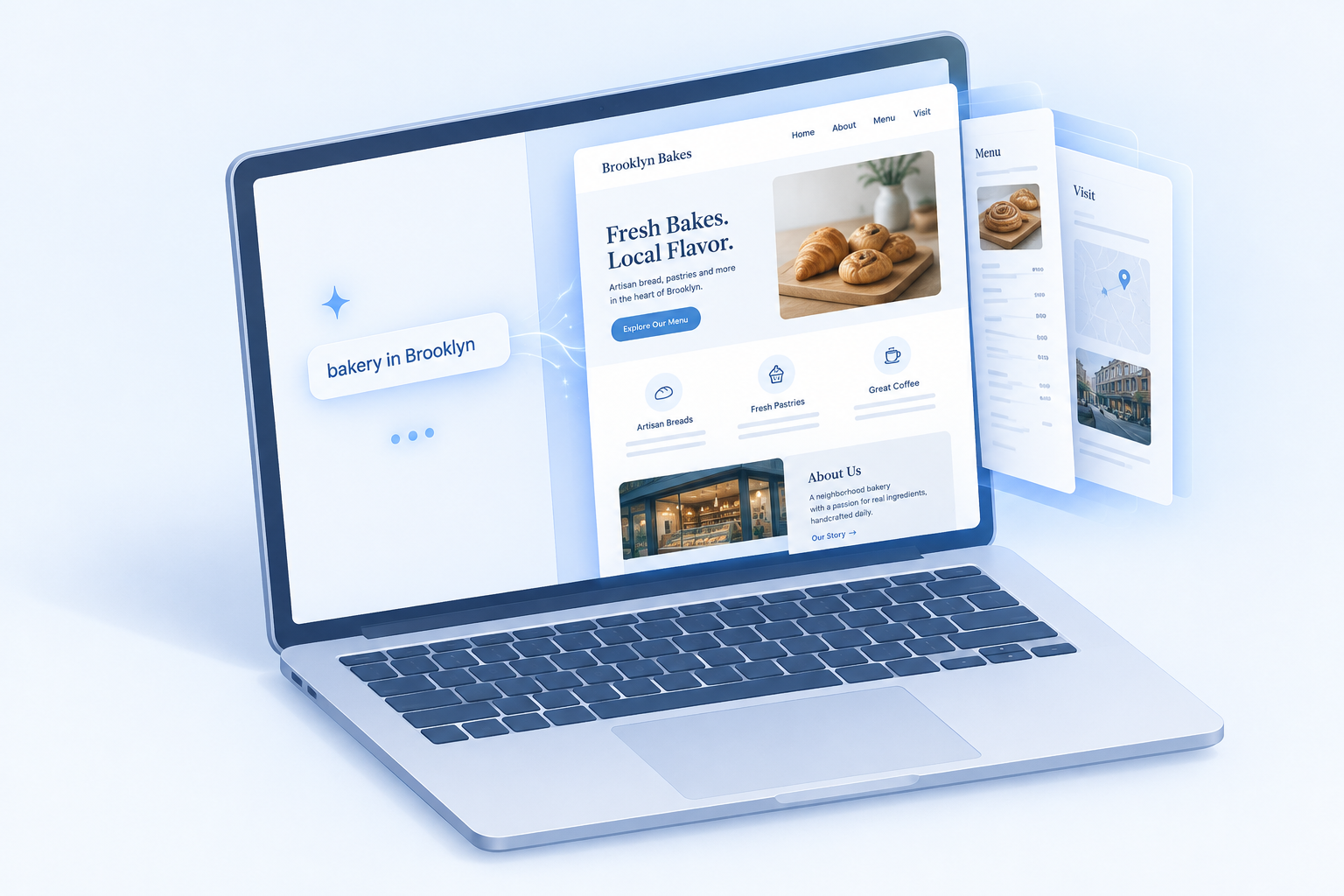
An AI website builder turns a short description of your business into a working site with pages, copy, images and a layout you can edit. This guide explains what happens between your prompt and the published page. It then ranks the eight AI website builders we would put in front of a small business client in 2026.
What an AI website builder actually is
An AI website builder is a hosted platform that uses generative AI to produce a first draft of your site. You answer a few questions or type a prompt. The tool picks a structure, writes the text, chooses images and applies a visual style.
The output is a normal site on that platform. You edit it in the same visual editor everyone else uses, and you publish it on the same hosting.
That last point matters. The AI does most of its work in the first five minutes. After that, you are using a regular website builder with some AI helpers bolted onto the editor.
It also helps to separate these tools from two neighbours:
- Template builders give you a pre-made design and expect you to fill it in. AI builders fill it in for you.
- AI code generators such as Lovable, Bolt.new and Vercel’s v0 write actual application code from a prompt. They suit developers. You usually handle hosting yourself, and you don’t get a client-friendly content editor by default.
If you want a brochure site, a portfolio or a small store you can update without touching code, you want an AI site builder rather than a code generator.
How an AI website builder creates your site
Every platform dresses this up differently, but the pipeline is similar across the ai-powered website builder category.
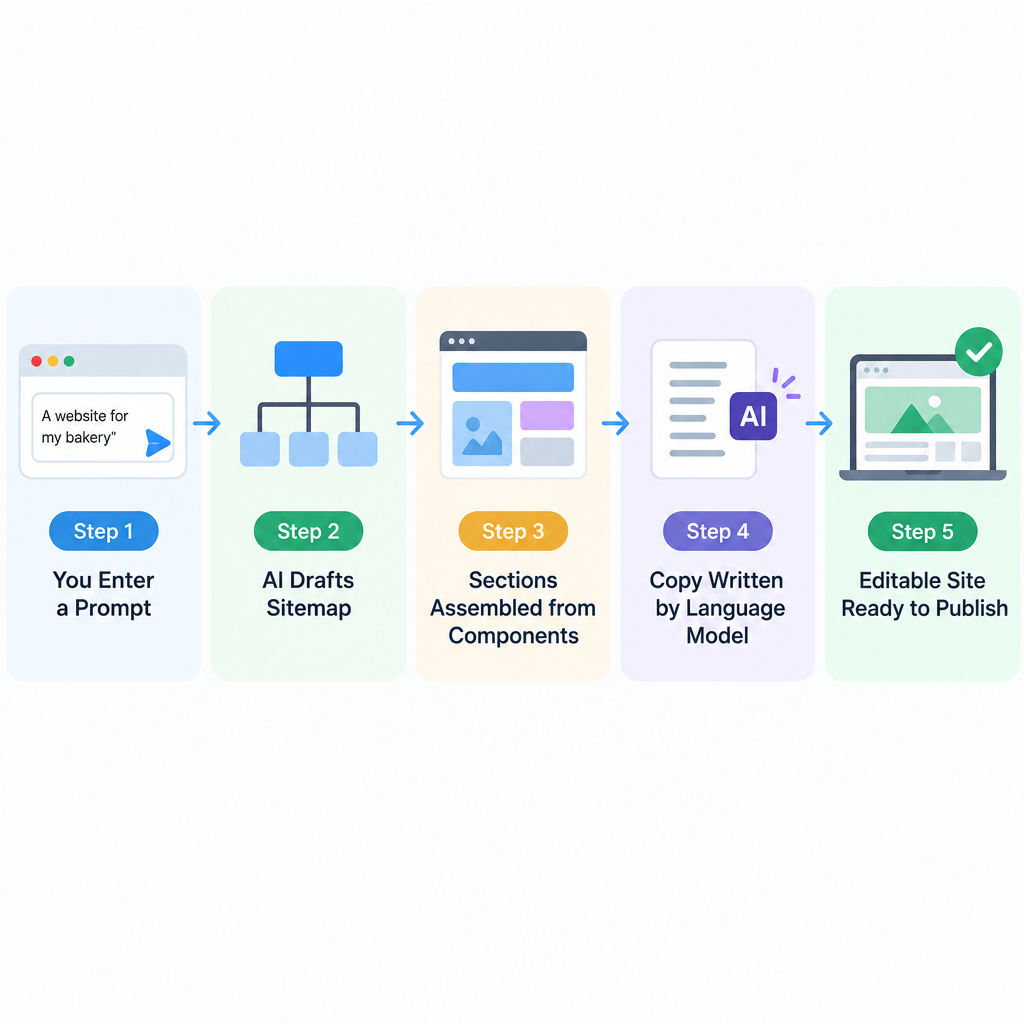
What happens after you hit Generate
- You describe your business through a chat or a short form.
- The AI drafts a sitemap, usually a home page plus three to six inner pages.
- Each page is assembled from pre-built sections in the platform’s component library.
- A language model writes headlines, body copy, calls to action and SEO titles.
- Images are pulled from a stock library or generated, then matched to sections.
- A colour palette and font pairing are applied site-wide.
- You get an editable draft, ready to refine and publish.
Step 3 is the part most people misunderstand. The AI rarely invents layouts from scratch. It picks and arranges blocks that human designers already built and tested. That is why AI drafts look tidy but often look alike.
Step 4 is where quality varies most. The model only knows what you told it. Give it “bakery” and you get generic bakery copy. Give it your neighbourhood, opening hours, best-selling loaf and the fact that you do wholesale for three cafés, and the draft gets far more usable.
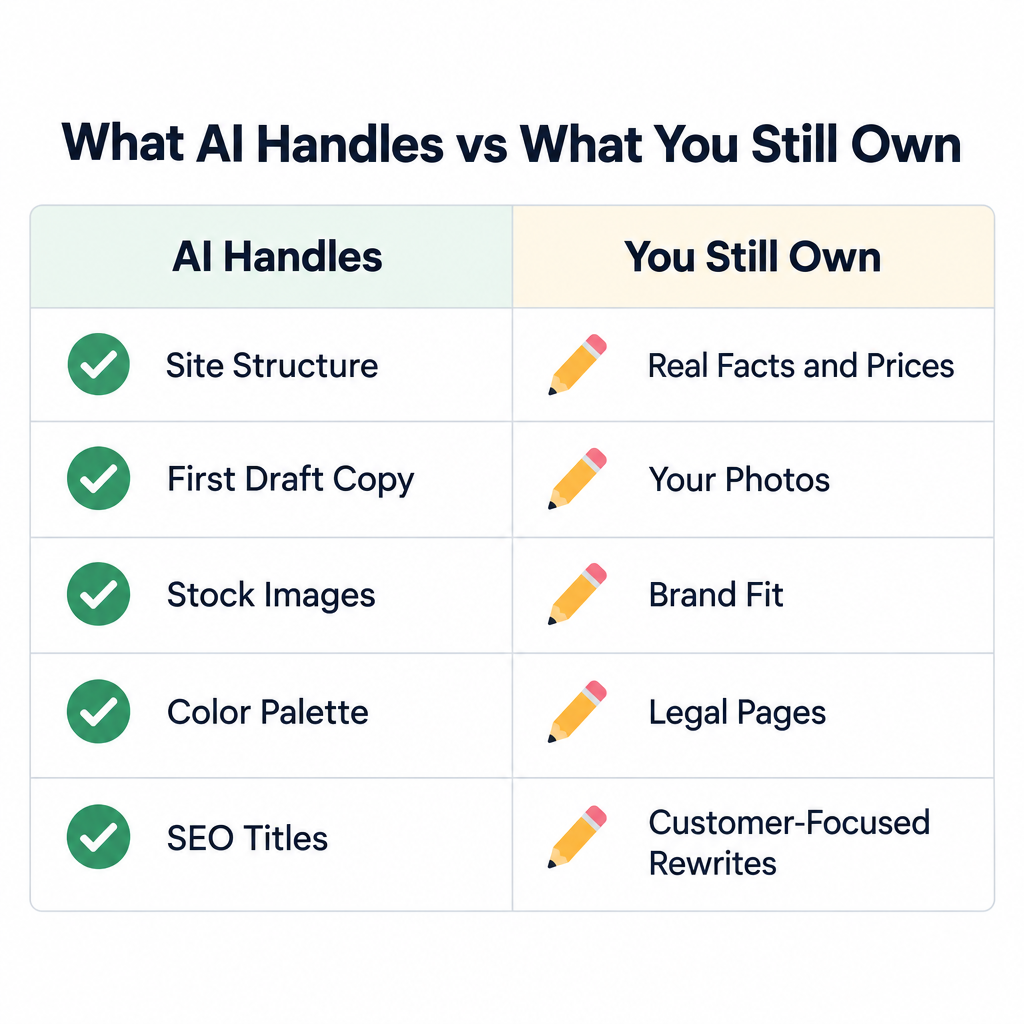
What the AI does well, and what you still own
| Task | What the AI handles | What you still need to do |
|---|---|---|
| Site structure | Suggests pages and navigation | Cut pages you don’t need, add ones it missed |
| Copywriting | Writes a full first draft | Replace claims with real facts, prices and proof |
| Images | Fills every slot with stock or generated art | Swap in your own photos, add proper alt text |
| Design | Applies palette, fonts, spacing | Check contrast, logo placement, brand fit |
| SEO basics | Drafts page titles and descriptions | Rewrite them around what customers search |
| Legal pages | Rarely, or as a generic template | Get a privacy policy that matches your data use |
The pattern is clear. An AI website builder saves you from the blank page. It does not know your business, so it cannot write the parts that win customers.
How we chose these AI website builders
We judged each platform on its published feature set and on how it fits the client work we do. We kept the criteria short:
- First-draft quality: does the generated site have a sensible structure, or just a pretty home page?
- Ease of refining: can a non-designer customize the draft without breaking the layout?
- Free plan or trial: can you build and preview before paying?
- Ownership: can you get your content, or your whole site, out later?
- Room to grow: blog, store, bookings, SEO controls and integrations.
We have not ranked on price. Several of these vendors run rotating introductory discounts and regional pricing. The only reliable number is the one on the checkout page the day you buy.
Quick comparison of the best AI site builders
| # | Builder | Best for | How the AI starts | Free plan | Can you take your site with you? |
|---|---|---|---|---|---|
| 1 | Wix | Most small businesses | Chat-style interview | Yes, with Wix branding | No full site export |
| 2 | Squarespace | Design-led brands, portfolios | Blueprint questionnaire | No, 14-day trial | Partial content export |
| 3 | Shopify | Online stores | Store generation plus Shopify Magic | No, free trial | Product and customer CSVs |
| 4 | Framer | Startups, landing pages | Text prompt to page | Yes, Framer subdomain | No official code export |
| 5 | Hostinger | Budget sites | Short business brief | No, 30-day refund | No full site export |
| 6 | 10Web | WordPress users | Prompt, or recreate from a URL | No, free trial | Yes, it is WordPress |
| 7 | Webflow | Designers and agencies | Prompt to site | Yes, webflow.io subdomain | Code export on paid plans |
| 8 | GoDaddy Airo | Fast local business sites | Business type and goals | Yes, limited | No full site export |
The 8 best AI website builders, ranked
1. Wix: the best AI website builder for most people
Wix has been doing automated site creation longer than most. Its original ADI tool launched in 2016. The current AI website builder works as a conversation: it asks about your business, goals and style, then generates a multi-page site.
The draft lands in the full Wix editor, so you can move anything. Wix also bundles AI text tools, image tools and a large app market for bookings, events, restaurants and stores.
It is our top pick because the gap between “AI draft” and “real business site” is shortest here. Bookings, payments, email marketing and SEO settings live in one dashboard.
The catch is lock-in. You cannot export a Wix site to another host. If you leave, you rebuild.
2. Squarespace: best for design-first sites
Squarespace Blueprint walks you through a short questionnaire about your site type, pages and style. It then builds a site from Squarespace’s design system, which keeps spacing and typography consistent.
The result tends to look more polished than other AI drafts. The trade-off is less freedom. The section-based editor stops you from making a mess, which also stops you from doing anything unusual.
Squarespace suits photographers, restaurants, consultants and creatives who care more about looks than plugins. There is no free plan, only a 14-day trial.
3. Shopify: best AI site builder for online stores
Shopify is a commerce platform first. Its AI tools sit inside that. Shopify Magic writes product descriptions and email copy, Sidekick acts as an admin assistant, and newer tools can generate a store layout from a short description.
If you plan to sell physical products, start here instead of bolting a store onto a general builder. Inventory, shipping, taxes, payments and checkout are core features, not add-ons.
Shopify’s AI features are included in its plans. Your products, customers and orders can be exported as CSV files, which makes a future move far less painful than on most closed builders.
4. Framer: best for startups and landing pages
Framer started as a design tool and still feels like one. You type a prompt, and its AI produces a page layout you can then refine on a canvas much like Figma.
It shines for SaaS landing pages, product launches and personal sites where animation and layout precision matter. The CMS handles blogs and changelogs well.
Framer is weaker for stores and has no official code export. The free plan publishes on a Framer subdomain with a Framer badge.
5. Hostinger: best budget AI powered website builder
Hostinger’s Website Builder generates a site from a short brief and bundles a stack of AI helpers. These include an AI writer, image generator and logo maker.
It is aimed squarely at people who want a simple site live quickly without paying premium-builder prices. Plans include hosting, and a 30-day money-back guarantee lowers the risk.
Design flexibility and the app ecosystem are thinner than Wix. For a five-page local business site, that rarely matters.
6. 10Web: best AI builder for WordPress
10Web generates a full WordPress site from a prompt. It can also recreate the layout of an existing site from its URL. The editor is built on Elementor, and 10Web hosts the result.
The big advantage is ownership. Because the output is standard WordPress, you can move it to any WordPress host, add WooCommerce, or install any plugin from the WordPress ecosystem.
Builder tip
If you might hire a developer later, starting on a WordPress-based AI builder saves a costly rebuild when the site outgrows its first version.
7. Webflow: best for designers and agencies
Webflow’s AI site builder generates a site from a prompt inside its visual designer. That designer exposes real CSS concepts like classes, flexbox and grid. Webflow’s AI assistant can also help generate sections and content.
This is the most powerful tool on the list and the hardest to learn. It suits designers, agencies and marketing teams who want pixel-level control and a strong CMS.
The free Starter plan publishes on a webflow.io subdomain. Paid workspace plans allow code export, though CMS and ecommerce features do not carry over in an export.
8. GoDaddy Airo: best for getting a local business online fast
GoDaddy Airo is the AI layer across GoDaddy’s products. It builds a site from your business type and goals. It can also suggest a domain and help with a logo and social posts.
It is the quickest path from “I have a business name” to “I have a live site and matching domain”. Design control is basic. For trades, salons and local services that need a phone number, a service list and a contact form, basic is enough.
Also worth knowing
Durable markets itself on generating a site in about 30 seconds and bundles small-business tools like a CRM and invoicing. It fits solo service businesses. Jimdo and Hocoos also offer AI-led setup for simple sites.
Free plans and trials compared
| Builder | Free option | Trial or refund on paid plans | What the free version lacks |
|---|---|---|---|
| Wix | Yes | 14-day refund on premium plans | Custom domain, ad-free pages, checkout |
| Squarespace | No | 14-day free trial | Publishing after the trial ends |
| Shopify | No | Free trial | Selling after the trial ends |
| Framer | Yes | None | Custom domain, badge removal |
| Hostinger | No | 30-day money-back guarantee | No free tier |
| 10Web | No | Free trial | No free tier |
| Webflow | Yes (Starter) | None | Custom domain, page and CMS limits |
| GoDaddy Airo | Yes | None | Custom domain, branding removal |
A free plan is fine for testing and for personal projects. For a business, budget for a paid plan from day one. A custom domain is the minimum for looking professional, and no builder on this list includes one free.
Features compared
| Builder | AI copywriting | Online store | Blog | Editor after generation | Built on |
|---|---|---|---|---|---|
| Wix | Yes | Yes | Yes | Drag-and-drop | Proprietary |
| Squarespace | Yes | Yes | Yes | Section-based | Proprietary |
| Shopify | Yes (Shopify Magic) | Core feature | Yes | Theme editor | Proprietary |
| Framer | Yes | Third-party only | Yes (CMS) | Design canvas | Proprietary |
| Hostinger | Yes | Yes | Yes | Drag-and-drop | Proprietary |
| 10Web | Yes | Yes (WooCommerce) | Yes | Elementor-based | WordPress |
| Webflow | Yes | Yes | Yes (CMS) | Visual designer | Proprietary |
| GoDaddy Airo | Yes | Yes, on commerce plans | Yes | Section editor | Proprietary |
How to build a website with AI for free
You can get a real draft live today without paying anything. Here is the process we use when sketching a site for a client.
Build your first AI site
- Pick a builder with a free plan: Wix, Framer, Webflow or GoDaddy.
- Write a specific prompt using the template below.
- Generate, then review the sitemap before touching design.
- Rewrite every headline and claim with real facts.
- Replace stock images with your own photos where you can.
- Set page titles, meta descriptions and alt text.
- Publish on the free subdomain and share it for feedback.
The prompt does most of the heavy lifting. Vague input gets vague output. This template works across most tools:
Business: Northside Bike Repair, independent bike workshop in Leeds, UK.
Audience: commuters and weekend riders within 5 miles.
Services: same-day puncture repair, full services, e-bike diagnostics.
Proof: 12 years trading, 2 qualified mechanics, 4.8 rating on Google.
Pages: Home, Services & Prices, About, Book a Repair, Contact.
Tone: friendly, plain English, no jargon.
Main goal: get visitors to book a repair slot online.
Once you are happy, upgrade to a paid plan and connect your own domain. Do this before you start promoting the site, so links and search results point at the address you will keep.
When the draft goes wrong
- Every page looks the same: regenerate individual sections, or swap in a different section layout from the library.
- The copy invents things: AI writers will happily add awards, years in business or guarantees you never mentioned. Delete anything you can’t back up.
- Images feel off-brand: turn off auto-generated images and use a consistent set of your own photos.
- Colours fail contrast: run key pages through a contrast checker against WCAG 2.2 guidance and adjust the palette.
Will an AI-built site rank on Google?
Yes, if the content is genuinely useful. Google’s published guidance says it rewards helpful content however it is produced. Its spam policies, updated in March 2024, target “scaled content abuse”, meaning mass-produced pages made mainly to manipulate rankings.
A single business site with AI-assisted copy is not the problem. Generic copy is. If your services page reads exactly like a thousand other plumbers’ pages, nothing in it gives Google or a customer a reason to choose you.
Add the specifics only you have: real prices, the areas you cover, photos of your work, named team members and customer reviews. Then write page titles around what people actually search, such as “boiler repair in Leeds” rather than “Welcome to Our Website”.
Ownership, lock-in and migration
This is the angle most “best of” lists skip. It matters more than any AI feature.
Most AI website builders are closed platforms. Your site lives on their servers in their format. If prices rise or you outgrow the tool, you often cannot take the site with you.
Lock-in risk
Wix, Hostinger and GoDaddy do not offer a full site export. Keep your own copies of text, images and product data from day one so a rebuild elsewhere is possible.
Your options for leaving vary:
- 10Web: full portability, since it is standard WordPress.
- Webflow: HTML, CSS and JavaScript export on paid plans, minus CMS and ecommerce functionality.
- Shopify: products, customers and orders export as CSV.
- Squarespace: partial export of some content types in a WordPress-compatible format.
- Wix, Hostinger, GoDaddy, Framer: plan on rebuilding by hand.
Before any migration or major edit, back up everything you can export. Keep a folder with your page copy, images, logos and a list of URLs. Set up 301 redirects from old URLs to new ones so you keep your search traffic.
Who should skip an AI website builder
These tools are a strong fit for local businesses, freelancers, new stores and anyone who needs a professional site this week. They are a poor fit in a few cases:
- Content-heavy publishers with hundreds of articles, who need editorial workflows and custom taxonomies.
- Complex ecommerce with custom pricing rules, B2B portals or deep ERP integrations.
- Teams that need full data ownership or self-hosting for compliance reasons.
For those sites, a self-hosted WordPress or WooCommerce build, or a headless CMS, is the better long-term call. You can still use AI for drafting copy and layouts inside those tools.
FAQ
Is an AI website builder free?
Several have free plans, including Wix, Framer, Webflow and GoDaddy Airo. Free plans show the builder’s branding and use a subdomain. You need a paid plan to connect your own domain.
Can AI build a whole website by itself?
It can build a complete, publishable draft in minutes. It cannot supply your real prices, photos, reviews or business details. Plan on an afternoon of editing before the site is ready for customers.
Which AI website builder is best for an online store?
Shopify, because selling is its core job and its AI tools sit on top of a full commerce system. 10Web with WooCommerce is the pick if you want a WordPress-based store you can move later.
Do I own the content on my AI-built site?
You own your text and images under the platforms’ standard terms. Owning the site files is different. Of the builders on this list, 10Web offers full portability because it is standard WordPress, while Webflow’s paid plans export static HTML, CSS and JavaScript without CMS content, forms or ecommerce features.
What is the difference between an AI site builder and tools like Lovable or Bolt?
An AI site builder gives you a hosted site with a visual editor anyone can update. Lovable, Bolt.new and v0 generate application code, which suits developers but needs separate hosting and maintenance.