
You can hire a website designer through a freelance marketplace, an agency, or the expert directory of the platform you plan to build on. Each route suits a different budget, timeline and tolerance for risk. This guide compares them side by side, with 2026 price ranges, the questions to ask, and the contract terms that protect you.
Last updated: October 30, 2026.
The short answer
If you only read one section, read this one. Here is the route we would point most people toward, based on the projects we build and the broken ones we get asked to fix.
- Simple site, small budget, some patience with tech: build it yourself on a website builder.
- Five to twenty pages, clear scope, a budget of a few thousand: hire a vetted freelance website designer.
- Custom features, integrations, several decision-makers, brand work: hire an agency.
- Already committed to Shopify, Wix, Squarespace or Webflow: hire through that platform’s expert directory.
The rest of this article explains why, and how to avoid the problems that turn a website project into a six-month headache.
Designer, developer or both? Know who you are hiring
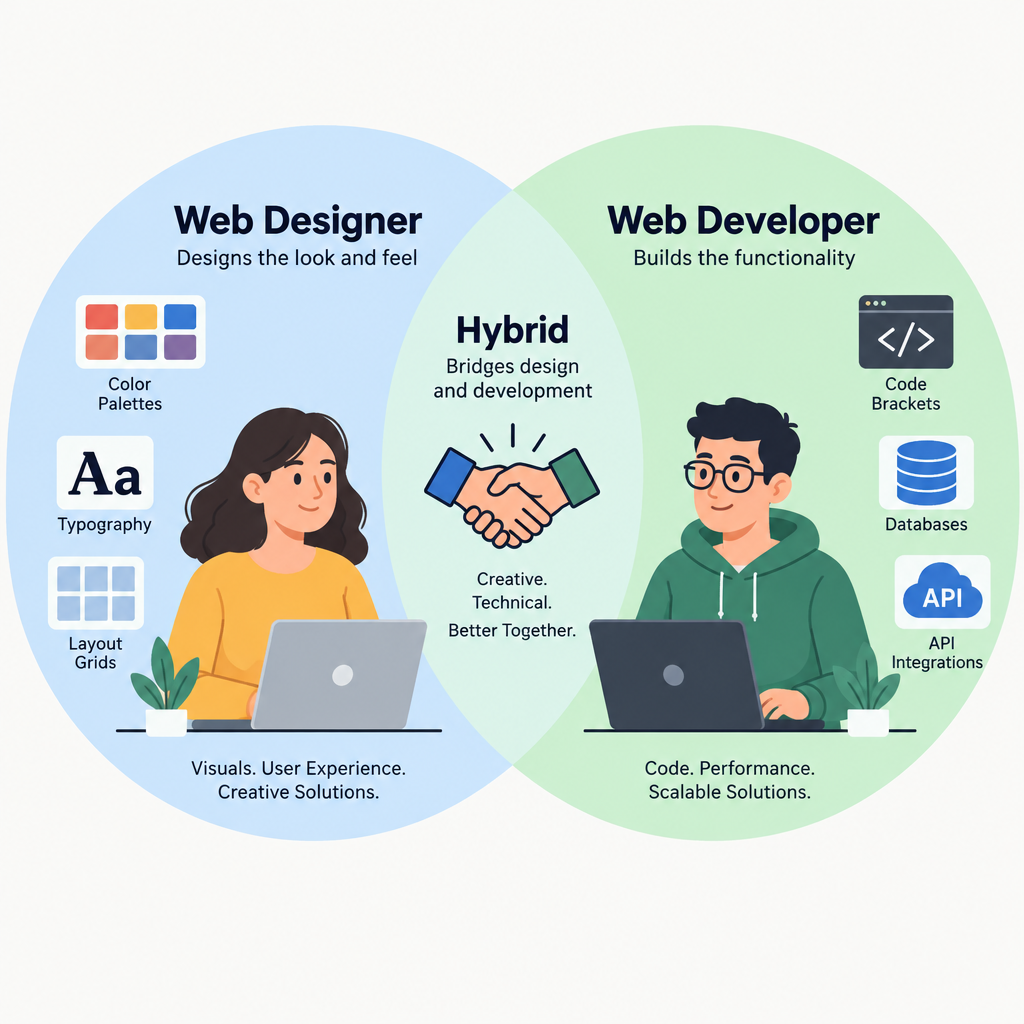
People use “web designer” and “web developer” interchangeably. They are different jobs, and hiring the wrong one is the first mistake we see.
A web designer decides how the site looks and works for visitors. That covers layout, typography, colour, navigation, and how a visitor moves from landing page to enquiry. Many designers also build the site, usually on WordPress, Webflow, Squarespace or Shopify, using an existing theme or a page builder.
A web developer writes the code that makes things work. You need a developer for a website when you want something no theme or plugin does out of the box. Examples include custom booking logic, a member portal, an integration with your CRM or stock system, or a fast headless build on a framework such as Astro.
| Role | What they handle | You need one when |
|---|---|---|
| Web designer | Visual design, layout, UX, often the build on a platform | You need a professional site with standard features |
| Front-end developer | Turning designs into code, performance, accessibility | You have a custom design or performance targets |
| Back-end or full-stack developer | Databases, APIs, custom functionality, integrations | Your site has to talk to other systems or do unusual things |
| Designer-developer (hybrid) | Design and build end to end | Small and mid-sized business sites, most of the time |
For most small business sites, a hybrid freelancer or a small studio covers everything. Once your feature list includes words like “sync”, “portal”, “API” or “custom calculator”, make sure someone on the team actually writes code. Ask who that person is by name.
Side-by-side comparison of your options
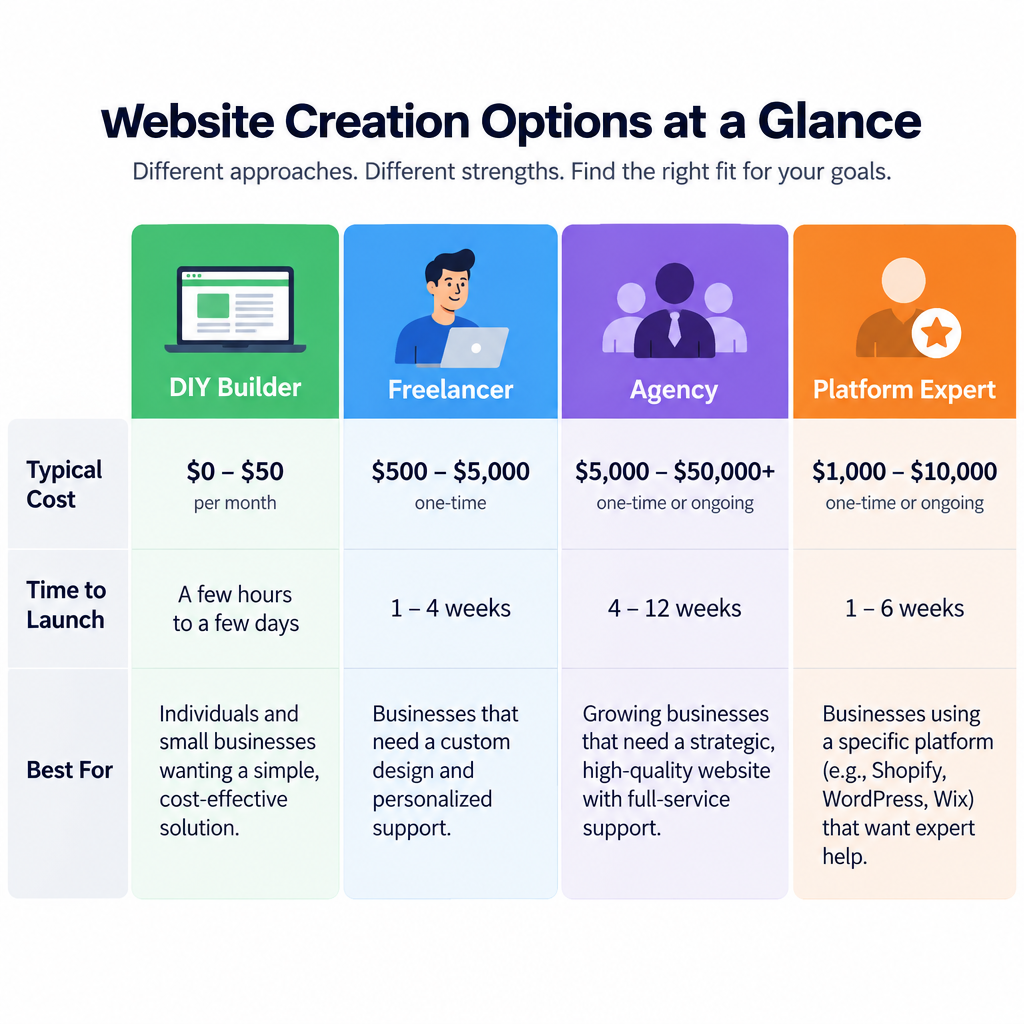
This table compares the four realistic routes. Costs are ballpark ranges for a typical small business site in the US, UK or Western Europe. The next section breaks pricing down further.
| DIY website builder | Freelancer | Agency | Platform expert | |
|---|---|---|---|---|
| Typical upfront cost | Plan fee plus your time | $1,500 to $8,000 | $8,000 to $40,000+ | $1,500 to $15,000 |
| Time to launch | Days to weeks | 3 to 8 weeks | 8 to 16 weeks | 3 to 8 weeks |
| Who does the work | You | One person, sometimes subcontractors | A team: strategist, designer, developer, PM | One person or small studio |
| Custom functionality | Limited to built-in apps | Depends on the person | Strong | Strong within that platform |
| Ongoing support | Platform support only | Varies a lot | Usually a formal retainer | Varies |
| Main risk | Your time and a generic result | Ghosting, single point of failure | Cost, slower pace | Locked to one platform |
| Best for | Starter sites, tight budgets | Most small businesses | Complex or high-stakes sites | Shopify stores, Webflow and Wix users |
What it costs to hire a web designer in 2026
Prices vary more by scope than by page count. A ten-page site with a custom design, written copy and a booking integration can cost three times as much as a ten-page site built on a stock theme with content you supply.
These are the ranges we see in quotes for clients in the US, UK and Western Europe in 2026. Rates from freelancers in lower-cost regions can be significantly lower, often with comparable quality from the best of them.
| Project type | Freelancer | Agency |
|---|---|---|
| Brochure site, 5 to 10 pages, theme-based | $1,500 to $5,000 | $8,000 to $20,000 |
| Small business site with blog, forms and custom design | $3,000 to $8,000 | $15,000 to $40,000 |
| Online store, up to roughly 100 products | $4,000 to $15,000 | $20,000 to $75,000+ |
| Custom functionality or integrations | $10,000+ | $50,000+ |
| Monthly maintenance and support | $50 to $300 | $300 to $2,000+ |
Hourly rates for experienced freelance designers in these markets commonly sit between $50 and $150. Specialist developers charge more. Agencies usually quote fixed project fees with a day rate for extra work.
For DIY, your costs are the builder subscription, a domain and any paid apps or templates. Our breakdown of Squarespace pricing shows how the plan fee is only part of what you really pay. The same is true for most builders.
What actually drives the price
- Custom design vs a theme. Designing from scratch takes far longer than adapting a well-made theme.
- Copywriting. If the designer writes your content, expect a meaningful jump. Content delays are also the top reason projects stall.
- Integrations. Each connection to a CRM, booking tool, inventory system or payment provider adds testing time.
- Ecommerce setup. Product imports, variants, shipping rules and tax settings are slow, careful work.
- Migration. Moving from an old site means redirects, content transfer and protecting search rankings.
- Accessibility and compliance. Building to WCAG 2.2 standards takes extra effort. If you sell to EU customers, the European Accessibility Act has applied to many businesses since June 28, 2025.
- Multilingual sites. Every extra language multiplies content and testing.
Option 1: Build it yourself with a website builder
Before you hire anyone, ask whether you need to. Modern builders are good. For a portfolio, a local service business with a handful of pages, or a side project, a builder can get you online in a weekend.
Our guide to the best website builder for every kind of site compares the main platforms. If you want the fastest possible start, an AI website builder can generate a first draft from a few prompts. Expect to rewrite most of the text it produces.
When DIY makes sense
- You need fewer than about ten pages and no custom features.
- Your budget is under $1,500 for the whole project.
- You have time to learn the tool and write your own content.
- You want to validate an idea before spending real money.
Pros
- Lowest upfront cost by a wide margin.
- Full control and no waiting on anyone.
- Hosting, security updates and backups are handled by the platform.
- Easy to edit after launch.
Cons
- Your time has a cost, and first builds often take longer than expected.
- Results tend to look like the template they started from.
- Weak spots in layout, mobile spacing and SEO basics are common.
- Moving away from a builder later usually means a rebuild.
A useful middle path: build the site yourself, then hire a freelancer for a few hours to review it. A good designer can fix spacing, navigation, page speed and calls to action in a single session. That costs a fraction of a full build.
Option 2: Hire a freelance website designer
Freelancers build most small business websites, and for good reason. You deal with one person, you pay less than agency rates, and the best freelancers are as skilled as anyone at a big studio.
When to hire a freelancer
Pick a freelancer when your project has a clear scope and a single decision-maker. A local accountant, a restaurant, a consultant, a small online shop or a nonprofit with standard needs all fit well.
Freelancers also work well for specific jobs. That includes redesigning an existing site, fixing a slow WordPress install, or setting up a Shopify store from a template.
Where to find a freelance web designer
- Referrals. Ask business owners whose sites you like who built them. This is still the most reliable source.
- Site footers. Many designers credit themselves at the bottom of sites they built. If a local business has a great site, scroll down.
- General marketplaces. Upwork and Fiverr have a huge supply at every price point. Quality varies widely, so vetting matters more here. Both platforms hold payment until work is approved, which gives you some protection.
- Curated networks. Toptal and Contra screen or showcase freelancers more selectively. Expect higher rates.
- Design communities. Dribbble and Behance are portfolio sites where designers show visual work. Strong for design talent. Check separately that they can build.
- Specialist platforms. Codeable focuses only on WordPress, with vetted developers and a matching process.
- LinkedIn. Search by city and platform, then read recommendations from past clients.
Pros
- Lower cost than agencies, often by half or more.
- Direct contact with the person doing the work.
- Flexible, fast decisions and fewer meetings.
- Easy to keep on for small ongoing tasks.
Cons
- If they get ill, busy or disappear, your project stops.
- Skills are narrower. A great designer may be a weak developer, or the reverse.
- Quality on open marketplaces ranges from excellent to poor.
- Support after launch depends entirely on that person’s availability.
Builder tip
Ask any freelancer who covers for them during holidays or illness. A good answer names a real colleague.
Option 3: Hire a web design agency
An agency gives you a team. Typically that means a project manager, a designer, at least one developer, and often a strategist, copywriter and SEO specialist. You pay for the coordination, and you get more resilience in return.
When to hire an agency
Choose an agency when the site is central to how your business makes money and the scope is too big for one person. Clear signs include:
- Several stakeholders need to sign off, such as founders, marketing and legal.
- You need brand strategy or a visual identity as well as a website.
- The site connects to several business systems.
- You expect ongoing work, such as landing pages, campaigns and conversion testing.
- Downtime or a failed launch would cost you real revenue.
How to find a web design agency
- Clutch is the best-known directory of agencies, with verified client reviews and filters by location, budget and service.
- Platform partner directories list agencies certified on Shopify, Webflow and other platforms.
- Sites you admire. Look at competitors and companies in your industry, then find out who built their sites.
- Industry associations and local business groups often have members who specialise in your sector.
Agency size matters. A five-person studio usually gives a small business more attention than a 100-person firm. At a large agency, your project may land with the most junior team.
Pros
- A full team with complementary skills.
- Formal process, project management and documentation.
- Less risk of the project collapsing if one person leaves.
- Better equipped for integrations, strategy and long-term growth.
Cons
- Much higher cost than a freelancer.
- More meetings and slower decisions.
- The senior people who pitch you may not do the work.
- Some agencies build on proprietary systems that tie you to them.
Option 4: Hire through a platform expert directory
If you already know your platform, its own directory is often the fastest way to find someone competent. Experts listed there have usually passed some form of platform vetting and work on that system every day.
The main options:
- Shopify Partner Directory lists agencies and freelancers for store setup, theme customisation, migrations and app development.
- Wix Marketplace lets you hire Wix designers and developers by service and budget.
- Webflow Experts is a directory of certified Webflow designers and agencies.
- Squarespace runs its own directory of vetted designers. If you are still deciding, our step-by-step guide to building a website on Squarespace shows how far you can get alone first.
- Codeable fills a similar role for WordPress, with pre-vetted developers.
Pros
- Platform-specific expertise and some level of vetting.
- Reviews tied to real projects on that platform.
- Experts know the platform’s limits and workarounds.
Cons
- Nobody in the directory will tell you a different platform suits you better.
- Rates are often higher than general marketplaces.
- Listings do not guarantee good communication or reliability.
Use these directories once you are sure about the platform. If you are not, talk to a platform-neutral freelancer or agency first.
Common problems when hiring a website designer
Most failed web projects fail for predictable reasons. Knowing them in advance is half the protection.
- The designer disappears mid-project. Common on cheap marketplace gigs and with overloaded freelancers. Milestone payments limit your exposure.
- Scope creep. “Can you just add…” turns a four-week job into a four-month one. A written scope with a change process fixes this on both sides.
- You do not own the site. The domain, hosting or premium licences sit in the designer’s accounts. When the relationship ends, you lose access.
- The site looks good and performs badly. Bloated page builders, oversized images and too many plugins create slow, fragile sites.
- Content becomes the bottleneck. In our experience, clients delay projects more often than designers do, usually waiting on text and photos.
- SEO gets wiped out in a redesign. Changing URLs without redirects can drop years of search traffic overnight.
- Accessibility is ignored. Poor contrast, missing alt text and keyboard traps exclude visitors and create legal exposure.
- No plan after launch. Nobody updates plugins, renews licences or checks backups, until something breaks.
Every step in the hiring process below targets one or more of these problems.
How to evaluate and hire a web designer, step by step
How to hire a website designer
- Write a one-page brief with goals, pages, features and budget.
- Shortlist three to five candidates from referrals and directories.
- Audit each portfolio using live sites, not screenshots.
- Hold a short call and ask the questions below.
- Call two past clients for each finalist.
- Compare written proposals line by line.
- Sign a contract that covers ownership, scope and payments.
- Start with a paid discovery phase or first milestone.
Write a one-page brief
A clear brief gets you accurate quotes and filters out designers who do not read carefully. Keep it to one page and include:
- What the business does and who the site is for.
- The main goal: enquiries, bookings, sales, donations or credibility.
- A list of pages, even a rough one.
- Must-have features, such as booking, a shop, a member area or multilingual content.
- Three sites you like and what you like about each.
- Who will supply content, and when.
- Your budget range and launch deadline.
Always state a budget range. Designers who know your range can propose the right solution. Hiding it just produces quotes you cannot compare.
Shortlist three to five candidates
Fewer than three gives you nothing to compare. More than five wastes everyone’s time. Mix sources: one or two referrals, a couple from a directory, maybe one from a site you admire.
Audit the portfolio like a buyer
Screenshots and mockups prove someone can make pretty pictures. Live sites prove they can ship. Spend ten minutes on each candidate’s three most relevant projects:
- Open each site on your phone. Check menus, buttons, forms and text size.
- Run it through Google PageSpeed Insights. Pay attention to the mobile score and Core Web Vitals. Consistently poor results across a portfolio point to heavy, careless builds.
- Check the site still exists and still credits them. Dead links and rebuilt sites tell you something.
- Look for variety. If every site looks the same, expect yours to look like them too.
- Test the contact form on one site, if it is fair to do so. Many broken forms go unnoticed for months.
If the candidate works on WordPress, ask which theme for WordPress they usually start from and why. A thoughtful answer about performance, licensing and long-term support is a good sign. “Whatever’s popular” is not.
Ask these questions on the call
| Question | Good answer | Red flag |
|---|---|---|
| Which platform would you recommend for us, and why? | A reasoned choice tied to your goals and budget | The same answer for every client |
| Who will do the work? | Named people, with roles | Vague mentions of “the team” |
| Whose accounts will the domain, hosting and licences be in? | Yours, with them added as a user | Theirs, “to keep it simple” |
| How do you handle changes outside the scope? | Written change requests with a price | “We’ll sort it out as we go” |
| What happens after launch? | A clear support or maintenance option | Silence, or “just email me” |
| How do you handle SEO during a redesign? | Redirect mapping and pre-launch checks | “SEO is a separate service” with no basics included |
| How do you approach accessibility? | Mentions WCAG, contrast, alt text, keyboard testing | Blank look |
| Can I edit the site myself afterwards? | Yes, with training or documentation | Only through them, at an hourly rate |
Call two references
Ask finalists for two past clients with similar projects, then actually call them. Ask three things. Did the project finish on time and on budget? How did the designer handle problems? Would they hire them again?
The third question matters most. Listen for hesitation.
Compare proposals line by line
Cheapest is rarely best, and the most expensive is not automatically better. Line up each proposal against your brief and check what is included:
- Number of page templates and total pages.
- Design rounds and revisions.
- Content entry, copywriting and image sourcing.
- Integrations and features, item by item.
- Training, documentation and post-launch support.
- Hosting, domain and licence costs, and who pays them.
A quote that looks cheap often leaves out content entry or post-launch fixes. Those get billed later.
Start with a paid discovery phase
For projects above a few thousand dollars, ask for a paid discovery phase first. This usually covers a sitemap, wireframes and a final scope. It costs a small share of the total and shows you how the person works before you commit to the full build.
If it goes badly, you walk away with a plan you can hand to someone else.
The contract: clauses that protect you
A one-page email agreement is not enough for any project worth more than a few hundred dollars. Your contract should cover:
- Scope of work. Pages, features and deliverables, written specifically.
- Timeline and milestones. Including what you must deliver and by when.
- Payment schedule. Commonly a deposit, payments at milestones, and a final payment at launch. Avoid paying 100% upfront.
- Revisions. How many rounds are included and the rate for extra rounds.
- Change requests. How out-of-scope work is quoted and approved.
- Intellectual property. Full ownership of the design, code and content passes to you on final payment. Third-party items such as themes, fonts and plugins are licensed, so the licences should be in your name.
- Account ownership. Domain, hosting, analytics and platform accounts belong to you.
- Warranty period. Bug fixes for a set period after launch, often 30 days.
- Termination. What happens if either side ends the project, and what you receive.
- Confidentiality, if you share business data.
Security note
Never let a designer register your domain or hosting in their own name. Create the accounts yourself, then add the designer as a user or collaborator.
If you have not bought a domain yet, register a domain name yourself before the project starts. It takes ten minutes and removes the most common ownership dispute entirely.
Red flags that should end the conversation
Walk away if you see any of these:
- They promise “page one of Google” or guaranteed rankings.
- They want full payment before starting any work.
- They cannot show live sites, only mockups.
- They refuse to put the domain and hosting in your name.
- They offer premium themes or plugins “free” with no licence. That usually means nulled software, which often carries malware.
- They push their own proprietary CMS without explaining how you would leave.
- They never ask about your goals, customers or budget.
- Their own website is slow, broken or outdated.
- References are unavailable or only come as written testimonials.
The nulled software point deserves emphasis. Pirated WordPress themes and plugins are a common source of hacked sites. A professional buys proper licences and includes the cost in your quote.
How to tell if a designer is a good fit
Skills get you on the shortlist. Fit decides whether the project runs smoothly. A few signals to watch during the first conversations:
They ask more questions than they answer. Good designers want to understand your customers, competitors and what success looks like. A designer who jumps straight to colour schemes is designing for their portfolio.
They push back. If you suggest something that will hurt the site, such as an auto-playing video homepage or a twelve-item menu, a good designer explains why it is a bad idea. Total agreement is a warning sign.
Their communication matches yours. Some people want weekly calls. Others prefer a shared board and async updates. Agree on the channel and rhythm before you sign.
They explain things plainly. If you cannot follow their explanation of hosting or SEO, you will struggle to manage the site after launch.
They respond reliably during the sales process. The sales phase is when people are on their best behaviour. Slow, sloppy replies now will not improve later.
Time zones work. Remote hiring is normal and works well. Still, make sure you have at least a couple of overlapping working hours for urgent issues around launch.
Before launch and after: the handover checklist
This is where many projects fall apart, and few hiring guides cover it. A site is not finished when it looks right. It is finished when you can run it without the designer.
Before launch
- Redirects mapped. For redesigns, every old URL that had traffic or links should redirect to its new equivalent with a 301 redirect.
- Forms tested. Every form sends to the right inbox, and a copy is stored somewhere.
- Mobile checked on real phones, not only a resized browser window.
- Analytics installed and confirmed to be recording.
- Privacy policy and cookie consent in place where your visitors’ location requires them.
- Accessibility checked for contrast, alt text, headings and keyboard navigation.
At handover
Ask for all of this in writing before you make the final payment:
- Admin logins for the CMS, hosting, domain registrar and any third-party tools, all in accounts you own.
- A list of every plugin, app and licence, with renewal dates and who pays.
- A recent full backup, plus confirmation of how automatic backups run.
- Short documentation or a recorded walkthrough showing how to edit pages, add blog posts and update products.
- Search Console verified and your sitemap submitted. While you are at it, set up Bing Webmaster Tools too. It takes a few minutes and covers searchers that Google tools do not.
After launch
Websites need maintenance. On WordPress, that means regular updates to core, themes and plugins, along with security monitoring and backups. On hosted builders, the platform handles most of this, but you still need someone to fix content, forms and integrations when they break.
Decide who owns this before launch. Options include a monthly retainer with your designer, a specialist maintenance service, or doing it yourself with a clear checklist. Always take a full backup before applying updates, and test the site afterwards.
Builder tip
Ask for a staging site for future changes, so updates and new features get tested before they touch your live site.
Which should you choose?
Here is our verdict, option by option.
Choose a DIY website builder if your budget is under about $1,500, your site is simple and you have time. Pair it with a few paid hours of expert review to avoid the common mistakes.
Choose a freelance website designer if you are a small business with a clear scope and a budget of roughly $1,500 to $8,000. This is the right answer for most readers of this article. Vet carefully, pay by milestone, and keep every account in your own name.
Choose an agency if the site is critical to revenue, involves several systems or stakeholders, or needs brand strategy as well as design. The higher cost buys a team, a process and resilience.
Choose a platform expert if you have already settled on Shopify, Webflow, Wix, Squarespace or WordPress and want someone who works on it every day. Confirm the platform choice independently first.
Whichever route you take, the same rules protect you. Write a clear brief, check live work, call references, sign a proper contract, and own every account. Do those five things and you avoid most of the problems that sink web projects.
FAQ
How much does it cost to hire a website designer?
In the US, UK and Western Europe, a freelance designer typically charges $1,500 to $8,000 for a small business site in 2026. Agencies usually start around $8,000 and can run past $40,000 for complex builds. Online stores and custom functionality cost more. Ongoing maintenance adds roughly $50 to $300 a month with a freelancer.
Should I hire a freelancer or an agency?
Hire a freelancer if your scope is clear, one person makes decisions and your budget is limited. Hire an agency if you need several specialists, formal project management or ongoing marketing work. For most small businesses, a well-vetted freelancer gives better value.
How long does it take to build a website?
A theme-based brochure site with a freelancer usually takes three to eight weeks. Agency projects with discovery, custom design and integrations typically take eight to sixteen weeks. Content delays from the client side are the most common reason projects overrun.
Do I need a web designer or a web developer?
Most small business sites only need a designer who also builds on a platform such as WordPress, Squarespace or Shopify. You need a developer when the site requires custom functionality, integrations with other business systems, or a custom-coded build.
Can I hire someone to fix or finish a site I started myself?
Yes, and it is often the most cost-effective route. Many freelancers offer hourly reviews or fixed-price “polish” packages for DIY sites. Give them admin access through a user account rather than sharing your own password.
Who owns the website when the project is finished?
You should, but only if the contract says so. Make sure intellectual property transfers to you on final payment, and that the domain, hosting and all licences are in accounts you control. Without those terms, ownership can be disputed later.
Is it worth hiring a designer from a lower-cost country?
It can be, and many excellent designers work from lower-cost regions. Vet them exactly as you would a local candidate: live portfolio sites, references, a clear contract and milestone payments. Check you have enough overlapping working hours to handle urgent issues around launch.