

Astro is a free, open-source JavaScript web framework for building content-driven websites such as blogs, documentation, marketing sites and portfolios. It turns your pages into plain HTML on the server or at build time and sends zero JavaScript to the browser by default. You add interactivity only where you ask for it, using small “islands” built in React, Svelte, Vue or other UI frameworks.
Last checked: October 29, 2026.
What is Astro, in plain terms?
Most modern JavaScript frameworks build your whole site as one big app that runs in the browser. Astro takes the opposite approach. It treats your site as a collection of documents. JavaScript is something you add to specific parts of a page, not a requirement for showing text and images.
You write components, Markdown files and layouts. Astro compiles them into static HTML and CSS. A visitor’s browser gets a finished page it can display right away, without first downloading and running a framework runtime.
That is the whole pitch. The rest of this article covers how it works, why it produces fast sites, and where it fits next to WordPress, Next.js and the other tools you might be weighing.
“What is an astro?” A quick disambiguation
If you typed “what is an astro,” you may have been after something else entirely. The word covers a Chevrolet minivan, a Malaysian satellite TV company, a brand of snapback caps and the dog from The Jetsons. This article is about Astro the web framework, maintained at astro.build. If you landed here looking for a van, you can stop reading now. Everyone else, keep going.
How Astro works: HTML first, JavaScript second
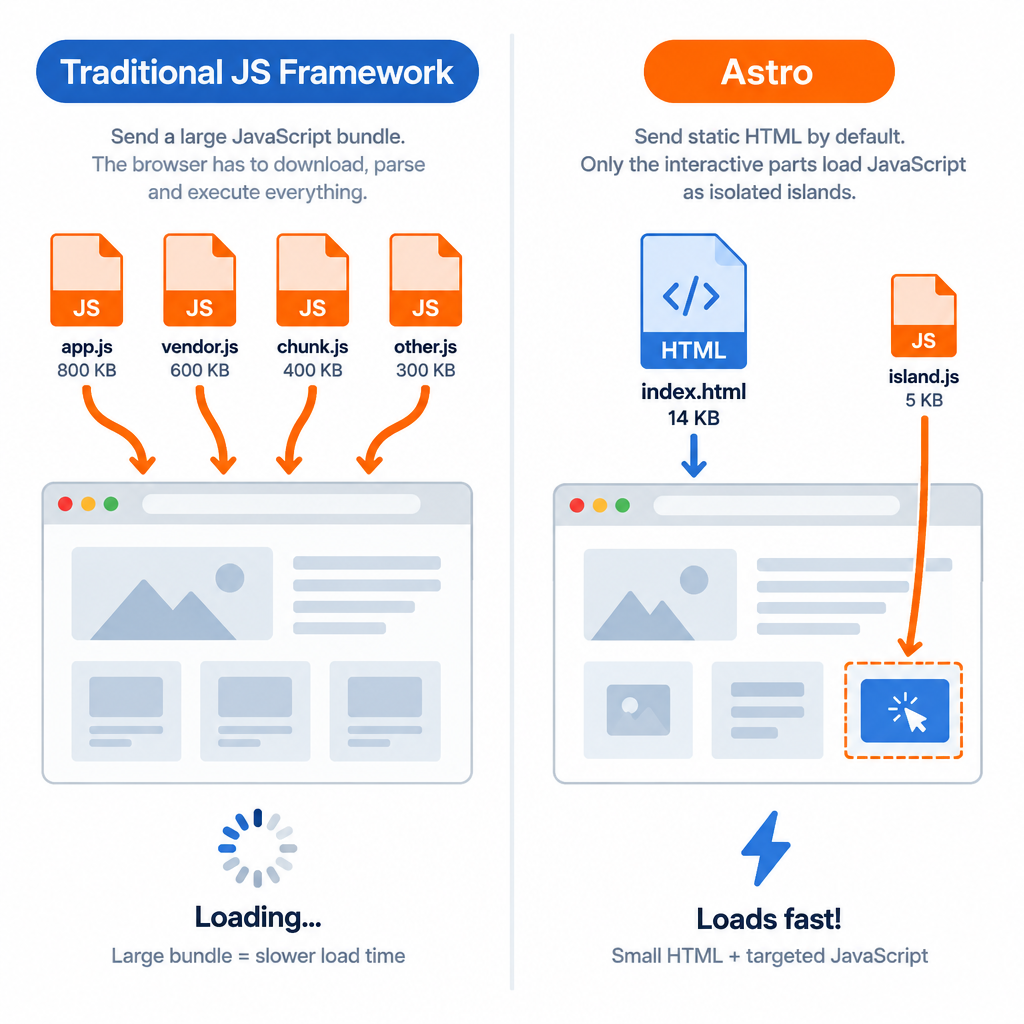
Astro’s design rests on two ideas: render everything you can to HTML ahead of time, and treat interactive parts as isolated pieces. Those two ideas explain most of its speed.
Astro outputs zero JavaScript by default
When you build an Astro page, the server-side code in your components runs during the build or on the server. It never reaches the browser. Even if you write a component in React, Astro renders it to HTML and strips the React runtime unless you explicitly tell it to keep the component interactive.
For a typical blog post, that means the browser gets HTML, CSS and your images. No hydration step, no framework bundle, no layout shift while scripts boot up. Pages render as fast as the network can deliver them.
You still have JavaScript available whenever you need it. A plain <script> tag in an Astro component gets processed, bundled and added to the page. You opt in instead of opting out.
Astro Islands
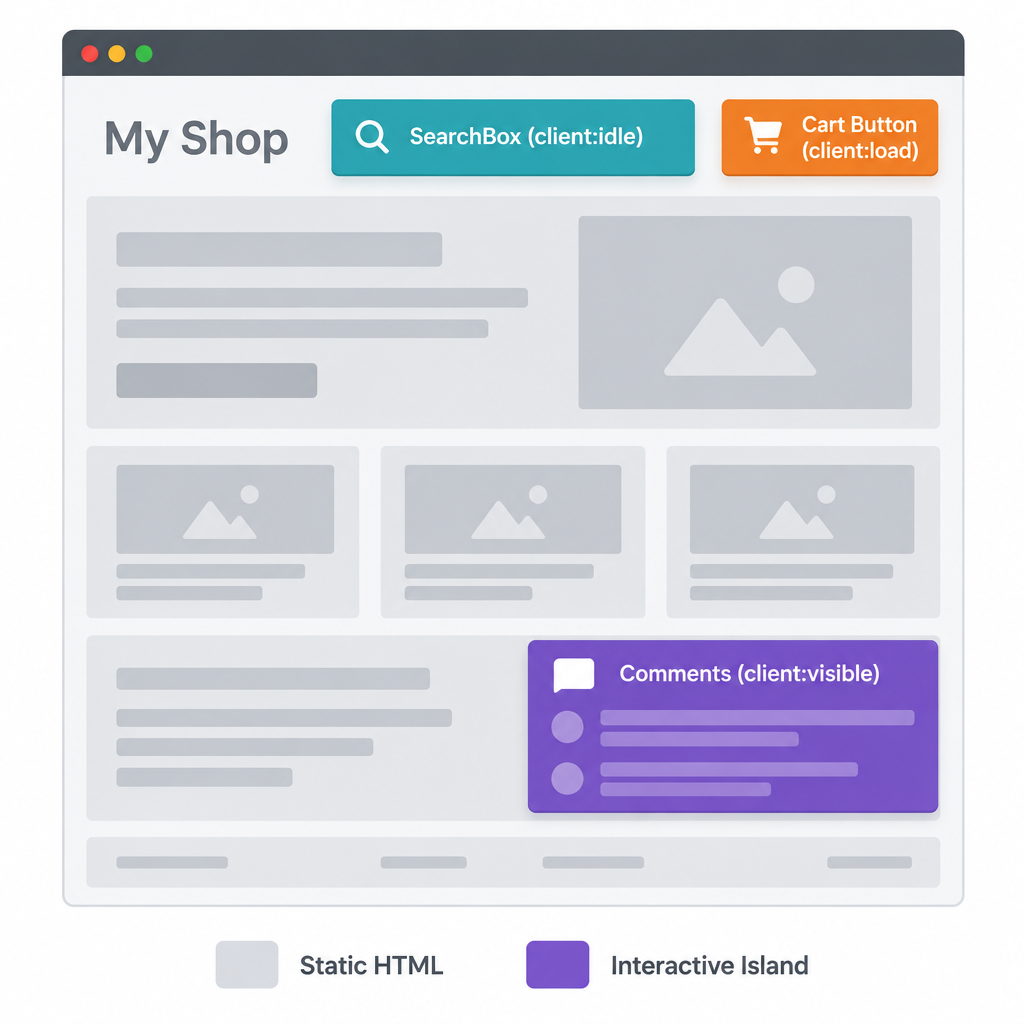
The “islands architecture” is the feature people usually mean when they talk about Astro. Picture a page as a sea of static HTML. Interactive components, such as an image carousel, a search box or a shopping cart button, sit on top as islands. Each island loads its own JavaScript and hydrates independently.
You control when an island wakes up with a client:* directive:
| Directive | When the component’s JavaScript loads | Good for |
|---|---|---|
client:load |
Immediately on page load | Above-the-fold UI that must work at once |
client:idle |
When the browser is idle | Lower-priority widgets, chat buttons |
client:visible |
When the component scrolls into view | Comments, carousels, footers |
client:media |
When a CSS media query matches | Mobile-only menus |
client:only |
Client-side only, skips server rendering | Components that rely on browser APIs |
Without a directive, the component renders to static HTML and ships no JavaScript at all. That default is what keeps Astro pages lean even when a team uses heavy UI libraries.
Here is what that looks like in practice:
---
import Header from '../components/Header.astro';
import SearchBox from '../components/SearchBox.jsx';
import Comments from '../components/Comments.svelte';
---
<Header />
<SearchBox client:idle />
<article>...</article>
<Comments client:visible />
The header is pure HTML. The search box loads its React code once the browser has finished more urgent work. The Svelte comments widget loads only if the reader scrolls far enough to see it.
Server islands
Astro 5 added server islands, the server-side counterpart to client islands. You mark a component with server:defer, and Astro renders the rest of the page right away (often from a cache or CDN) while that component is fetched separately from the server.
This solves a common problem on content sites. Most of a product page or article is the same for everyone, but a few pieces are personal: a user avatar, a cart count, a localized price. Server islands let you cache the shared page aggressively and fill in the personal bits afterwards, with a fallback shown while they load.
Astro components and the .astro file format
Astro has its own component format, saved as .astro files. If you know HTML, you can read one. If you know JSX, you can write one within minutes.
An Astro component has two parts. The top section, fenced by ---, is the component script. It runs only on the server or at build time. Below it sits the template, which looks like HTML with JSX-style expressions.
---
// src/components/Card.astro
interface Props {
  title: string;
  href: string;
}
const { title, href } = Astro.props;
---
<a class="card" href={href}>
  <h2>{title}</h2>
  <slot />
</a>

<style>
  .card {
    display: block;
    padding: 1.5rem;
    border-radius: 0.5rem;
  }
</style>
A few things stand out. Props are typed with a TypeScript interface. Child content goes into a <slot />. The <style> block is scoped to this component automatically, so .card here won’t clash with a .card class elsewhere on your site.
Because the script section never ships to the browser, you can safely fetch data, read files or call APIs in it. An API key used in the component script stays on the server. A fetch() call to a headless CMS runs at build time, and the visitor gets the finished HTML.
The framework of all frameworks: bring your own UI library
Astro does not force you into one UI library. Through official integrations, you can use components from several frameworks in the same project, even on the same page. Astro’s marketing calls this “the framework of all frameworks,” and for once the slogan is fairly literal.
| UI framework | Official integration | Install command |
|---|---|---|
| React | @astrojs/react |
npx astro add react |
| Preact | @astrojs/preact |
npx astro add preact |
| Svelte | @astrojs/svelte |
npx astro add svelte |
| Vue | @astrojs/vue |
npx astro add vue |
| SolidJS | @astrojs/solid-js |
npx astro add solid |
| Alpine.js | @astrojs/alpinejs |
npx astro add alpinejs |
The astro add command installs the package and updates your config file for you. Past these, the integrations directory lists hundreds of official and community packages for sitemaps, Tailwind CSS, MDX, analytics, search and CMS connections.
Mixing frameworks is useful in a few real situations. You can migrate a React site gradually. You can reuse a Svelte widget your team already built. You can pick Preact for a small island where React’s bundle size would be overkill. In day-to-day client work, most teams settle on one UI library plus plain Astro components, and that is the sensible default.
File-based routing
Astro builds routes from the files in src/pages/. Add a file, get a URL. There’s no router configuration to maintain.
File in src/pages/ |
Resulting URL |
|---|---|
index.astro |
/ |
about.astro |
/about |
blog/index.astro |
/blog |
blog/[slug].astro |
/blog/any-post-name |
docs/[...path].astro |
/docs/any/nested/path |
rss.xml.js |
/rss.xml |
Square brackets create dynamic routes. On a static build, you tell Astro which pages to generate by exporting a getStaticPaths() function that returns every slug. A double-bracket spread such as [...path] catches nested paths, which suits documentation.
Files ending in .js or .ts become endpoints. That is how you generate an RSS feed, a JSON file or, with on-demand rendering, a small API route.
Markdown, MDX and layouts
Astro treats Markdown as a first-class page format. Drop a .md file into src/pages/ and it becomes a page. Add frontmatter to set a title, date or layout.
---
layout: ../layouts/PostLayout.astro
title: Why we moved our docs to Astro
pubDate: 2026-10-01
---

Your post content goes here, written in plain **Markdown**.
Layouts are ordinary Astro components that wrap page content with a shared header, footer and <head> tags. You build one BaseLayout.astro and every page reuses it.
With the @astrojs/mdx integration, you can use MDX instead. MDX lets you import and drop components straight into your Markdown, so a technical article can include an interactive chart or a callout component without leaving the writing flow. Syntax highlighting for code blocks works out of the box through Shiki.
Content collections and the Content Layer
Content collections are where Astro pulls clearly ahead of a folder of loose Markdown files. A collection is a typed group of content, such as blog posts, authors or products, with a schema that Astro validates at build time.
Astro 5 rebuilt this system as the Content Layer. Collections now use loaders, so content can come from local files, a remote API or a headless CMS through the same interface. Collections are defined in src/content.config.ts:
// src/content.config.ts (Astro 5 syntax)
import { defineCollection, z } from 'astro:content';
import { glob } from 'astro/loaders';

const blog = defineCollection({
  loader: glob({ pattern: '**/*.md', base: './src/content/blog' }),
  schema: z.object({
    title: z.string(),
    pubDate: z.coerce.date(),
    draft: z.boolean().default(false),
  }),
});

export const collections = { blog };
Then you query it in any page:
---
import { getCollection } from 'astro:content';
const posts = await getCollection('blog', ({ data }) => !data.draft);
---
<ul>
  {posts.map((post) => <li>{post.data.title}</li>)}
</ul>
If an author forgets a title or types a date wrong, the build fails with a clear error instead of shipping a broken page. You also get full TypeScript autocompletion for every field. On a site with hundreds of posts and several contributors, that validation is worth a lot.
Check the official upgrade guide if your project is on a newer major version, since import paths for schema helpers have shifted between releases.
Rendering options: static, on-demand and hybrid
Astro started as a static site generator, but it now covers server rendering too. You choose per page.
| Mode | How it works | Use it for |
|---|---|---|
| Static (prerendered) | HTML generated once at build time | Blogs, docs, marketing pages |
| On-demand (server-rendered) | HTML generated per request on a server | Logged-in pages, search results, forms |
| Hybrid | Static by default, selected pages on-demand | Most real-world sites |
| Server islands | Cached page with deferred server components | Personalized bits on cached pages |
Static is the default. To render a page on demand, install an adapter for your host and add one line to the page:
---
export const prerender = false;
---
Official adapters cover Node.js (@astrojs/node), Netlify (@astrojs/netlify), Vercel (@astrojs/vercel) and Cloudflare (@astrojs/cloudflare). Community adapters handle other runtimes. Older guides mention an output: 'hybrid' setting, which Astro 5 removed because the static default now covers hybrid behavior on its own.
On-demand rendering also unlocks middleware, cookies, redirects and Astro Actions, which give you type-safe server functions for things like form submissions.
Other built-in features worth knowing
Astro bundles a lot more than routing and rendering. The features you will reach for most often on client sites:
- Image optimization. The
<Image />and<Picture />components fromastro:assetsresize images, convert them to modern formats such as WebP and add width and height attributes to prevent layout shift. - View transitions. Add the
<ClientRouter />component fromastro:transitionsfor animated, app-like page transitions on a multi-page site. - Type-safe environment variables.
astro:envlets you declare which variables are public, which are secret, and which are required. - Internationalization routing. Built-in i18n config handles locale prefixes and fallbacks.
- Dev toolbar. A small overlay in development that flags accessibility and performance problems and lets you inspect islands.
- Starlight. Astro’s official documentation theme, with search, sidebars, dark mode and i18n ready to go.
Together these make Astro feel fully featured for content work. You rarely need to assemble a dozen plugins before you can ship.
Why developers use Astro for fast websites
Plenty of frameworks claim speed. Astro’s case is stronger because speed falls out of the default architecture instead of depending on careful tuning.
Performance comes from shipping less
The fastest JavaScript is the JavaScript you never send. A React-based site has to download, parse and hydrate a framework runtime before interactive parts work, and that cost hits phones on slow networks hardest. Astro skips that step for everything that isn’t an island.
The result shows up in Core Web Vitals. Astro’s team publishes its own reading of public Chrome UX Report and HTTP Archive data, and in those reports Astro sites have consistently posted some of the highest Core Web Vitals pass rates among the major frameworks. Treat that as a vendor analysis rather than an independent benchmark. It lines up with what you would expect from sites that ship mostly HTML.
The developer experience is unusually calm
Astro feels close to writing HTML, with modern tooling layered on. It is built on Vite, so the dev server starts quickly and hot reload is fast. TypeScript works without setup. Scoped CSS removes a whole class of styling bugs.
There’s also less to reason about. No client-side state management for pages that don’t need state, no hydration mismatches on static content, no “use client” boundaries to track. Developers consistently rate it highly: Astro has ranked at or near the top of the meta-framework category for satisfaction and interest in recent State of JavaScript surveys.
Zero lock-in
Astro’s lock-in risk is low on three fronts. Your UI components can be React, Svelte or Vue, and they keep working outside Astro. Your content can live in Markdown or any CMS. Your deployment target can be any static host or any platform with an adapter.
If you outgrow Astro, you take your components and content with you. That matters for agencies handing a site over to a client who might switch vendors in three years.
A short history, and who owns Astro now
Astro was created by Fred K. Schott and a small team who previously built the Snowpack build tool. It has moved quickly from experiment to mature platform.
| Date | Milestone |
|---|---|
| June 2021 | Astro publicly announced as an early beta |
| August 2022 | Astro 1.0 released |
| January 2023 | Astro 2.0 introduces content collections |
| August 2023 | Astro 3.0 adds view transitions and image optimization |
| December 2023 | Astro 4.0 adds the dev toolbar and i18n routing |
| December 2024 | Astro 5.0 ships the Content Layer and server islands |
| January 2026 | Cloudflare announces it is acquiring The Astro Technology Company |
| Early 2026 | Astro 6 announced in beta with a rebuilt dev server |
For most of its life, Astro was developed by The Astro Technology Company, a venture-backed startup, with extra funding from sponsors through Open Collective. The footer line “Astro is free, open-source software made possible by these wonderful sponsors” reflected that model. Hosting companies, CMS vendors and tooling firms all chipped in.
In January 2026, Cloudflare announced it was acquiring The Astro Technology Company, with the core team joining Cloudflare. Both sides said Astro would stay open source under the MIT license and keep supporting deployment to other hosts. The Netlify, Vercel and Node adapters are still official packages.
What does that mean for you? Financial stability for the project is the clear upside. The open question is whether new features gradually tilt toward Cloudflare’s platform. So far Astro still maintains first-party adapters for Node.js, Netlify and Vercel alongside Cloudflare, while adapters for other hosts remain community- or vendor-maintained, and whether that official list holds is the signal worth watching.
Astro and headless CMS: a natural pairing
This is the angle that matters most if you build sites for clients. Astro has no admin panel. Content editors who won’t touch Markdown or Git need a CMS somewhere.
Astro works well as the frontend for a headless CMS. The Content Layer and plain fetch() calls let you pull content at build time or per request from:
- Hosted headless CMS platforms such as Contentful, Sanity, Storyblok, Hygraph and Prismic, several of which publish official Astro guides.
- Self-hosted options such as Strapi, Payload and Directus.
- Headless WordPress, using the built-in REST API or the WPGraphQL plugin. Editors keep the WordPress dashboard they know, and visitors get a static Astro frontend.
- Git-based CMS tools such as Decap CMS, Keystatic and TinaCMS, which commit Markdown straight to your repository.
The headless WordPress setup deserves a closer look. You keep WordPress on a locked-down server that the public never hits, while Astro builds static pages from its content. Your attack surface drops sharply because visitors never touch PHP or the database. The tradeoff is real, though. Many WordPress plugins that output frontend HTML (page builders, form plugins, some SEO features) won’t carry over, so you rebuild those parts in Astro.
Builder tip
Trigger an Astro rebuild from your CMS with a deploy webhook on publish, so editors see changes within a minute without touching Git.
What Astro costs to run
The framework itself costs nothing. Your real costs are hosting, any CMS you add and developer time.
| Item | Cost (as of October 2026) |
|---|---|
| Astro framework | Free, MIT license |
| Starlight documentation theme | Free |
| Official integrations and adapters | Free |
| Static hosting on Cloudflare, Netlify or GitHub Pages | Free tiers available |
| Vercel Hobby plan | Free, non-commercial use only |
| Headless CMS | Free tiers through to paid plans, varies by vendor |
| Developer time | Usually your largest cost |
A fully static Astro site with modest traffic can run on a free hosting tier indefinitely. Costs rise when you add on-demand rendering with heavy traffic, image transformation at scale or a paid CMS seat count. Check each provider’s current pricing page before quoting a client, since free-tier limits change.
Astro compared with Next.js, Gatsby and WordPress
Astro is one of several ways to build a content site. The right pick depends on how much interactivity you need and who edits the content.
| Astro | Next.js | Gatsby | WordPress | |
|---|---|---|---|---|
| Core idea | Content-first, islands | React app framework | React static site generator | PHP CMS with themes |
| JavaScript shipped by default | None | React runtime | React runtime | Varies by theme and plugins |
| UI frameworks | React, Vue, Svelte, Solid, Preact and more | React only | React only | PHP templates, block editor |
| Rendering | Static, on-demand, hybrid | Static, server, streaming | Mostly static | Server-rendered PHP |
| Built-in admin for editors | No | No | No | Yes |
| Best fit | Blogs, docs, marketing sites | Web apps, dashboards, complex stores | Legacy projects | Sites run by non-developers |
Next.js is the better tool for application-heavy work, where most of the page is interactive and shared state matters. Gatsby’s development has slowed sharply since Netlify acquired it in 2023, and new projects rarely start on it now. WordPress wins when the client needs to edit everything themselves without a developer in the loop.
Astro’s sweet spot is the large middle ground: sites that are mostly content, need to be fast, and have a developer or a headless CMS handling updates.
Who Astro suits, and who should skip it
Astro is a strong fit for:
- Developers and agencies building marketing sites, landing pages and portfolios where Core Web Vitals and SEO matter.
- Documentation teams, especially with Starlight, which handles search, navigation and translations.
- Blogs and publications that want Markdown or MDX, typed content and fast page loads.
- Teams migrating off Gatsby or a heavy React setup who want to keep their existing components.
- Headless CMS projects that need a lightweight, flexible frontend.
It’s a weaker fit for:
- Non-developers. Astro requires a terminal, Node.js and code. If you want to drag and drop a site together, a website builder is the right tool, and an AI website builder can generate a first draft from a short prompt.
- App-like products such as dashboards, real-time collaboration tools or complex SaaS interfaces where nearly everything is interactive. A full app framework is less awkward there.
- Full online stores with carts, accounts, checkout and inventory. Astro can power a storefront in front of Shopify’s Storefront API or a similar backend, but it is not a commerce platform. If you’re still working out how ecommerce works and which platform to sell on, settle that first and treat Astro as an optional frontend later.
How to start an Astro project
You need Node.js and a terminal. Astro 5 supports Node 18.17.1, 20.3.0 and 22 or newer, but Node 18 and Node 20 have both reached end of life, so use a current LTS release of Node 22 or later. Newer Astro majors raise the minimum, so check the install docs for the exact version.
Setup steps
- Install a current LTS version of Node.js.
- Run npm create astro@latest in your terminal.
- Pick a starter template when prompted.
- Run npm run dev and open localhost:4321.
- Edit files in src/pages and watch the browser update.
- Run npm run build to output your site to the dist folder.
The commands themselves:
npm create astro@latest
cd my-astro-site
npm run dev
To start from Starlight for a docs site:
npm create astro@latest -- --template starlight
To add an integration or a hosting adapter later:
npx astro add react
npx astro add node
A fresh project has a simple layout: src/pages/ for routes, src/components/ for components, src/layouts/ for layouts, public/ for files served as-is (favicons, robots.txt) and astro.config.mjs for settings. Images you want optimized belong in src/assets/ rather than public/, because Astro only processes assets it imports.
Security note
Any environment variable prefixed PUBLIC_ is exposed in the browser bundle. Keep API keys and secrets unprefixed, and keep astro and your adapter packages updated on any server-rendered site.
Common first-week problems
- A component isn’t interactive. You forgot a
client:*directive. Without one, Astro renders it as static HTML. window is not definederrors. The component touches browser APIs during server rendering. Move that code into auseEffect, anonMountor a<script>tag, or useclient:only.- Images aren’t optimized. They’re in
public/. Move them tosrc/assets/and use the<Image />component. - On-demand pages fail in production. You set
prerender = falsewithout installing an adapter for your host. - The build fails on content. A content collection schema caught a missing or malformed field. Read the error; it names the file.
Migrating an existing site to Astro
Back up your current site, database and content exports before you start any migration. Then plan around where your content lives.
From WordPress. You can export posts to Markdown with an export plugin or a script against the REST API, then load them as a content collection. Or you keep WordPress running as a headless CMS and pull content in live. Map your URL structure first, and set up 301 redirects for any path that changes, or you will lose search rankings.
From Gatsby or Create React App. Your React components usually work in Astro after installing @astrojs/react. Convert pages and layouts to .astro files, then add client:* directives only to components that truly need interactivity. Most teams discover that far fewer components need JavaScript than they assumed.
From Jekyll, Hugo or Eleventy. Your Markdown carries over with light frontmatter changes. Templates need rewriting in Astro syntax, which is usually the bulk of the work.
Astro’s docs include migration guides for many of these tools. Run old and new sites side by side on a staging domain, crawl both, and compare titles, canonical tags and redirects before you switch DNS.
Getting help and professional support
The official docs are thorough and kept current with each release, and they’re the first place to look. The Astro Discord server is active, with channels for support, integrations and Starlight. GitHub issues on the withastro repositories are the place for confirmed bugs.
For commercial projects, Astro has listed agency partners on its website, and many independent agencies and freelancers now build on Astro as a standard offering. If you hire help, ask to see live Astro sites they’ve shipped and check how they handle CMS editing for your team. That part makes or breaks a client handover.
FAQ
What is the meaning of Astro?
In web development, Astro is the name of an open-source JavaScript framework for building fast, content-focused websites. The name comes from the Greek root for “star.” Outside development, “Astro” is also a Chevrolet van, a Malaysian TV company and a cartoon dog, so context matters when you search for it.
What kind of company is Astro?
The framework was built by The Astro Technology Company, a venture-backed startup that also took sponsorship through Open Collective. In January 2026, Cloudflare announced it was acquiring the company, with the core team joining Cloudflare. The framework itself remains free and open source under the MIT license.
What does Astro actually do?
Astro takes your components, Markdown and data, and turns them into HTML pages, either at build time or on a server per request. It ships no JavaScript to the browser unless you mark specific components as interactive islands. That gives you fast, SEO-friendly pages while still letting you use React, Svelte, Vue or Solid where you need interactivity.
What are some websites that use Astro?
Cloudflare’s developer documentation runs on Starlight, Astro’s documentation theme, as do the docs for projects such as Tauri and Biome. Microsoft’s Fluent 2 design system site was built with Astro, and Astro’s own documentation runs on Starlight. The official showcase on the Astro website lists many more, from personal blogs to large corporate marketing sites.
Is Astro free to use for commercial projects?
Yes. Astro is released under the MIT license, so you can use it for client work and commercial products without paying a fee. Your costs come from hosting, any headless CMS you connect and development time.
Do you need to know React to use Astro?
No. Plain .astro components cover most content sites, and they read like HTML with a little JavaScript. You only need React, Vue or another UI library if you want to build interactive islands with it, and even then you can pick whichever one you already know.