
E-commerce is the buying and selling of goods or services over the internet, with the order, the payment and usually the customer conversation all happening digitally. You see it every time you buy from Amazon, book a haircut online or download a paid app. This guide explains how online selling works behind the scenes, the main types, what it costs to run a store, and how to choose a platform.
What is e-commerce, in plain terms?
E-commerce (short for electronic commerce) is any commercial transaction completed over a digital network. In practice that means the internet: a website, a mobile app, a marketplace, a social platform or a chat interface.
The definition is broader than “online shopping.” A wholesaler taking orders through a trade portal is doing e-commerce. So is a freelancer selling design templates, a gym selling memberships through its booking page, and someone reselling a jacket on a secondhand app.
You’ll see the word spelled several ways: e-commerce, ecommerce and eCommerce. They all mean the same thing. The hyphenated form came first and is still common in dictionaries and formal writing. The unhyphenated “ecommerce” is widely used across the industry, including by the platforms themselves. Pick one and use it consistently on your own site.
E-commerce vs. e-business
These two get mixed up. E-commerce covers the transaction itself: the listing, the cart, the payment and the delivery. E-business is wider and includes everything a company runs digitally, such as internal data systems, supplier management, HR software and customer service tools. Every e-commerce store is part of an e-business, but plenty of e-business activity never touches a sale.
A short history of online selling
Online selling is younger than most people assume, and it moved fast.
- 1979: English inventor Michael Aldrich connected a modified TV to a transaction-processing computer over a phone line, an early form of what he called teleshopping.
- 1994: NetMarket processed what is widely cited as the first secure online retail purchase, a Sting CD, using encryption to protect the card details.
- 1995: Amazon launched as an online bookstore, and eBay started life as AuctionWeb.
- Late 1990s: PayPal appeared, making it easier for strangers to pay each other online.
- 2000s and 2010s: Hosted store builders, smartphones and mobile payments made it possible for anyone to open a shop without writing code.
Today, online sales make up a large and steadily growing share of retail. The US Census Bureau publishes quarterly e-commerce figures, and in its recent reports online sales have accounted for roughly one in every six retail dollars in the United States.
How online selling actually works
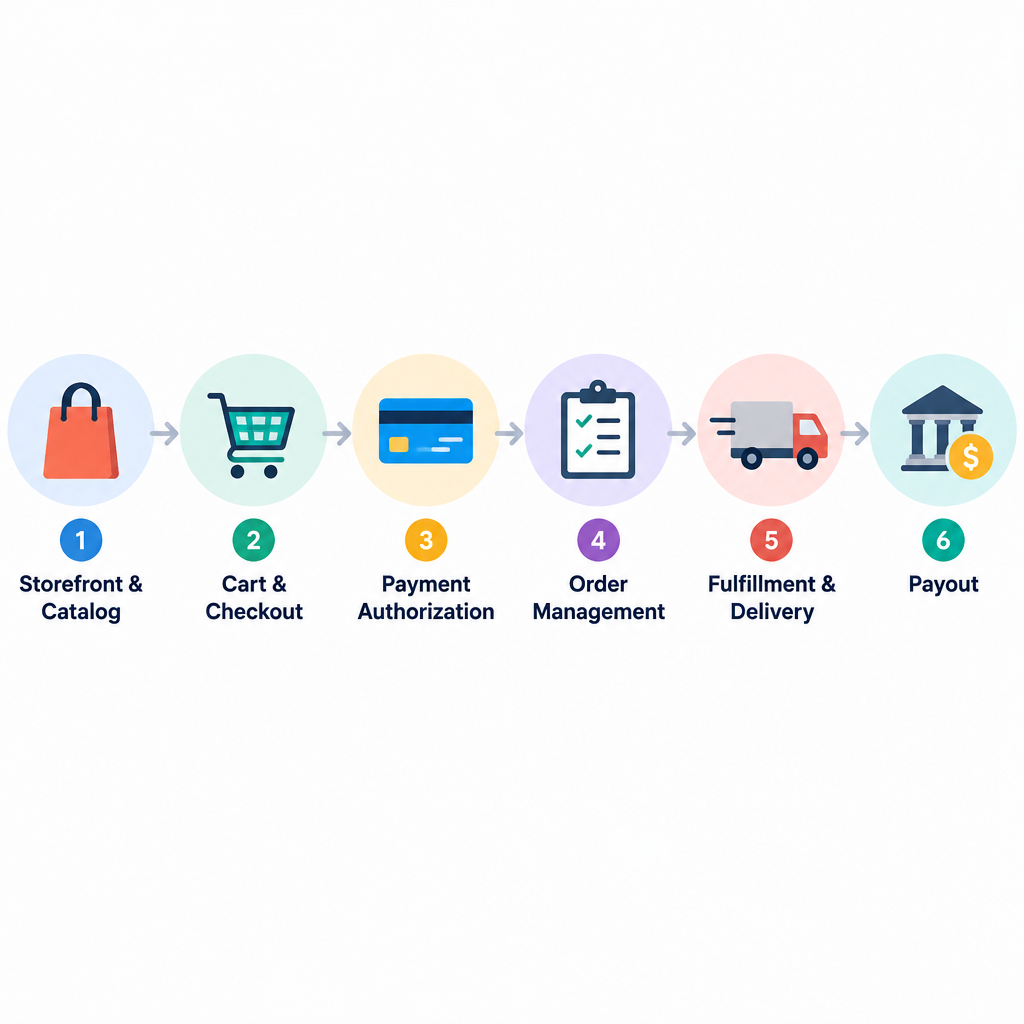
Most explanations stop at “customers buy things on a website.” That skips the interesting part. Here is what happens between a shopper clicking “Buy” and the box landing on their doorstep.
1. The storefront and catalog
Your storefront is the website or app customers browse. Behind it sits a product catalog: titles, descriptions, photos, prices, variants such as size and color, and stock levels. The e-commerce platform stores this data and displays it through your theme or template.
2. The cart and checkout
When a shopper adds items to the cart, the platform calculates the subtotal. At checkout it applies discounts, works out shipping rates and calculates sales tax or VAT based on the delivery address. The customer then enters payment details.
3. Payment authorization
This is the part most sellers never see, and it takes a couple of seconds:
- The checkout passes the card details to a payment gateway, which encrypts them.
- The gateway sends the request to a payment processor.
- The processor routes it through the card network (Visa, Mastercard, American Express and so on).
- The customer’s issuing bank checks the funds and fraud signals, then approves or declines.
- The approval travels back, and your store shows the order confirmation.
At this stage the money is usually only authorized, not moved. It gets captured either immediately or when you ship, depending on your settings. Services such as Stripe, PayPal and Shopify Payments bundle the gateway and processor into one product, which is why most small sellers never deal with these layers separately.
4. Order management
Once payment clears, the platform records the order, reduces inventory, sends a confirmation email and notifies you. Larger stores push this order data into accounting software, warehouse systems or a CRM through integrations and automation.
5. Fulfillment and delivery
Physical products need to be picked, packed and shipped. You can do this yourself, use a third-party logistics (3PL) warehouse, or let a supplier ship directly to the customer (dropshipping). Digital products skip this step: the platform delivers a download link or license key automatically.
6. Payout
Your payment provider deposits the money, minus its fees, into your bank account on a regular payout schedule, often within a few business days.
7. After the sale
Returns, refunds, reviews, support tickets and follow-up emails all live here. This stage is where repeat customers are won or lost, and it’s where many new stores underinvest.
Types of e-commerce
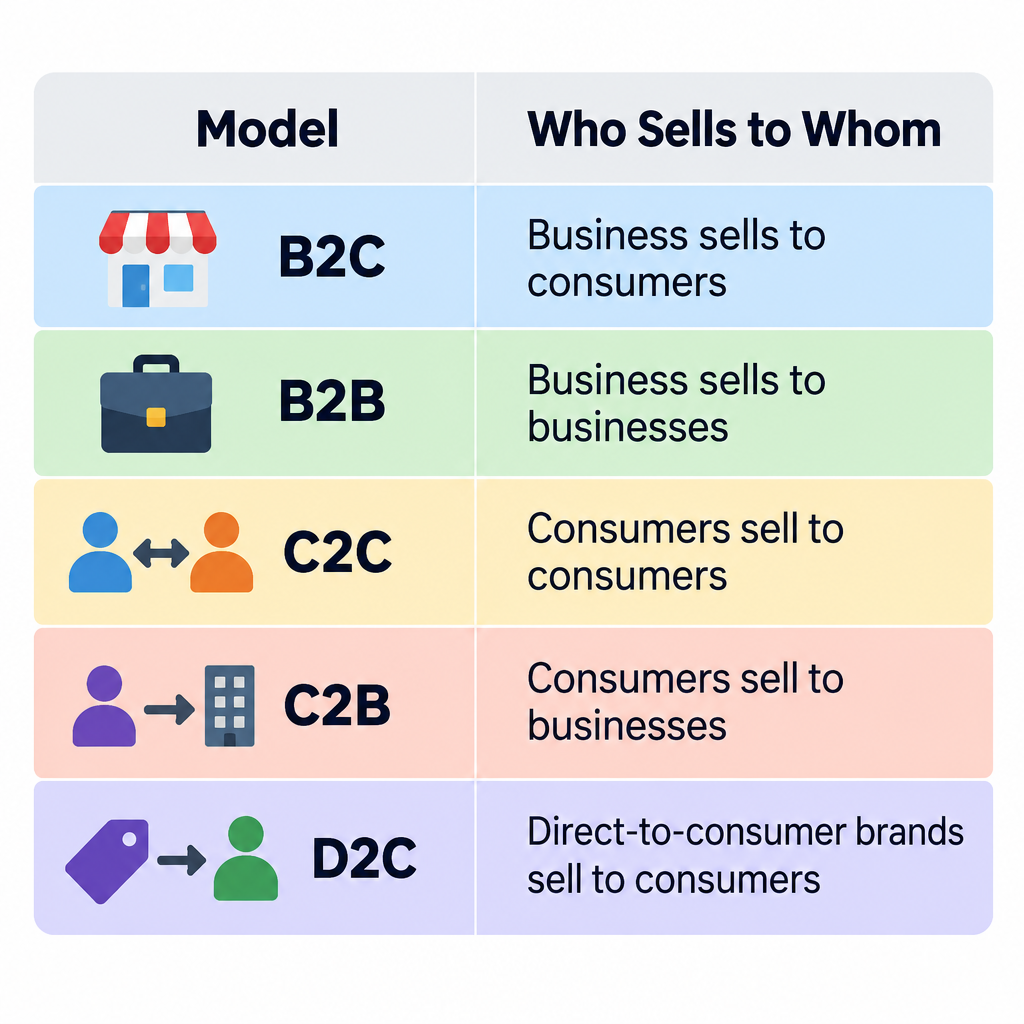
E-commerce is usually grouped by who is selling to whom.
| Type | Who sells to whom | Real examples |
|---|---|---|
| B2C (business to consumer) | A company sells to individual shoppers | Online clothing stores, electronics retailers |
| B2B (business to business) | A company sells to other businesses | Wholesale portals, office supply accounts, software licenses |
| C2C (consumer to consumer) | Individuals sell to each other through a platform | eBay, Etsy, secondhand marketplaces |
| C2B (consumer to business) | Individuals sell products or services to companies | Freelancers, stock photographers, influencers |
| D2C (direct to consumer) | A brand skips retailers and sells directly | Mattress, razor and skincare brands with their own stores |
| B2G (business to government) | Companies sell to public agencies | Online procurement and tender portals |
Common business models within those types
The “who sells to whom” label tells you the audience. The business model tells you how the money and the products flow.
- Retail with your own stock: You buy or make inventory, store it and ship it. Higher margins, more cash tied up.
- Dropshipping: You list products and a supplier ships them. Low startup cost, thin margins and limited control over quality and delivery times.
- Print on demand: Designs are printed onto shirts, mugs or posters only after an order comes in.
- Wholesale: You sell in bulk to other retailers, often through a B2B portal with tiered pricing.
- Subscriptions: Customers pay on a recurring schedule for boxes, software, memberships or replenished products.
- Digital products: Ebooks, courses, templates, music and software. No shipping, near-zero cost per extra sale.
- Services: Bookings, consultations, classes and appointments sold and paid for online.
Many successful stores combine models, such as a D2C brand that also sells wholesale to boutiques and runs a subscription on its best-selling product.
Where e-commerce happens: the main channels
Your website isn’t the only place to sell. Most stores use several channels at once.
- Your own online store: Full control over branding, pricing and customer data.
- Marketplaces: Amazon, eBay, Etsy, Walmart Marketplace and others bring built-in traffic in exchange for fees and strict rules.
- Social commerce: Instagram, Facebook and TikTok let shoppers buy without leaving the app.
- Mobile apps: Common for larger retailers with loyal, repeat customers.
- Chat and AI assistants: Shoppers can increasingly discover and buy products inside AI tools. In 2025, OpenAI introduced checkout inside ChatGPT, built with Stripe and starting with Etsy sellers.
Marketplaces are a good way to test demand. Your own store is where you build an asset you control, because the customer email list and purchase data belong to you, not to the marketplace.
Benefits of e-commerce
For sellers, the case for going online is strong.
- Lower startup costs: No lease, no shop fitting, no in-store staff on day one.
- Open 24/7: Your store takes orders while you sleep.
- Wider reach: You can sell nationally or internationally from the same site.
- Better data: You can see which products people view, what they abandon in carts and which marketing actually drives sales.
- Automation: Order emails, inventory updates, abandoned-cart reminders and tax calculations run without manual work.
- Easy testing: You can change prices, photos or offers in minutes and measure the result.
For shoppers, the benefits are convenience, price comparison, a much larger selection, reviews from other buyers and delivery to the door.
The real downsides
E-commerce has trade-offs, and it’s better to know them before you start.
- Competition is a click away. Shoppers compare prices instantly, which squeezes margins.
- Traffic isn’t free. A store with no visitors makes no sales. Ads, SEO, email and social content all take money or time.
- Shipping and returns eat profit. Free-shipping expectations and generous return policies are expensive, especially for clothing.
- Customers can’t touch the product. Good photos, sizing guides and clear descriptions do the job a shop assistant would.
- Security and compliance are your responsibility. Payment data, customer privacy and tax rules all apply to online sellers.
What it really costs to run an online store
Cost is the question new sellers ask most, and the honest answer is that fees stack in layers. Prices change often, so check each provider’s current pricing page before you commit. Here’s what you’ll pay for in each setup.
| Cost | Hosted platform (e.g. Shopify, Wix, Squarespace) | Self-hosted open source (e.g. WooCommerce) |
|---|---|---|
| Platform software | Monthly or annual subscription | Free core software |
| Hosting | Included | Paid separately to a web host |
| Domain name | Yearly fee, sometimes free for year one | Yearly fee |
| Theme or template | Free options, premium themes cost extra | Free options, premium themes cost extra |
| Apps or plugins | Many paid monthly | Many paid yearly |
| Payment processing | Percentage plus fixed fee per sale | Percentage plus fixed fee per sale |
| Maintenance and security | Mostly handled for you | Your job or your developer’s |
Payment processing is the fee people forget. Card processing typically works out at a percentage of each sale plus a small fixed charge, and some hosted platforms add their own transaction fee if you use a third-party payment provider instead of theirs. On a low-priced product, that fixed charge can take a surprisingly big bite.
Builder tip
Before launch, add up every monthly app fee plus processing on your average order value. That’s your real cost per order, and it’s often higher than the plan price suggests.
Understanding e-commerce platforms
An e-commerce platform is the software that runs your store: catalog, cart, checkout, orders and customer accounts. There are four broad types.
Hosted (SaaS) platforms
Shopify, BigCommerce, Wix, Squarespace and Square Online host everything for you. You pay a subscription, pick a theme and start adding products. Security patches, uptime and the checkout’s PCI compliance are handled by the provider. The trade-off is less control and ongoing app costs.
If you’re new to building sites, a website builder with commerce built in is usually the fastest route from idea to first sale. Some now include an AI website builder that drafts your pages, layout and product copy from a short prompt, which you then edit.
Self-hosted open-source platforms
WooCommerce is a free plugin that turns a WordPress site into a store, and it’s one of the most widely used e-commerce tools on the web, with millions of active installs. Magento Open Source and PrestaShop are other popular options. You own the code and data and can customize almost anything, but you’re responsible for hosting, updates, backups and security.
Headless commerce
Headless setups separate the front end (what shoppers see) from the back end (products, orders, checkout). A developer builds a custom storefront, often with a JavaScript framework, and connects it to a commerce engine through an API. Shopify, BigCommerce and commercetools all support this approach. It delivers speed and flexibility but needs a development team.
Enterprise platforms
Large retailers and B2B companies often use Adobe Commerce, Salesforce Commerce Cloud or SAP Commerce Cloud. These handle complex catalogs, multiple currencies and regions, negotiated B2B pricing and deep integration with ERP systems. They’re priced and implemented accordingly.
Core features every e-commerce platform should have
| Feature | Why it matters |
|---|---|
| Product and inventory management | Variants, stock tracking and bulk editing save hours |
| Mobile-friendly checkout | Most browsing now happens on phones |
| Payment gateway options | Cards, digital wallets and local payment methods |
| Shipping and tax settings | Accurate rates and tax at checkout prevent losses |
| Discounts and promotions | Coupon codes, sales and free-shipping rules |
| SEO controls | Editable titles, descriptions, URLs and clean site structure |
| Analytics | Sales, conversion rate, top products and traffic sources |
| Integrations | Email marketing, accounting, marketplaces and fulfillment services |
| Customer accounts | Order history and faster repeat checkout |
What to look for when choosing a platform
Match the platform to your situation, not to whatever is trending.
- Your technical comfort. If you don’t want to manage hosting or updates, choose a hosted platform.
- What you sell. Digital downloads, subscriptions, bookings and large catalogs each have platforms that handle them better than others.
- Where you sell. If marketplaces and social channels matter, check how well the platform syncs inventory across them.
- B2B needs. Wholesale pricing, quote requests, net payment terms and company accounts aren’t standard everywhere.
- Total cost at your expected volume. Model costs at the sales level you expect in a year, not just at launch.
- Exit options. Check how easily you can export products, customers and orders if you move platforms later.
How to get started in e-commerce
Launch your first online store
- Pick one product line and one target customer.
- Check demand on a marketplace or with pre-orders.
- Choose a platform that fits your skills.
- Register a domain and set up business email.
- Add products with clear photos and descriptions.
- Connect a payment provider and test checkout.
- Configure shipping rates, taxes and returns policy.
- Add privacy, terms and refund policy pages.
- Place a real test order, then refund it.
- Launch and drive your first traffic.
Start small. A focused store with ten well-presented products usually outsells a sprawling one with two hundred thin listings.
Legal, tax and security basics
E-commerce comes with obligations that physical shop owners sometimes never think about.
Sales tax and VAT. In the US, the 2018 Supreme Court decision in South Dakota v. Wayfair allows states to require online sellers to collect sales tax even without a physical presence there, once they pass that state’s sales or transaction thresholds. In the EU, the VAT One Stop Shop scheme, introduced in July 2021, simplifies how businesses report VAT on cross-border sales to consumers. Most platforms can calculate tax, but you’re still responsible for registering and filing. A local accountant is worth the fee here.
Privacy. If you collect customer data, privacy laws such as the EU’s GDPR and California’s CCPA may apply. You’ll need a privacy policy and, in many regions, a cookie consent banner.
Payment security. Anyone who accepts card payments must follow PCI DSS, the card industry’s data security standard. Using a hosted checkout or a major payment provider keeps most of the card data off your servers and shrinks your compliance burden considerably.
Security note
Outdated plugins and themes are the most common way small self-hosted stores get hacked. Keep everything updated, use only official sources, and back up your store before every update or migration.
Never install nulled or pirated themes and plugins to save money. They often contain hidden malware that can steal customer card details and get your store blacklisted.
Moving an existing store or shop online
If you already sell offline or on another platform, plan the move carefully.
- Export your data first: products, customers, orders and reviews.
- Map your old URLs to new ones with 301 redirects so you keep search rankings.
- Take a full backup of the old store before you change anything.
- Run both systems side by side briefly if you can, then switch DNS during a quiet sales period.
- Test checkout, emails and tax on the new store before you announce it.
For brick-and-mortar shops, look for a platform with a point-of-sale (POS) system so in-store and online inventory stay in sync.
The future of e-commerce
The e-commerce landscape keeps shifting, but a few directions are already clear.
AI shopping agents. Shoppers are starting to ask AI assistants to find and buy products for them. Payment companies and AI firms have released protocols that let agents complete purchases on a shopper’s behalf. For sellers, clean product data with accurate titles, specs, prices and stock will matter as much as a pretty storefront, because an agent reads your catalog rather than your banner images.
Social and video commerce. Live shopping and in-app checkout on social platforms keep growing, especially for beauty, fashion and gadgets.
More automation in operations. AI tools already write product descriptions, answer routine support questions, forecast inventory and flag fraud. Expect these to become standard features rather than paid add-ons.
Faster, cheaper delivery expectations. Large retailers have trained shoppers to expect quick, cheap shipping. Smaller stores compete on product, service and brand instead of trying to match that speed.
Unified commerce. Online, in-store, marketplace and social sales are increasingly managed from one system, with one inventory count and one customer record.
FAQ
What is e-commerce in simple words?
E-commerce is buying or selling anything over the internet. If the order and payment happen online, it counts, whether the product is physical, digital or a service.
Is Amazon an example of e-commerce?
Yes. Amazon is both a B2C retailer selling its own stock and a marketplace where third-party sellers list products, which makes it an example of several e-commerce models at once.
What are the four main types of e-commerce?
The four classic types are B2C, B2B, C2C and C2B. D2C (direct to consumer) and B2G (business to government) are often added as extra categories.
Is dropshipping a form of e-commerce?
Yes. Dropshipping is an e-commerce business model where you sell products online and a supplier ships them directly to your customer, so you never hold inventory.
How much does it cost to start an e-commerce business?
You can launch a basic store with a modest monthly platform subscription, a domain and payment processing fees per sale. The bigger costs usually come later: inventory, apps, marketing and shipping. Check current platform pricing pages, as plans change regularly.
Do I need a business license to sell online?
It depends on your country, state or city and on what you sell. Many places require a business registration and a sales tax permit even for home-based online stores, so check with your local authority or an accountant before launch.
Which e-commerce platform is best for beginners?
A hosted platform such as Shopify, Wix or Squarespace is easiest because hosting, security and checkout are handled for you. If you already run a WordPress site and are comfortable maintaining it, WooCommerce gives you more control.