
You can register a domain name yourself in about 15 minutes. You need a payment card, an email address you check, and a name nobody else has taken. This guide covers each step, from choosing the extension to pointing the domain at your site, and flags the renewal prices, upsells and lock-in traps that catch first-time buyers.
Last checked: October 29, 2026.
What you are actually buying when you purchase a domain
When you purchase a domain, you do not own it outright. You rent the exclusive right to use the name for a set term, usually one to ten years, and you keep it by renewing on time.
Three parties make this work:
- The registry runs the extension. Verisign operates .com and .net, Public Interest Registry runs .org, and Google Registry runs .app and .dev. Country codes like .uk or .ca are run by national bodies such as Nominet and CIRA.
- The registrar sells you the name and keeps the record that says it is yours. Cloudflare, Namecheap, Porkbun, GoDaddy and Squarespace Domains are all registrars.
- ICANN sets the rules for generic extensions (gTLDs) like .com and accredits the registrars that sell them. It charges a fee of $0.20 per domain per year, which your registrar passes on to you.
Some companies that sell domains are resellers rather than registrars. Many web hosts fall into this group. A reseller sits between you and an accredited registrar. That is fine as long as you can see and manage your domain, but it adds another account and another support queue when something goes wrong.
The practical takeaway: put the domain in your own name, at a company you choose on purpose, in an account you control. Everything else in this guide follows from that.
What you need before you start
Gather these before you open a registrar’s search page. It keeps the purchase quick and stops you from rushing a decision at checkout.
- A shortlist of 5 to 10 names. Your first choice may be gone, so have backups ready.
- A permanent email address. Do not use a work address you might lose, or an address on the domain you are about to buy. Registrars send renewal warnings and transfer approvals here.
- Your legal name and postal address, or your business’s. These go into the registration record.
- A payment card or PayPal. Some registrars also accept other methods, but cards are universal.
- A password manager and an authenticator app for two-factor authentication.
- A rough idea of where the website will live. A hosted builder, managed WordPress hosting, Shopify, or a static host all work, and you can decide later. Knowing now helps you skip upsells you will not use.
How to register a domain name in 8 steps
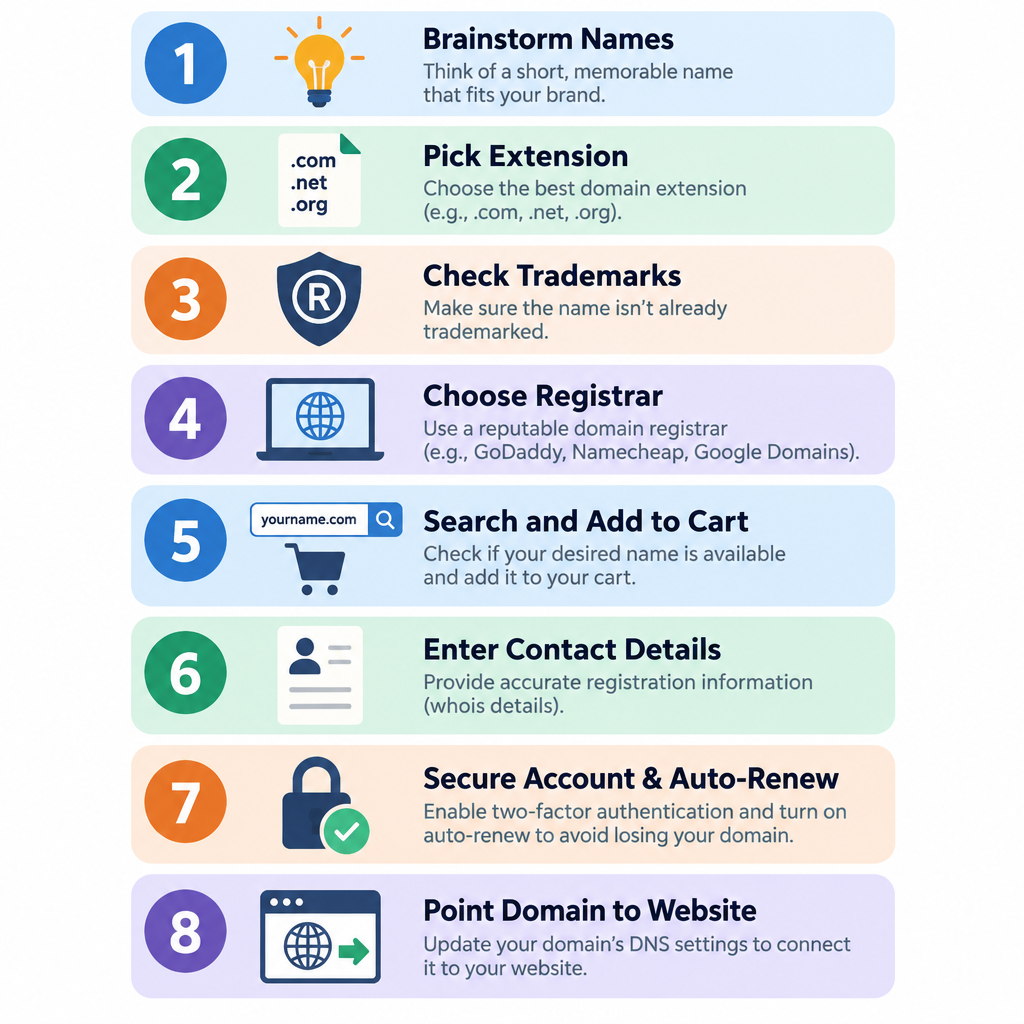
Setup steps
- Brainstorm names and check they follow the rules.
- Pick the extension that fits your audience.
- Check trademarks and social handles.
- Choose a registrar based on renewal price.
- Search, add to cart and decline upsells.
- Enter accurate contact details and verify your email.
- Secure the account and turn on auto-renew.
- Point the domain at your website.
Step 1: Brainstorm names and check they follow the rules
The technical rules are simple. Each part of a domain (the “label”) can be up to 63 characters long. You can use letters, numbers and hyphens, but a label cannot start or end with a hyphen. Domains are not case-sensitive, so UnitCMS.com and unitcms.com are the same address.
The practical rules matter more. A good domain is short, easy to spell after hearing it once, and clearly connected to your brand. Run each candidate through these tests:
- The radio test. Say it out loud to someone. If they ask “is that with a hyphen?” or “how do you spell that?”, keep looking.
- The squint test. Write it in lowercase with no spaces. Some names produce unfortunate words when run together. Check before you print business cards.
- The length test. Aim for under 15 characters before the extension. Shorter is easier to type on a phone and easier to fit in an email signature.
- No numbers unless they are the brand. “4” versus “four” creates the same confusion as hyphens.
If your exact brand name is taken, add a short, natural word: get, try, hq, shop, or your city. “acmeplumbing” is fine. “acme-plumbing-services-online” is not.
Step 2: Pick the extension that fits your audience
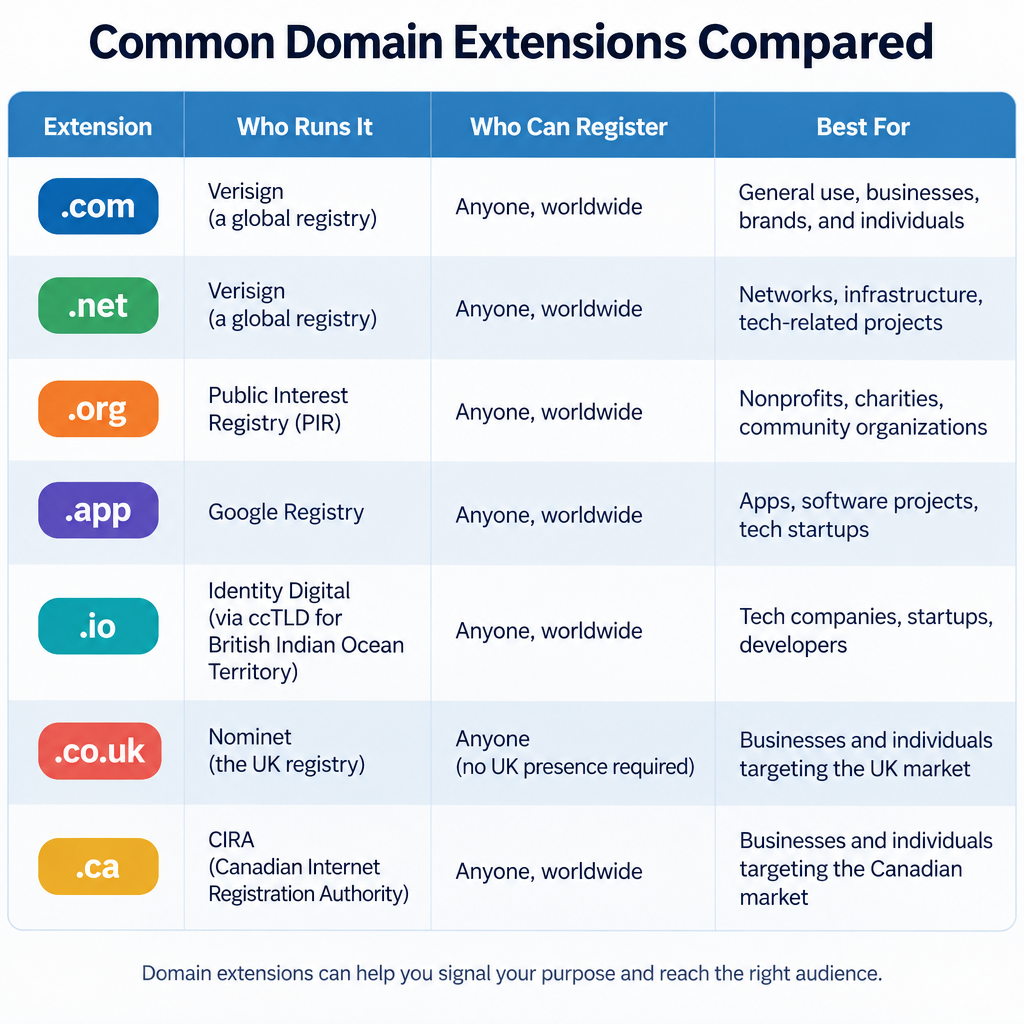
The extension is the part after the last dot, also called the top-level domain or TLD. There are well over a thousand of them. For most sites the choice comes down to a handful.
Our default recommendation is .com for any business with an audience outside a single country. People type it by habit, and mobile keyboards often have a “.com” key. If you serve one country, its country-code extension builds local trust and is often easier to get.
Here is how the common choices compare. Restrictions are set by each registry and have been stable for years, but check the registry’s current rules before you buy a restricted extension.
| Extension | Run by | Who can register | Worth knowing |
|---|---|---|---|
| .com | Verisign | Anyone | The default. Most expensive wholesale price of the big three. |
| .net | Verisign | Anyone | Fine backup, but people often type .com by mistake. |
| .org | Public Interest Registry | Anyone | Associated with nonprofits, though not restricted to them. |
| .app / .dev | Google Registry | Anyone | HTTPS is enforced by browsers, so you need an SSL certificate from day one. |
| .io | Internet Computer Bureau | Anyone | Popular with tech startups. The UK’s 2024 agreement to transfer the Chagos Islands to Mauritius raised questions about its long-term status. |
| .co.uk / .uk | Nominet | Anyone, with accurate contact details | Strong local signal for UK audiences. |
| .ca | CIRA | Canadian Presence Requirements apply | Individuals get privacy built in. |
| .us | Neustar (now GoDaddy Registry) | US citizens, residents or entities with US ties | Privacy and proxy services are not allowed. |
| .eu | EURid | EU citizens, residents or organisations | Must stay eligible to keep it. |
| .au / .com.au | auDA | Australian presence required | Business extensions need a matching ABN or similar. |
A few other points:
- New gTLDs such as .shop, .studio or .agency can produce memorable names. Check the renewal price before you fall for one. Some carry low first-year prices and much higher renewals.
- Premium domains are short or dictionary names that the registry prices higher. On some extensions the premium price applies every year, not only at registration.
- Defensive registrations make sense once you have a brand worth protecting. Grabbing the .com, your country code and a common misspelling is a reasonable starting set. Registering twenty extensions is usually money wasted.
Step 3: Check trademarks and social handles
A domain that infringes a trademark can be taken from you. Rights holders can file a complaint under ICANN’s Uniform Domain-Name Dispute-Resolution Policy (UDRP), and panels regularly order domains transferred when they find bad faith.
Before you buy, search the trademark database for your main market. That means the USPTO in the US, the UK IPO in Britain, or EUIPO for the EU. Look for registered marks in your industry that match or closely resemble your name. A plumber called “Apple Plumbing” is unlikely to bother anyone. A software company called “Microsofty” will.
While you are at it, check whether the matching handles are free on the social platforms you will use. Having your domain and handles line up saves you from explaining two different names to customers.
Step 4: Choose a registrar based on renewal price
This is the step most first-time buyers rush. The registrar you pick affects what you pay every year, how easy it is to manage DNS, and how much hassle you face if you ever leave.
Judge registrars on renewal price, not the first-year price. A .com for $4.99 or less in year one is a common promotion. It often renews at well over double the price of a budget registrar. Over ten years, that gap adds up to the cost of a decent hosting plan.
Here is how the main registrars compare on the things that matter. Prices change often, so the table focuses on pricing model and features. Check each registrar’s renewal price for your extension at checkout.
| Registrar | Pricing model | WHOIS privacy | DNSSEC | Notable catch |
|---|---|---|---|---|
| Cloudflare Registrar | At cost: wholesale plus ICANN fee, no markup | Redaction included free | One-click | You must use Cloudflare’s nameservers. Not every TLD is supported. |
| Porkbun | Low markup, flat renewals on most TLDs | Free | Supported | Fewer bundled extras, which suits most people. |
| Namecheap | Low first-year promos, moderate renewals | Free on eligible TLDs | Supported | Checkout offers several add-ons to decline. |
| Squarespace Domains | Mid-range | Free on eligible TLDs | Supported | Took over Google Domains registrations in 2023. |
| GoDaddy | Low promotional first year, higher renewals | Check at checkout | Supported | Largest registrar. Renewal prices sit at the higher end. |
Our view: for a single site, Cloudflare Registrar is the cheapest option over the long run, as long as you are happy to run DNS through Cloudflare. If you want freedom to use any DNS provider, Porkbun and Namecheap are sensible, low-cost choices.
You will also see free domains offered with hosting plans and website builders. We cover those below. Short version: they are fine for year one, but read the renewal terms.
Builder tip
Keep your domain at a registrar, separate from your hosting. If a host goes down, raises prices or locks your account, you can point the domain elsewhere in minutes instead of waiting on a transfer.
Step 5: Search, add to cart and decline upsells
Type your first-choice name into the registrar’s search box. You will see one of three results:
- Available at the standard price. Add it to your cart.
- Available at a premium price. Check whether the premium applies at renewal too.
- Taken. The registrar may suggest alternatives or offer a “backorder.” We cover buying taken domains later.
Once the name is in your cart, set the term. One year is fine if you have auto-renew on. Two to five years reduces the chance of an accidental lapse. Ten years is the maximum for gTLDs.
Then deal with the add-ons. Here is what we accept and decline for client sites:
| Add-on | Our verdict | Why |
|---|---|---|
| WHOIS privacy / redaction | Accept if it is free | Hides your personal details and cuts spam. Most good registrars include it. |
| Email hosting | Usually decline | Google Workspace or Microsoft 365 are better if you need email on your domain. |
| Website builder or hosting bundle | Decline at this stage | Pick your platform separately, on its merits. |
| SSL certificate | Decline | Most hosts and builders provide free certificates through Let’s Encrypt or similar. |
| “SEO” or “listing” packages | Decline | They do not improve rankings in any meaningful way. |
| Extra extensions | Decline, unless defending a real brand | Every extension is another renewal to manage. |
| Domain protection or ownership guard | Read the terms | Some are useful lock services. Some duplicate free features. |
Step 6: Enter accurate contact details and verify your email
The registrant is the legal holder of the domain. Put your own name or your business’s legal name here. Do not let a designer, developer or agency register it under their name “to save you the trouble.” It is the single most common cause of domain disputes we see.
Use accurate details. Under ICANN’s registrar contract, registrars must verify your contact email. If you do not click the verification link within 15 days, the registrar must suspend the domain. Your site and email will stop working until you verify.
Check your inbox and spam folder right after checkout. The email usually comes from the registrar, though the wording varies.
On privacy: since the EU’s GDPR took effect in 2018, most registrars redact personal data from public lookups by default. ICANN has also replaced the old WHOIS protocol with RDAP, which became the definitive source of registration data on January 28, 2025. Your details are still held by the registrar and can be disclosed to law enforcement or in disputes. They just are not published for anyone to scrape.
You can see what is public about any domain with a lookup. On macOS or Linux, the whois command still works for most extensions:
whois yourdomain.com
For RDAP data, use ICANN’s lookup tool or your registrar’s built-in lookup.
Step 7: Secure the account and turn on auto-renew
Your registrar account controls where your website and email go. If someone takes it over, they can redirect your traffic or move the domain. In July 2024, attackers hijacked a number of domains held at Squarespace after the Google Domains migration. Security researchers and outlets including KrebsOnSecurity reported that accounts were migrated without two-factor authentication in place.
Do these four things before you log out:
- Turn on two-factor authentication. Use an authenticator app or a hardware key. SMS codes are weaker.
- Turn on auto-renew and check that your card on file will not expire soon.
- Confirm the registrar lock is on. It is often called “transfer lock” or “domain lock.” It stops anyone moving the domain to another registrar without your approval.
- Enable DNSSEC if your registrar and DNS host support it. DNSSEC signs your DNS records so attackers cannot quietly swap in fake answers. At Cloudflare it is a single toggle. Elsewhere you may need to copy a DS record from your DNS provider to your registrar.
Security note
Losing access to your registrar account is the fastest way to lose a domain. Use a unique password and app-based two-factor authentication, and keep backup codes somewhere offline.
Step 8: Point the domain at your website
A new domain does nothing until you connect it to something. You have two ways to do that.
Option A: Change the nameservers. Your host or builder gives you two or more nameserver addresses. You paste them into your registrar’s settings, usually under a menu like Domain > Nameservers > Custom. The host then manages all your DNS records. It is the simplest route if one company runs your website and email.
Option B: Keep DNS at the registrar and add records. You leave the nameservers alone and add the records your host asks for. This route suits you if your site and email live with different providers, or if you are on Cloudflare Registrar and must keep Cloudflare’s nameservers.
These are the records you will meet most often:
| Record | What it does | Typical use |
|---|---|---|
| A | Points a name to an IPv4 address | Root domain to your web server |
| AAAA | Points a name to an IPv6 address | Same as A, for IPv6 |
| CNAME | Points a name to another name | www to your host’s address |
| MX | Says which servers receive email | Google Workspace or Microsoft 365 |
| TXT | Holds text values | SPF, DKIM, DMARC and domain verification |
| NS | Lists the domain’s nameservers | Set at the registrar |
| CAA | Lists which authorities can issue SSL certificates | Optional extra security |
A simple setup for a site on a host with email on Google Workspace might look like this. The IP address and hostname are placeholders from the documentation ranges. Use the values your providers give you.
yourdomain.com.      A      192.0.2.10
www.yourdomain.com.  CNAME  yourdomain.com.
yourdomain.com.      MX 1   smtp.google.com.
yourdomain.com.      TXT    "v=spf1 include:_spf.google.com ~all"
Record changes usually take effect within minutes to a few hours. Nameserver changes can take up to 24 to 48 hours to reach every network. You can check what the world sees with dig:
dig yourdomain.com NS +short
dig yourdomain.com A +short
Where you point the domain depends on how you build the site. A hosted website builder walks you through the connection with a wizard, and many now include an AI website builder that drafts pages for you once the domain is connected. Shopify and other store platforms work the same way. Read up on how ecommerce works first if you plan to sell. Developers deploying a static site built with the Astro framework to a host like Netlify, Vercel or Cloudflare Pages usually add an A or CNAME record, and the host issues the SSL certificate automatically.
How much it costs to purchase a domain name
The price you see in a search result is only one line of the real cost. Here is what goes into it.
The wholesale price. The registry sets this. Verisign raised the .com wholesale price to $10.26 per year from September 1, 2024. Its agreement with ICANN lets it raise the price by up to 7% in each of the last four years of every six-year period, so the figure has only moved upward. Add ICANN’s $0.20 fee and you have the floor price any registrar pays for a .com.
The registrar markup. At-cost registrars like Cloudflare charge you close to that floor. Budget registrars add a small margin. Registrars that lead with promotional pricing tend to make it back on renewals.
Extras. Privacy, email, premium pricing and bundled products all add to the bill.
| Cost item | What to expect | Notes |
|---|---|---|
| First year, standard .com | From promotional prices under $5 to roughly the renewal price | Promos almost always apply to year one only |
| Annual renewal, standard .com | At or above the wholesale floor | The number that matters over time |
| ICANN fee | $0.20 per domain per year | gTLDs only, usually included in the price shown |
| WHOIS privacy | Free at most good registrars | Not allowed on some extensions, such as .us |
| Transfer in | Usually the price of one year’s renewal | For gTLDs this adds a year to your term |
| Registry premium names | Hundreds to thousands of dollars | Check if the premium renews every year |
| Aftermarket purchase | Set by the current owner | Plus normal renewals afterwards |
Our advice is simple. Add up five years of renewals at each registrar you are considering, then compare. The cheapest year one is rarely the cheapest five years.
Getting a free domain with hosting or a website builder
Many hosts and builders include a free domain for the first year with an annual plan. Shared WordPress hosts, Squarespace, Wix and Shopify have all run offers like this at various times.
That free year is real value, with three conditions:
- Renewal pricing. From year two you pay the provider’s domain rate, which can be higher than a budget registrar’s.
- Registrant name. Check that you, not the provider, are listed as the registrant. Most reputable providers do this correctly. Confirm it anyway.
- Moving later. If you cancel the plan, you will need to transfer the domain out or start paying for it separately. Transfers are allowed but take time. You also cannot move a domain in its first 60 days at most registrars.
For a hobby project you expect to keep on one platform, the free domain is fine. For a business, register the domain at a separate registrar and connect it to the platform. It costs a little more in year one and keeps you free to switch platforms later. Our guide to the best website builders compares how each one handles custom domains.
How to purchase a domain someone already owns
If your ideal name is taken, look it up before you give up. Visit the address in a browser and check its RDAP record. You will see one of these situations:
- An active site. The owner is using it. A purchase is possible, but expect to pay well.
- A parked page with a “for sale” notice. The owner wants to sell. Many list prices on marketplaces such as Afternic, Sedo or Dan.com.
- Nothing at all. The domain may be held by someone who forgot about it. It might also be close to expiring.
To buy safely:
- Use an escrow service or a marketplace with built-in escrow. Never send money directly to a stranger and hope they hand over the domain.
- Check the domain’s history. Search for the name and look at archived versions of past sites. A domain used for spam can carry baggage with email providers and search engines.
- Confirm the extension’s renewal price. Buying a premium name on the aftermarket does not change what the registry charges you each year.
- Consider a broker for anything above a few thousand dollars. They negotiate on your behalf, often anonymously, so the seller does not inflate the price after spotting your brand.
Backorders let you queue for a domain in case it expires and gets released. They are a lottery for anything desirable, because several services compete to catch the same name.
A word on buying domains as an investment
Domain investing is a real business, but it is not passive income for most people. Holding costs are the renewals, so a portfolio of 100 .com domains carries a four-figure bill every year whether you sell anything or not. Most speculative names never sell. If you are curious, start with a handful of names you could use yourself, and track every renewal against every sale. Avoid names built on other companies’ trademarks entirely. They lose UDRP disputes and can expose you to legal claims.
How to transfer an existing domain to another registrar
You might register a domain at one company and later want to manage it somewhere else. Transferring an existing domain is routine for gTLDs, though the process takes several days.
- Back up your DNS records. Screenshot or export every record at your current DNS host. If the transfer changes nameservers, you will need to recreate them.
- Check the domain is eligible. Most registrars block transfers for 60 days after a new registration, a previous transfer, or a change to the registrant’s name or organisation. ICANN has been revising its Transfer Policy, so check your registrar’s current rules.
- Unlock the domain at your current registrar.
- Get the authorization code (also called an auth code, EPP code or transfer key).
- Start the transfer at the new registrar, paste in the code and pay. For most gTLDs this adds one year to the expiry date, up to the ten-year maximum.
- Approve the transfer from the email your old registrar sends. Without approval, gTLD transfers typically complete automatically after about five days.
- Re-lock the domain and re-enable DNSSEC at the new registrar once the move completes.
If your site uses DNSSEC, turn it off or coordinate the change before the transfer if the DNS provider is changing. A mismatched DS record can make the domain unreachable for anyone whose resolver validates DNSSEC.
Country-code extensions follow their own rules. Some .uk transfers, for example, use a “tag” change rather than an auth code. Check the steps with both registrars first.
What happens if you forget to renew
Domains rarely vanish the moment they expire. For most gTLDs there is a staged lifecycle, though the length of each stage varies by registrar.
| Stage | Typical length | What happens | Cost to recover |
|---|---|---|---|
| Expiry | Day 0 | Registrar may park the domain or stop DNS. Site and email stop working. | Normal renewal |
| Renewal grace period | Up to 45 days, registrar-dependent | You can usually renew normally | Normal renewal, sometimes a late fee |
| Redemption grace period | 30 days | Domain is pulled from the zone. Only the registrant can restore it. | Renewal plus a redemption fee, often much higher |
| Pending delete | 5 days | Nothing can be done | Not recoverable |
| Release | After pending delete | The name becomes available to anyone, including backorder services | Whatever a new buyer is willing to pay |
ICANN’s expired registration rules require registrars to send renewal reminders before and after expiry. Those emails only help if they reach an inbox you read. That is why the permanent email address on your prerequisites list matters.
Common mistakes and how to fix them
These are the problems we see most often when clients come to us with a domain that is not working or not theirs.
The domain is registered to your developer or old agency. Ask them to change the registrant to you, or to transfer the domain to an account you control. If they will not cooperate and you can show you paid for it, the registrar’s support team and, as a last resort, a lawyer are your routes. Prevent this by registering the domain yourself from day one.
The site shows “This domain is parked” or a registrar’s holding page. The nameservers or records still point to the registrar’s defaults. Recheck Step 8 and compare your records against what your host requires.
Email stopped working after you connected the website. Switching nameservers to a web host often wipes your MX records, because the new DNS host starts with a blank or default zone. Add your email provider’s MX, SPF and DKIM records at the new DNS host.
“Your connection is not private” errors. The SSL certificate has not been issued yet, or the domain is not pointing to the host that issues it. Wait an hour after DNS changes, then trigger certificate issuance again in your host’s dashboard. On .app and .dev this error appears straight away, because browsers enforce HTTPS on those extensions.
The domain was suspended a couple of weeks after purchase. You missed the contact verification email. Find it, click the link, and the suspension lifts. Ask support to resend it if it has gone missing.
You cannot transfer the domain. It is probably still locked, inside a 60-day lock window, or the auth code has expired. Unlock it, wait out the window, or request a fresh code.
The renewal bill is far higher than what you paid. You bought on a first-year promotion. Transfer to a cheaper registrar once you are past the 60-day lock, ideally a few weeks before renewal.
Someone registered the misspelling of your brand. If they are using it in bad faith, a UDRP complaint is an option for gTLDs. For your next brand, register the obvious misspelling when you buy the main name.
Before you make any change to nameservers, DNSSEC or the registrant details, back up your current DNS records. Most mistakes are easy to undo if you have a copy of what worked.
What you should have when you are done
After following these steps, check that you have each of these:
- A domain registered in your name or your business’s name, at a registrar you chose deliberately.
- A verified contact email that you check and will keep.
- Two-factor authentication, auto-renew and the registrar lock turned on.
- DNSSEC enabled where your setup supports it.
- Privacy or redaction active, so your home address is not published.
- DNS pointing at your host, with the site loading on https:// for both the root domain and www.
- Email records in place if you use email on the domain.
- A note of your renewal date and price in your calendar, as a backup to auto-renew.
That is a domain you control, that renews on its own, and that you can move to any host or registrar later without asking anyone’s permission.
FAQ
Can I register a domain name myself?
Yes. Anyone who can agree to a registrar’s terms, which generally means an adult, can register a domain in a few minutes at any registrar. Businesses can register in the company’s name. Some country-code extensions add eligibility rules: .ca needs a Canadian presence, .us needs a US connection, and .eu needs EU citizenship, residence or an EU-based organisation.
How much does it cost to register a domain name?
A standard .com sits close to its wholesale floor of $10.26 plus ICANN’s $0.20 fee at at-cost registrars, and costs more elsewhere. Budget registrars typically renew a .com in the low-to-mid teens of dollars. Registrars that lead with promotional pricing often charge $20 or more at renewal. First-year promotions can be under $5. Other extensions range widely, and premium names can cost hundreds or thousands of dollars.
What is the best site to register a domain?
For most single-site owners, we recommend Cloudflare Registrar if you are happy to use Cloudflare’s DNS. It charges the wholesale price with no markup. If you want to use any DNS provider, Porkbun and Namecheap are good low-cost choices with free privacy. Pick a registrar based on renewal price, security features and ease of DNS management, not the first-year deal.
What is the cheapest website to register a domain name?
Over several years, Cloudflare Registrar is usually the cheapest for the extensions it supports, because it sells at cost. For the first year alone, a promotional price at another registrar can be lower. Compare five years of renewals before you decide.
Can I change my domain name later?
You cannot rename a registered domain. You register a new one, move your site to it, and set up 301 redirects from the old domain so visitors and search engines follow. Keep renewing the old domain for at least a year or two after the switch.
How long does it take for a new domain to work?
Registration is near-instant for most extensions. Pointing the domain at a site usually works within minutes to a few hours. Nameserver changes can take up to 48 hours to reach every network.