
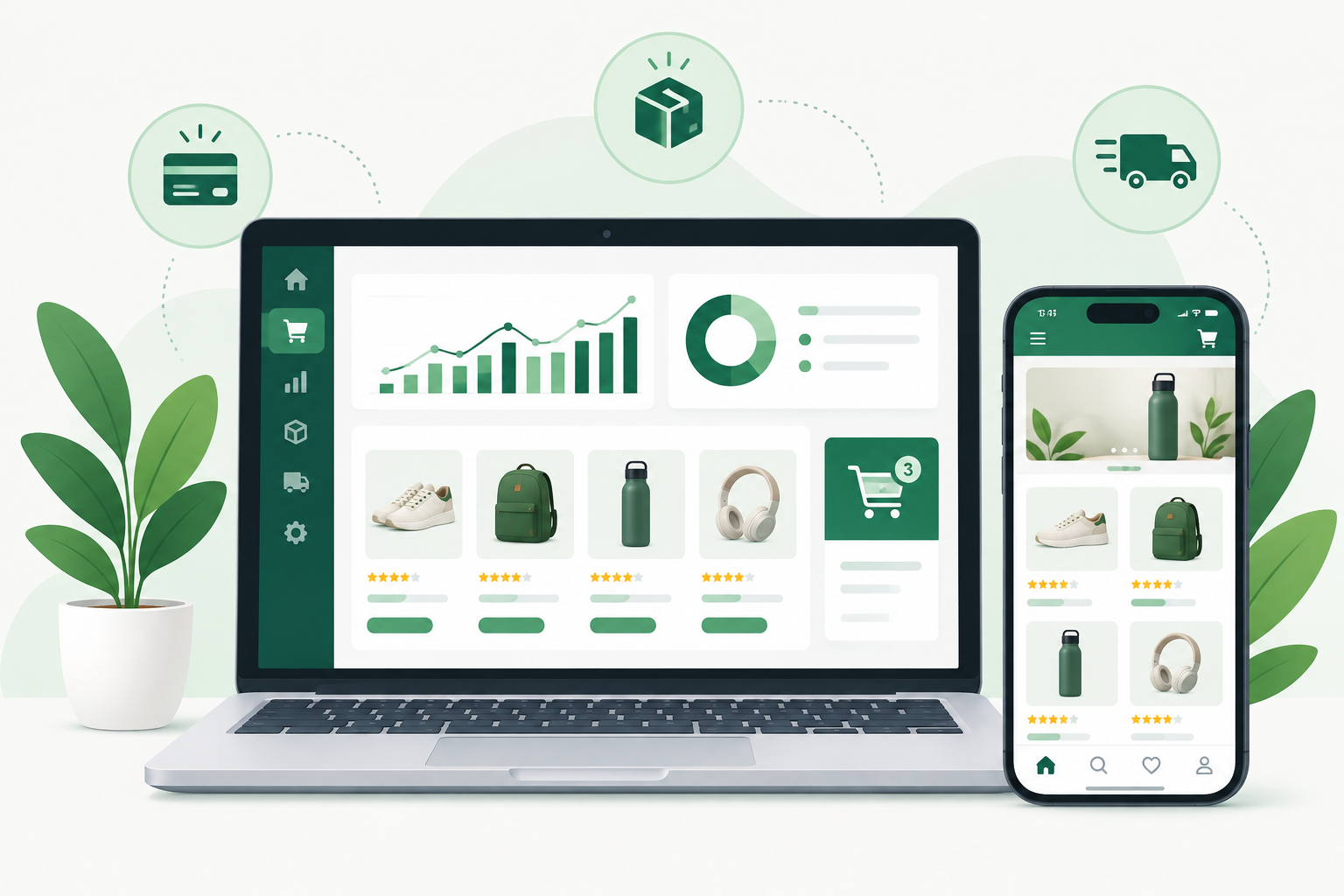
Shopify is a hosted ecommerce platform. You pay a monthly subscription and get everything needed to sell online and in person: a store builder, product and inventory management, checkout, payments, hosting and security. You don’t install software or manage servers. You sign up, add products, pick a theme and start taking orders.
What Shopify is, in plain terms
Shopify is software as a service (SaaS). Shopify Inc. owns and runs the platform, and you rent your piece of it. That one fact explains most of what makes it different from something like the WordPress platform, where you download free software, find your own hosting and take responsibility for updates.
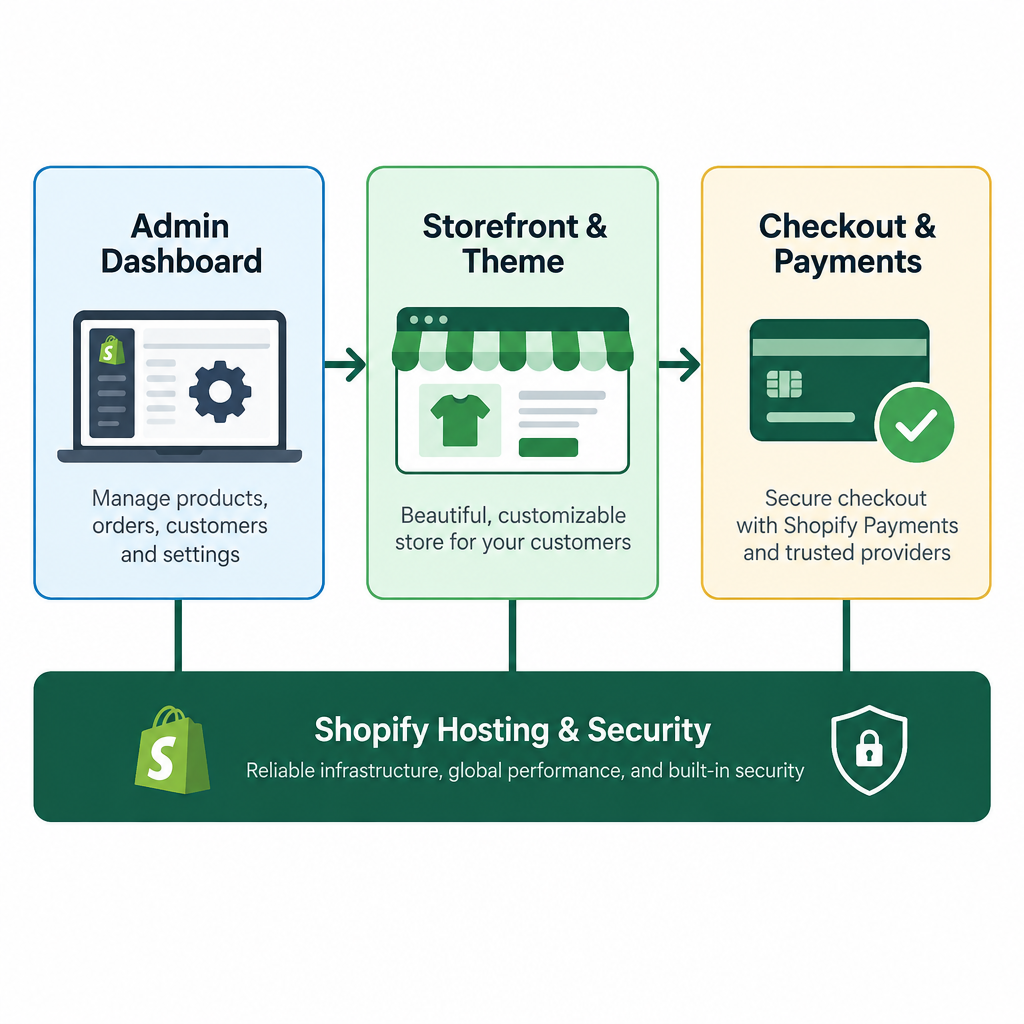
When you open a Shopify account, you get three things bundled together:
- An admin dashboard where you manage products, orders, customers, discounts and reports.
- A storefront that your customers see, built from a theme you can customise.
- A checkout and payments layer that handles carts, taxes, shipping rates and card processing.
Shopify also hosts everything. Your store runs on Shopify’s infrastructure with an SSL certificate, a content delivery network and PCI DSS Level 1 compliance for card data included in every plan. Bandwidth is unlimited, so a product going viral on social media won’t get you a surprise hosting bill.
If you’re still getting your head around how ecommerce works at a basic level (carts, payment gateways, fulfilment), Shopify packages all of those moving parts into one product. You trade some control for a lot of convenience.
From snowboard shop to commerce platform
Shopify began as a workaround. In 2004 Tobias Lütke, Scott Lake and Daniel Weinand wanted to sell snowboards online through a shop called Snowdevil. The ecommerce software available at the time frustrated them, so Lütke, a programmer, built his own on Ruby on Rails.
They realised the software was worth more than the snowboards. Shopify launched as a platform in 2006, headquartered in Ottawa, Canada. Lütke also created Liquid, the templating language that still powers Shopify themes today.
The company went public in 2015 and now reports serving millions of businesses in more than 175 countries. In its 2024 annual results, Shopify reported gross merchandise volume (the total value of sales processed through its merchants) of roughly $292 billion. That scale matters to you as a merchant: it funds the platform’s development, keeps the app ecosystem healthy and makes it unlikely your store’s underlying software will be abandoned.
How Shopify works behind the scenes
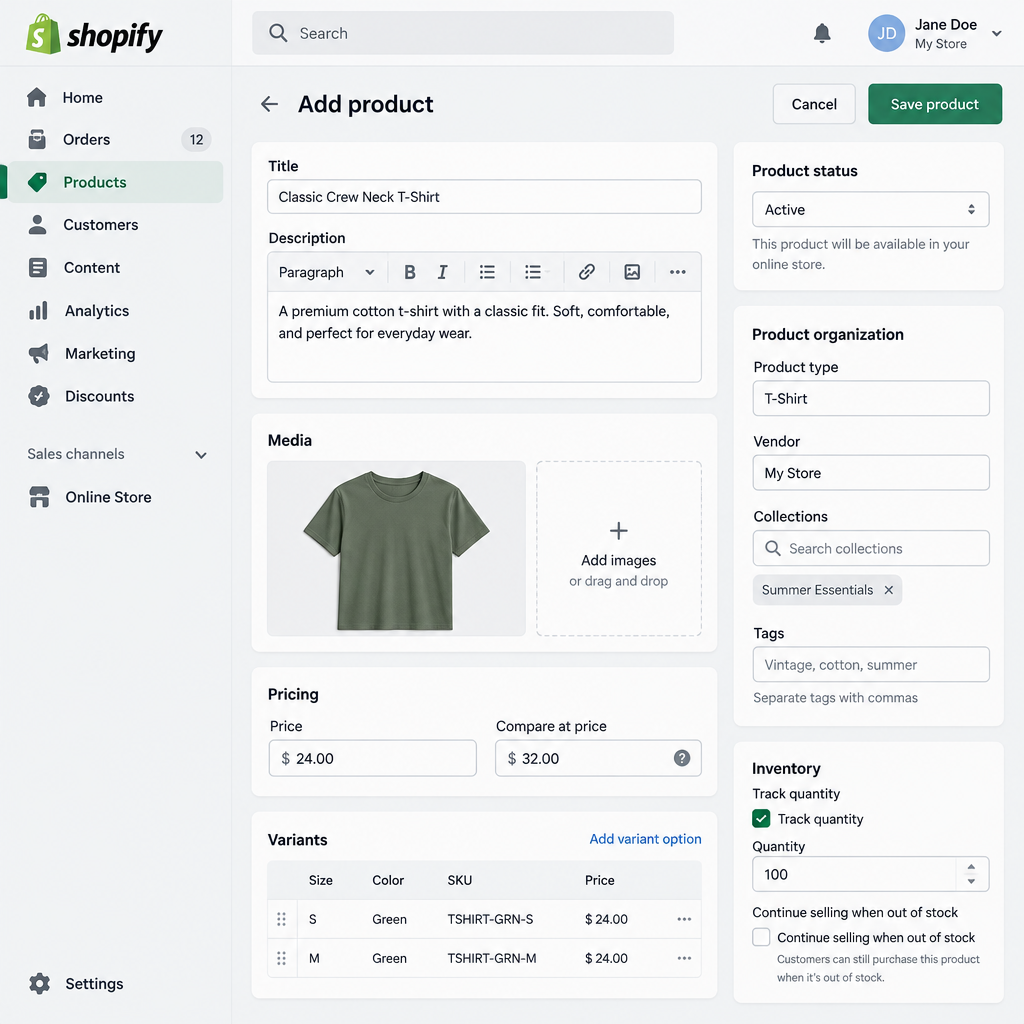
Here’s what you’re actually working with day to day.
The admin
Everything starts in the Shopify admin. The left-hand menu covers Orders, Products, Customers, Content, Analytics, Marketing, Discounts and Online Store, plus any sales channels and apps you’ve added.
Products are the core object. Each product has a title, description, media, price, variants (such as size and colour), inventory quantities per location, a SKU, weight and SEO fields. You can group products into collections, either manually or automatically based on rules like “tag equals summer” or “price is less than $50.”
Inventory tracks at the variant level across locations. If you sell from a warehouse, a retail shop and a pop-up stall, each location keeps its own stock count, and Shopify decides where to fulfil an online order from based on your settings.
The storefront and themes
Your storefront’s look comes from a theme. The Shopify Theme Store offers a set of free themes built by Shopify (the long-running default was Dawn, and the newer Horizon family arrived in 2025) alongside paid themes from third-party designers, which are one-time purchases typically priced in the low hundreds of dollars.
Modern themes follow Shopify’s “Online Store 2.0” architecture. That means you build pages from sections and blocks in a drag-and-drop editor, with no code required for most layouts. You go to Online Store > Themes > Customize and rearrange headers, product grids, image banners and testimonials visually.
Under the hood, themes are written in Liquid, HTML, CSS and JavaScript. Developers can edit the code directly or work locally with Shopify CLI.
Checkout and payments
Shopify’s checkout is one of its biggest selling points. It’s hosted, optimised and fast, and you can’t break it with a bad theme edit. Shop Pay, Shopify’s accelerated checkout, stores customer details so returning shoppers can pay in a couple of taps across any Shopify store they’ve used before.
For payments, most merchants use Shopify Payments, the built-in processor available in a set of supported countries. It accepts major cards, Apple Pay, Google Pay and Shop Pay without a separate merchant account. If you prefer another gateway (PayPal is offered alongside Shopify Payments by default), Shopify supports many, though it charges an extra transaction fee when you don’t use Shopify Payments.
Checkout customisation is deliberately restricted. On standard plans you control branding, fields and a few options. Deeper changes use Checkout Extensibility, Shopify’s app-based system, with the most flexibility reserved for Shopify Plus.
Hosting, security and speed
You never see a server. Shopify handles uptime, scaling during traffic spikes, software patches and SSL renewal. Each store gets a free yourstore.myshopify.com address, and you can connect a custom domain at any time. If you haven’t picked one yet, it’s worth taking time to register for a domain name you’ll keep for years, since changing it later costs you search rankings and brand recognition.
Shopify also generates a sitemap.xml and robots.txt automatically. Submit the sitemap to Google Search Console, and it’s worth setting up Bing Webmaster Tools too, since Bing’s index also feeds several other search and AI assistants.
Following one order through a Shopify store
Abstract feature lists don’t show how the pieces connect, so here’s a single order from click to doorstep.
- A shopper lands on your product page from an Instagram ad. The page loads from Shopify’s CDN, rendered by your theme’s Liquid templates.
- They pick a size. The variant selector checks live inventory and shows “in stock.”
- They tap Shop Pay. Their saved address and card fill in, and Shopify calculates shipping rates and sales tax based on your settings.
- Payment processes through Shopify Payments. The order appears in your admin under Orders with the status “Paid, Unfulfilled.”
- Inventory for that variant drops by one at the location assigned to fulfil it.
- You buy a discounted shipping label inside Shopify (Shopify Shipping is available in several countries), print it and mark the order fulfilled.
- The customer gets an automatic shipping confirmation email with tracking. If they return the item later, you process the refund from the same order screen.
Every step happens inside one system. That’s the core promise: no plugins stitching together cart, payment and email tools that might conflict after an update.
Is Shopify an ecommerce CMS?
Yes, with a commerce-first slant. A content management system lets you create and organise content without hand-coding pages. Shopify does that for products, and it also handles editorial content: static pages, a built-in blog, navigation menus and file storage under Content > Files.
Where Shopify used to lag behind a traditional CMS was structured content. That changed with metafields and metaobjects. Metafields add custom fields to products, collections, customers and orders (care instructions, ingredient lists, size charts). Metaobjects let you define entirely new content types, such as “Designer,” “Lookbook” or “Store location,” then reference them anywhere in your theme.
For a store with a modest blog and rich product data, Shopify works perfectly well as its own CMS. For a publication with hundreds of long articles, complex editorial workflows and many authors, the WordPress platform is stronger, and some brands run WordPress for content alongside Shopify for commerce.
What Liquid looks like
If you or a developer edit a theme, you’ll see Liquid. It mixes HTML with placeholders in double curly braces and logic tags in {% %}:
<h1>{{ product.title }}</h1>
<p class="price">{{ product.price | money }}</p>

{% if product.available %}
  <button type="submit">Add to cart</button>
{% else %}
  <p>Sold out. Check back soon.</p>
{% endif %}

{% if product.metafields.custom.care_instructions %}
  <div class="care">
    {{ product.metafields.custom.care_instructions | metafield_tag }}
  </div>
{% endif %}
Liquid is deliberately limited. It can read store data and output it, but it can’t touch the database or run arbitrary server code, which is part of why Shopify themes are hard to compromise.
Going headless with Hydrogen
You can also skip Shopify’s theme layer entirely. In a headless setup, Shopify manages products, inventory and checkout, while a separate frontend fetches data through the Storefront API.
Shopify’s own headless framework is Hydrogen, built on React, and its companion hosting service is Oxygen, included on paid plans. Other teams pair Shopify with frameworks like Next.js, or use the Astro framework for content-heavy, fast-loading storefronts.
Headless gives you total design freedom and can deliver excellent performance. It also means developer costs, a separate codebase to maintain, and losing the drag-and-drop theme editor for your marketing team. Most stores under a few million dollars in annual sales don’t need it.
Shopify plans and pricing
Shopify sells five main tiers. The table shows US list prices as published through 2025; Shopify adjusts prices and offers regional pricing, so confirm on its pricing page before you subscribe.
| Plan | Monthly (billed monthly) | Monthly (billed yearly) | Built for |
|---|---|---|---|
| Starter | $5 | $5 | Selling via social media and links, no full storefront |
| Basic | $39 | $29 | New stores and solo founders |
| Grow | $105 | $79 | Growing teams with more volume |
| Advanced | $399 | $299 | Larger stores needing better reporting and lower rates |
| Plus | From about $2,300 (multi-year term) | Contract pricing | High-volume brands and enterprises |
Annual billing cuts the Basic, Grow and Advanced plans by 25%. New stores usually get a short free trial followed by a discounted introductory period on selected plans; the exact offer changes frequently.
Starter deserves a clear warning: it doesn’t give you a proper online store with a theme. It’s a checkout-link and social selling tool. If you want a real website, Basic is your actual starting point.
Payment processing fees
Subscription price is only part of the bill. Card processing scales with your sales.
| Plan | Online card rate (US, Shopify Payments) | Extra fee if you use a third-party gateway |
|---|---|---|
| Starter | 5% + 30¢ | Not applicable to most Starter setups |
| Basic | 2.9% + 30¢ | 2% |
| Grow | 2.7% + 30¢ | 1% |
| Advanced | 2.5% + 30¢ | 0.6% |
| Plus | Negotiated, from about 2.25% + 30¢ | 0.2% |
That third-party fee is how Shopify nudges you toward Shopify Payments. On Basic, routing $10,000 a month through another gateway costs an extra $200 on top of that gateway’s own fees. Unless you have a strong reason, use Shopify Payments where it’s available.
What a small store actually pays each month
Here’s an illustrative monthly budget for a new store on Basic, billed yearly, doing $5,000 in sales across 100 orders:
| Cost | Approximate monthly amount |
|---|---|
| Basic plan (annual billing) | $29 |
| Two paid apps (reviews, email pop-ups) | $20 |
| Premium theme, $350 spread over 12 months | $29 |
| Custom domain, roughly $15/year | $1.25 |
| Card fees: 2.9% of $5,000 plus 30¢ × 100 | $175 |
| Total | About $254 |
Notice that card fees dwarf the subscription. Moving to Grow only saves money on processing once your monthly sales are high enough to offset the higher plan price. At 2.7% versus 2.9%, the saving is 0.2% of sales, so you’d need around $25,000 a month in sales before the $50 difference in annual plan prices pays for itself.
Features by plan
Every paid plan includes unlimited products, the online store, Shopify Payments, Shop Pay, discount codes, abandoned cart recovery, basic analytics, a free SSL certificate and Shopify POS Lite for in-person sales. The differences sit in staff seats, reporting and rates.
| Feature | Basic | Grow | Advanced | Plus |
|---|---|---|---|---|
| Staff accounts | 2 | 5 | 15 | Unlimited |
| Custom report builder | No | No | Yes | Yes |
| Third-party calculated shipping rates | No | No | Yes | Yes |
| Duties and import taxes at checkout | No | No | Yes | Yes |
| Advanced checkout customisation | No | No | No | Yes |
| B2B / wholesale tools built in | No | No | No | Yes |
| Shopify Flow automation | Yes | Yes | Yes | Yes |
Shopify Flow, the no-code automation tool, used to be a Plus perk. It’s now on lower plans, which is useful for tasks like tagging high-value customers or hiding sold-out products automatically.
Sell anywhere: channels, POS and international
A Shopify store isn’t limited to your website. Products, inventory and orders sync across sales channels, which you add from the admin:
- Facebook and Instagram for shoppable posts and a catalogue synced to Meta.
- Google and YouTube for free product listings and Shopping ads.
- TikTok for in-app shopping.
- The Shop app, Shopify’s consumer app, where shoppers track orders and discover stores.
- Marketplaces such as Amazon and eBay through apps.
For physical retail, Shopify POS runs on iPhone, iPad and Android with Shopify’s card readers. POS Lite comes free with every plan. POS Pro, which adds staff permissions, advanced inventory tools and more retail features, has been priced at $89 per month per location.
Selling abroad runs through Shopify Markets. You group countries into markets and set local currencies, prices, domains or subfolders, and languages for each. The free Translate & Adapt app covers translations. For merchants who want Shopify to handle duties, tax registration and fraud abroad, Managed Markets acts as the merchant of record in supported regions.
Sidekick and Shopify Magic
Shopify has built AI tools directly into the admin, and they’re included rather than sold as add-ons.
Shopify Magic is the umbrella name for generative features: writing product descriptions from a few keywords, drafting email campaigns, editing product photo backgrounds and suggesting replies in the Inbox chat tool.
Sidekick is a conversational assistant inside the admin. You ask it questions in plain language (“which products sold worst last month?”) or ask it to do things like create a discount or build a report. It’s useful for merchants who don’t know where a setting lives.
Treat both as a fast first draft. Generated product copy tends to sound generic, and nothing replaces specifics only you know: materials, sizing quirks, why your product exists. If you’re curious how this compares to tools that generate an entire site from a prompt, our piece on what an AI website builder is covers that category.
Who uses Shopify, from first sale to full scale
Shopify’s range is unusually wide. The same platform runs a teenager’s sticker shop and global brands like Gymshark, Allbirds and Kylie Cosmetics.
First-time sellers get the most from Shopify’s simplicity. You can launch in a weekend without hiring a developer, and the hosted checkout means you start with a conversion rate built on years of testing.
Growing brands (a few hundred to a few thousand orders a month) benefit from the app ecosystem, POS for markets and pop-ups, and multi-location inventory.
Retailers with physical shops like having online and in-store inventory, customers and reporting in one place instead of syncing two systems.
Enterprises use Shopify Plus for B2B, multiple storefronts, checkout customisation and dedicated support. Plus also suits brands doing frequent product drops, the kind of store people line up for online, because Shopify’s infrastructure absorbs the traffic.
Shopify is a weaker fit for businesses selling mainly services or bookings, stores with extremely complex product configurators, or publishers whose revenue comes mostly from content rather than products.
Where Shopify falls short
Shopify is our default recommendation for most product businesses, but you should know its limits before committing.
- App costs add up. Features like product reviews, subscriptions, advanced filtering and loyalty programs usually need apps, many charging $10 to $50 a month each. Stores with 10 or more paid apps can spend more on apps than on their plan.
- Limited checkout control below Plus. You can’t freely restructure the checkout on standard plans.
- URL structure is fixed. Products live under
/products/and collections under/collections/. You can’t change those prefixes, which bothers some SEO specialists more than it hurts rankings. - Variant and option limits. Shopify has raised its long-standing caps on product variants, but heavily configurable products still often need an app.
- You don’t own the code base. It’s a closed platform; you can’t self-host it.
Shopify vs WooCommerce vs Squarespace
The most common alternatives approach the problem very differently.
| Shopify | WooCommerce | Squarespace | |
|---|---|---|---|
| Type | Hosted SaaS | Free open-source WordPress plugin | Hosted website builder |
| Hosting | Included | You arrange and pay for it | Included |
| Security updates | Handled by Shopify | Your responsibility | Handled by Squarespace |
| Ecommerce depth | Very strong | Very strong, with extensions | Moderate |
| Content and blogging | Good | Excellent (it’s WordPress) | Good |
| Design flexibility | High with themes and Liquid | Unlimited | Template-driven |
| Best for | Product-focused stores of any size | Content-heavy sites wanting full control | Portfolios and small catalogues |
Pick WooCommerce if you already run a content site on WordPress, want full code ownership and are comfortable maintaining hosting, plugins and backups. Choose Squarespace if your site is mainly a portfolio or service business with a small shop attached; our step-by-step guide on how to build a website on Squarespace walks through that route. For a business where selling products is the main job, Shopify is the stronger choice.
What you own, and how to leave
Lock-in is a fair worry with any hosted platform, so here’s what you can take with you.
You can export products, customers, orders and discount codes as CSV files from their respective admin sections. You can download your theme’s code from Online Store > Themes > … > Download theme file. Blog posts and pages are harder to export natively and usually need an app or the API.
What you can’t take is the theme as a working site elsewhere (Liquid only runs on Shopify), installed app functionality, or Shopify Payments history in a portable format beyond reports.
Your domain is yours if you registered it with a third-party registrar. If you bought it through Shopify, you can transfer it out after the registrar’s standard waiting period.
Backup note
Shopify keeps the platform running, but it doesn’t give you a one-click restore if you or an app deletes products or overwrites data. Duplicate your theme before editing code, and consider a backup app such as Rewind before bulk imports, app installs or migrations.
How to start selling on Shopify
If you’ve decided Shopify fits, the setup sequence below gets a store live without wasted effort.
Setup steps
- Sign up at shopify.com and start the free trial.
- Add your business address and enable Shopify Payments under Settings > Payments.
- Add products with clear photos, prices, SKUs and inventory counts.
- Pick a theme and customise it under Online Store > Themes.
- Create About, Contact, Shipping and Returns pages.
- Set shipping rates and tax collection under Settings.
- Connect your custom domain under Settings > Domains.
- Choose a plan, remove the store password and place a test order.
Builder tip
Start with a free Shopify theme and no more than three apps. Run real orders for a month before buying a premium theme or adding tools; you’ll know exactly what’s missing instead of guessing.
If you’re moving from another platform, export your products and customers first, keep the old site live until the new store is tested, and set up URL redirects under Online Store > Navigation > URL Redirects so your search traffic follows you. Take a full backup of the old site before you start.
FAQ
What is Shopify in simple terms?
Shopify is a monthly subscription service that gives you an online store, a checkout, payments and hosting in one package. You manage products and orders from a dashboard, and Shopify runs the technical side.
Is Shopify free to use?
No. Shopify offers a short free trial, then you pay a monthly plan starting at $5 for Starter or $39 a month for Basic (or $29 a month billed yearly), plus card processing fees on each sale.
Do I need coding skills to use Shopify?
No. You can build a complete store with the theme editor and admin. Coding knowledge in Liquid, CSS and JavaScript only matters for custom design work or advanced features.
Is Shopify a CMS?
Yes. Shopify works as an ecommerce CMS: it manages products, pages, blog posts, menus and custom content through metafields and metaobjects. For very large editorial sites, a dedicated CMS like WordPress is stronger.
Can I use Shopify without a website?
Yes. The Starter plan lets you sell through social media, messaging and checkout links without a full storefront. Shopify POS also lets you sell in person, synced with the same inventory.
Who owns my store data on Shopify?
You own your business data and can export products, customers and orders as CSV files. The platform and its code belong to Shopify, so your theme won’t run anywhere else.
Is Shopify good for beginners?
It’s one of the easiest ways to start selling online. The hosted checkout, built-in payments and guided setup remove most technical hurdles, and you can grow onto higher plans without rebuilding your store.