
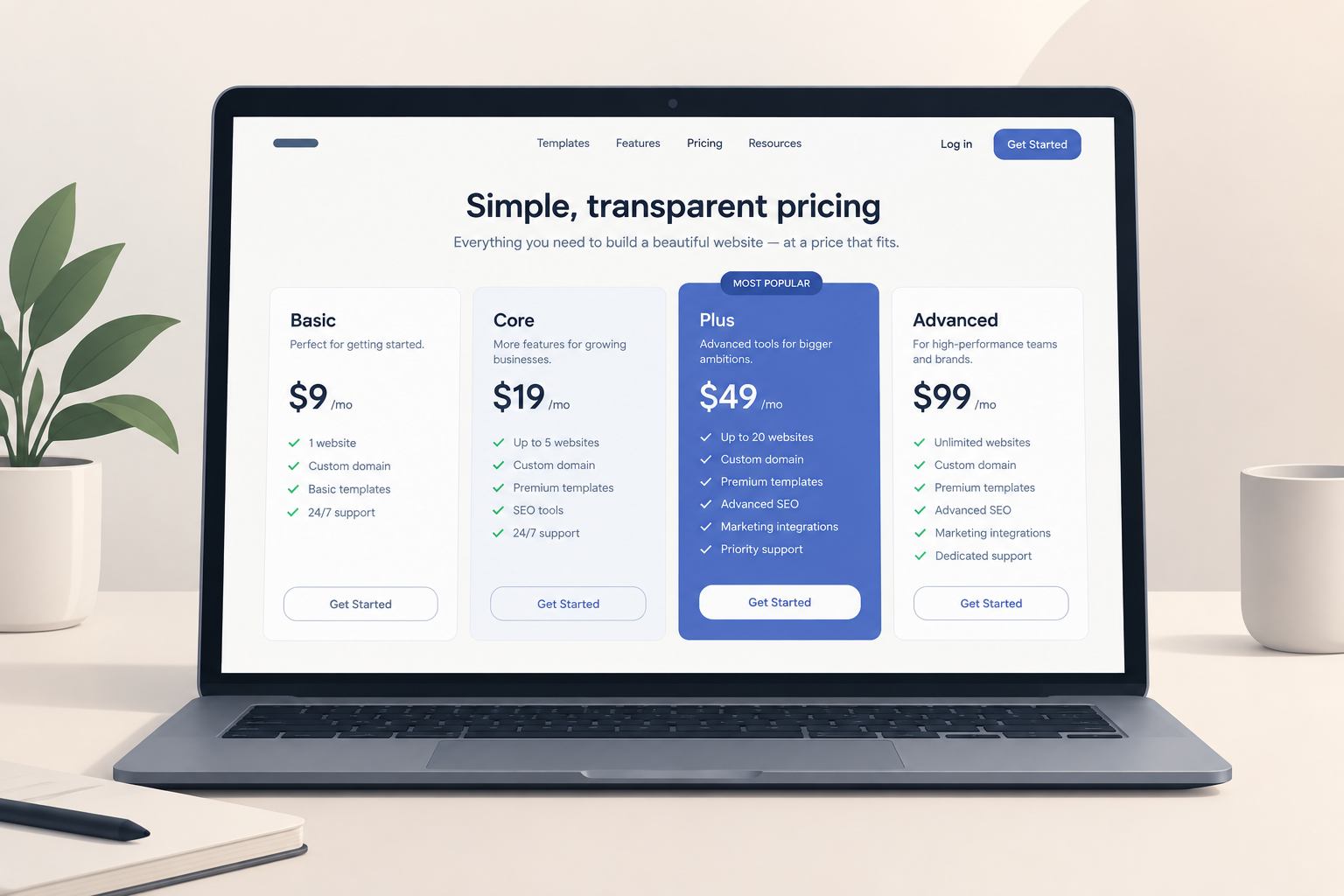
Squarespace pricing starts at $16 a month on an annual plan, but that headline number is rarely what you end up paying. This guide breaks down the four website plans, the fees that sit on top of them, and which plan fits which kind of site.
Last updated: October 29, 2026. Squarespace has repriced its plans before. The figures below are the US list prices published for the Basic, Core, Plus and Advanced lineup that Squarespace introduced in 2025. Taxes are added at checkout depending on where you live. Confirm the current numbers on Squarespace’s pricing page before you pay.
How much does a Squarespace website cost?
A Squarespace website costs $16 to $139 a month for the plan itself. The price depends on the tier and on whether you pay yearly or monthly.
In practice, most small sites spend between $200 and $500 in the first year. That covers the plan, the domain after its free first year, and maybe one add-on. Stores pay more once transaction and card processing fees are counted.
Hosting and SSL are part of every plan. So are templates and the drag-and-drop editor. You never pay a separate host the way you would on a self-hosted WordPress platform.
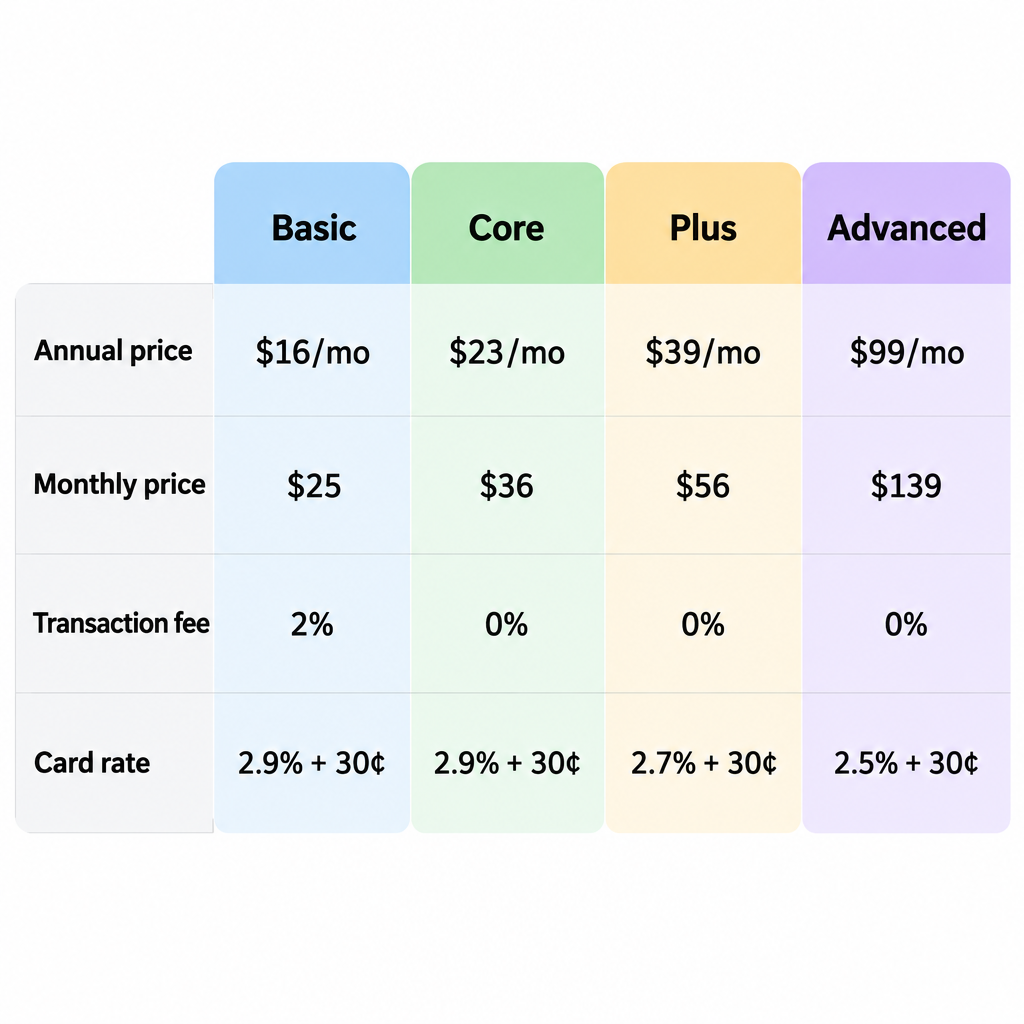
Squarespace plans compared side by side
| Plan | Annual billing (per month) | Monthly billing | Squarespace transaction fee | Squarespace Payments card rate |
|---|---|---|---|---|
| Basic | $16 | $25 | 2% | 2.9% + 30¢ |
| Core | $23 | $36 | 0% | 2.9% + 30¢ |
| Plus | $39 | $56 | 0% | 2.7% + 30¢ |
| Advanced | $99 | $139 | 0% | 2.5% + 30¢ |
Two different fees show up in that table, and people often mix them up.
- Transaction fee: Squarespace’s own cut of each sale. Only Basic charges it, and it applies whichever payment processor you use.
- Card processing rate: what the payment processor charges to move the money. Every store pays this on every plan. Squarespace Payments rates drop on Plus and Advanced. Stripe and PayPal charge their own published rates.
Basic
Basic is the entry plan. It covers a full website with a custom domain, and you can sell on it. The catch is the 2% fee Squarespace takes on every sale.
Pros: lowest price, complete website features, selling allowed.
Cons: the 2% fee adds up quickly, and it’s the most expensive way to run a store once sales grow.
Core
Core removes the transaction fee. For most small businesses, it’s the plan worth paying for.
Pros: 0% transaction fees, still affordable, a good fit for service businesses with a small shop.
Cons: standard card rates, and fewer commerce tools than Plus and Advanced.
Plus
Plus is aimed at stores that already sell steadily. It lowers your Squarespace Payments rate and opens up more commerce features.
Pros: lower processing rate, a stronger commerce toolkit.
Cons: costs $16 a month more than Core. The rate cut alone only pays for itself at high volume.
Advanced
Advanced is the top tier. It offers the lowest card rate and the fullest set of selling tools.
Pros: best processing rate, the most complete commerce features.
Cons: $99 a month on annual billing. That’s hard to justify unless you sell a lot or need a specific feature only this tier unlocks.
Builder tip
Before you choose Plus or Advanced, open Squarespace’s plan comparison and find the one feature you actually need. Clients often upgrade for the rate cut when the real reason should be a specific tool.
The break-even math nobody shows you
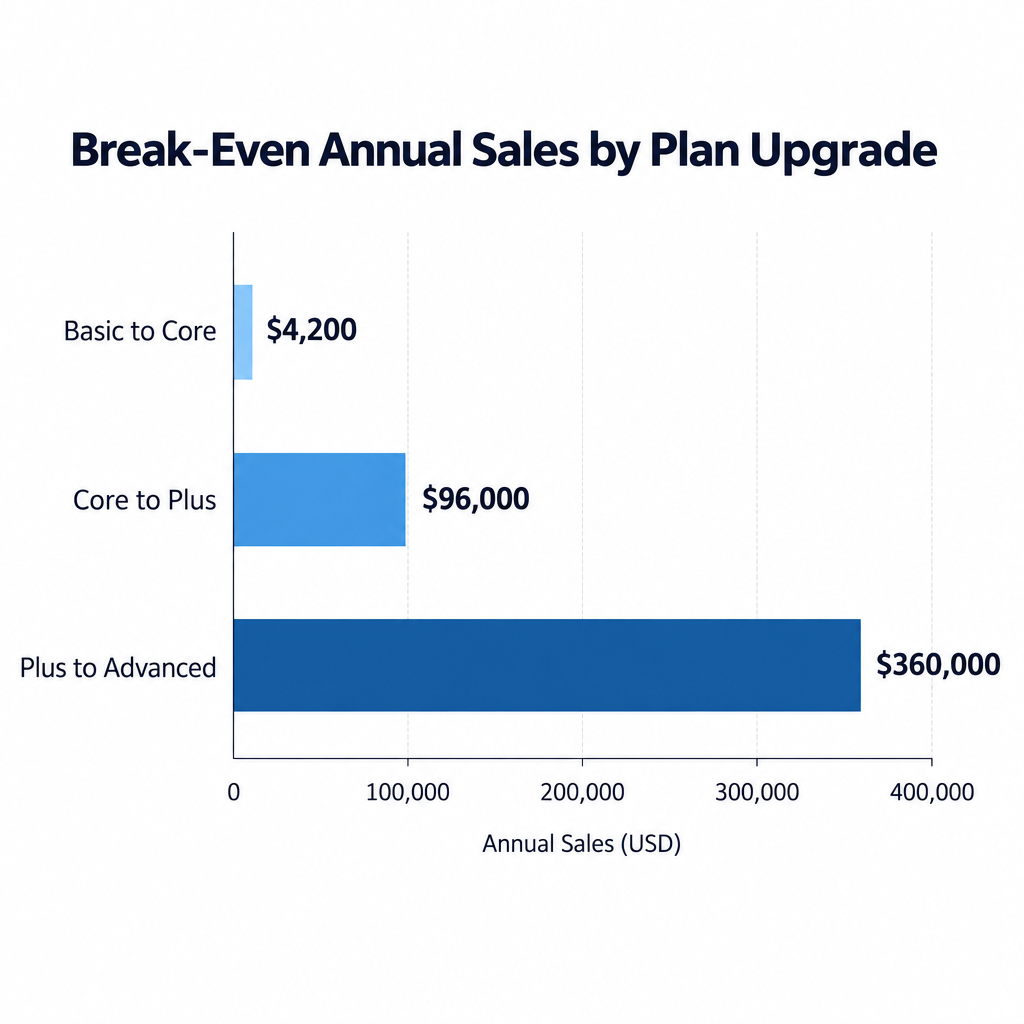
You can work out the right plan from your expected annual sales. The calculation uses the published fees.
| Upgrade | Extra cost per year (annual billing) | What you save | Break-even sales per year |
|---|---|---|---|
| Basic to Core | $84 | 2% transaction fee | $4,200 |
| Core to Plus | $192 | 0.2% card rate | $96,000 |
| Plus to Advanced | $720 | 0.2% card rate | $360,000 |
The first row matters most. Once you sell more than about $350 a month, Basic costs you more than Core. If you plan to sell anything beyond a few items, skip Basic.
The other two rows show that lower processing rates rarely justify an upgrade by themselves. Upgrade for features, not for the 0.2%.
What Squarespace charges on top of the plan
The plan price is only the base. These costs are what push the real bill higher.
Product subscriptions are billed separately
Squarespace sells several tools as separate subscriptions, each with its own tiers:
- Email Campaigns for newsletters
- Acuity Scheduling for bookings and appointments
- Digital products and memberships for gated content, courses and paid communities
- Google Workspace for business email on your domain
None of these come with the website plan. Your website plan renews on one date and each add-on renews on its own cycle, so the billing panel can fill up quickly.
Domains
Annual website plans include a free custom domain for the first year. After that, the domain renews at Squarespace’s standard rate for that extension.
If you already own a domain with another registrar, you can connect it instead. That means editing records in the domain name system so the domain points at Squarespace.
Each site needs its own plan
One subscription covers one website. If you run a business site and a separate portfolio, you pay for two plans. Agencies managing several client sites pay per site too.
Annual vs monthly billing
Annual billing saves 30% or more depending on the tier. On Core, you’d pay $276 a year upfront compared with $432 over twelve monthly payments.
Paying monthly makes sense in two cases. One is a short-lived project such as an event site. The other is when you’re still unsure Squarespace is the right fit.
Squarespace’s policy has been to refund annual plans cancelled within 14 days of purchase. Monthly payments aren’t refunded. Read the current terms at checkout, because refund rules can change.
What first-year costs look like in practice
These are three typical setups, priced at annual list rates before tax:
| Site type | Plan | Add-ons | Approximate year-one cost |
|---|---|---|---|
| Photography portfolio | Basic | None | $192 |
| Consultant with bookings | Core | Acuity Scheduling | $276 plus the scheduling subscription |
| Small store, $30,000 sales | Core | Email Campaigns | $276 plus email, plus about $960 in card fees |
The store figure surprises people. On a $30,000 store, card processing costs more than three times what the plan does. If that store ran on Basic, the 2% fee would add another $600.
Mobile Start plan
Squarespace’s help documentation lists a Mobile Start plan for sites created in its mobile app. We couldn’t confirm its current price or feature limits for this update. If you start a site from the app, check the plan options shown inside it before upgrading.
Free trial and how to upgrade
Every new site gets a 14-day free trial, and you don’t need a card to start. You can build the whole site during the trial, but it won’t be public until you pay.
Upgrade a trial to a paid plan
- Open the site in your Squarespace dashboard.
- Click Upgrade in the trial banner, or open Billing from the Settings panel.
- Choose a plan and select annual or monthly billing.
- Enter payment details and confirm.
- Claim your free domain if you chose annual billing.
You can switch plans later, and Squarespace generally credits unused time toward the new plan. Back up your content before any plan change. Squarespace’s export tool covers only part of a site, so save copies of your pages and product data as well.
Is Squarespace expensive compared with alternatives?
For a polished small site, Squarespace is fairly priced. You get hosting, security updates and support in one bill, and there are no plugins to maintain.
It gets less competitive as a store grows. Larger catalogues, multichannel selling and deep app ecosystems are where the Shopify ecommerce platform pulls ahead. Self-hosted WordPress can cost less if you’re comfortable managing hosting yourself, but the maintenance becomes your job.
If you’re still weighing options, look at what each website builder includes at the same price point. Don’t just compare the cheapest tiers.
Which Squarespace plan should you choose?
- Choose Basic for a portfolio, blog or brochure site where you’ll sell rarely or never.
- Choose Core for most businesses. Pick it the moment you plan to sell regularly.
- Choose Plus when your store needs the commerce features this tier unlocks and sales are steady.
- Choose Advanced only for high-volume stores or a feature you can’t get on Plus.
Our verdict: Core is the best-value Squarespace plan for most small businesses. Pay annually, and cost out every add-on before you commit.
FAQ
How much is Squarespace per month?
At the published list prices, plans run from $16 to $99 a month on annual billing. Monthly billing costs $25 to $139. Tax is added on top in many regions.
Is there a free Squarespace plan?
No. There’s a 14-day free trial, but you need a paid plan to publish a site.
Does Squarespace charge transaction fees?
Only on Basic, which takes 2% of each sale. Core, Plus and Advanced charge 0%. Card processing fees still apply on every plan.
Is the domain really free?
For the first year only, and only with annual billing. After that, it renews at the standard price for that domain extension.
Can one Squarespace plan cover several websites?
No. Each website needs its own plan, and add-ons such as Email Campaigns are billed per site.