
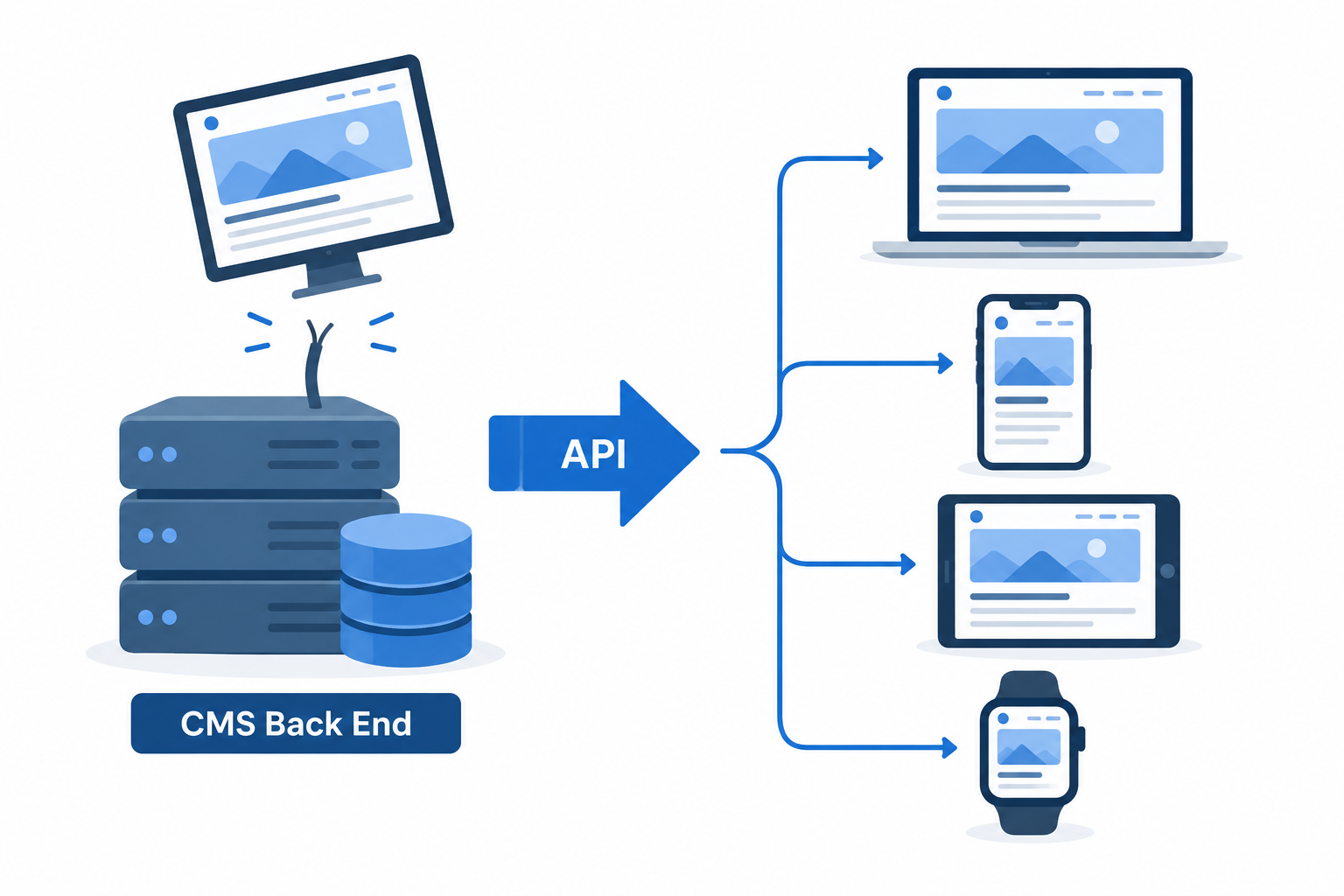
A headless CMS stores and manages your content, then sends it through an API to any website, app or screen you build, instead of rendering pages itself. This guide covers what headless means, how the architecture works, how it compares with traditional and decoupled systems, and which ten platforms are worth your shortlist.
Last updated: October 29, 2026
Headless CMS explained in one minute
A traditional content management system has two halves. The “body” is the back end, where you write, store and organise content. The “head” is the front end, the templates and theme that turn that content into the web pages visitors see.
A headless CMS removes the head. You keep the body: the editor, the database, the user roles and the publishing workflows. The system no longer decides what your pages look like. It exposes your content through an API, and developers build whatever front end they want on top.
That is the headless CMS definition in one line: a back-end-only content system that delivers structured content through an API to any front end.
The phrase “head CMS” turns up in searches, but nobody in the industry uses it. People say “traditional”, “coupled” or “monolithic” CMS for the version with a built-in front end. WordPress with a theme, Drupal with Twig templates and Joomla are the classic examples. If you want the fundamentals of that older model first, we have the traditional CMS explained in a separate guide.
What headless means in practice:
- Content is stored as data, not pages. A product description lives as fields (name, price, summary, images), not as a blob of HTML tied to one template.
- The API is the only way out. Your website, iOS app, smartwatch app and in-store kiosk all request the same content from the same endpoint.
- Developers choose the framework. Next.js, Nuxt, SvelteKit, Astro, Swift or Kotlin can all sit in front of a single content source.
- Editors work in a web dashboard and usually never touch the code.
Where headless came from
Early web CMS platforms were built for one job: publishing pages to a browser. Drupal launched in 2001, WordPress in 2003 and Joomla in 2005. Each bundled content storage and page rendering into a single application, because a desktop browser was the only screen that mattered.
The iPhone arrived in 2007, and the app stores followed. Suddenly publishers needed the same articles in a website, an iOS app, an Android app and partner feeds. Copying content between systems by hand did not scale.
NPR was one of the first organisations to describe a fix publicly. In 2009 its engineering team wrote about COPE, short for “Create Once, Publish Everywhere”. Editors entered content once into a central system, and APIs pushed it to the website, apps and partner platforms. That idea is the intellectual core of every headless CMS on the market today.
Commercial products followed. Contentful was founded in Berlin in 2013 as an API-first content platform with no front end at all. Drupal 8, released in 2015, shipped RESTful web services in core. WordPress added its REST API to core in version 4.7 in December 2016, which made “headless WordPress” a realistic option overnight.
Around the same time, Netlify’s founders popularised the term “Jamstack” for sites built from JavaScript, APIs and pre-rendered markup. Headless content sources were the “A” in that stack. In 2020 a group of vendors formed the MACH Alliance to promote Microservices, API-first, Cloud-native and Headless architecture, and headless became a standard line item in enterprise RFPs.
Headless CMS vs traditional CMS at a glance
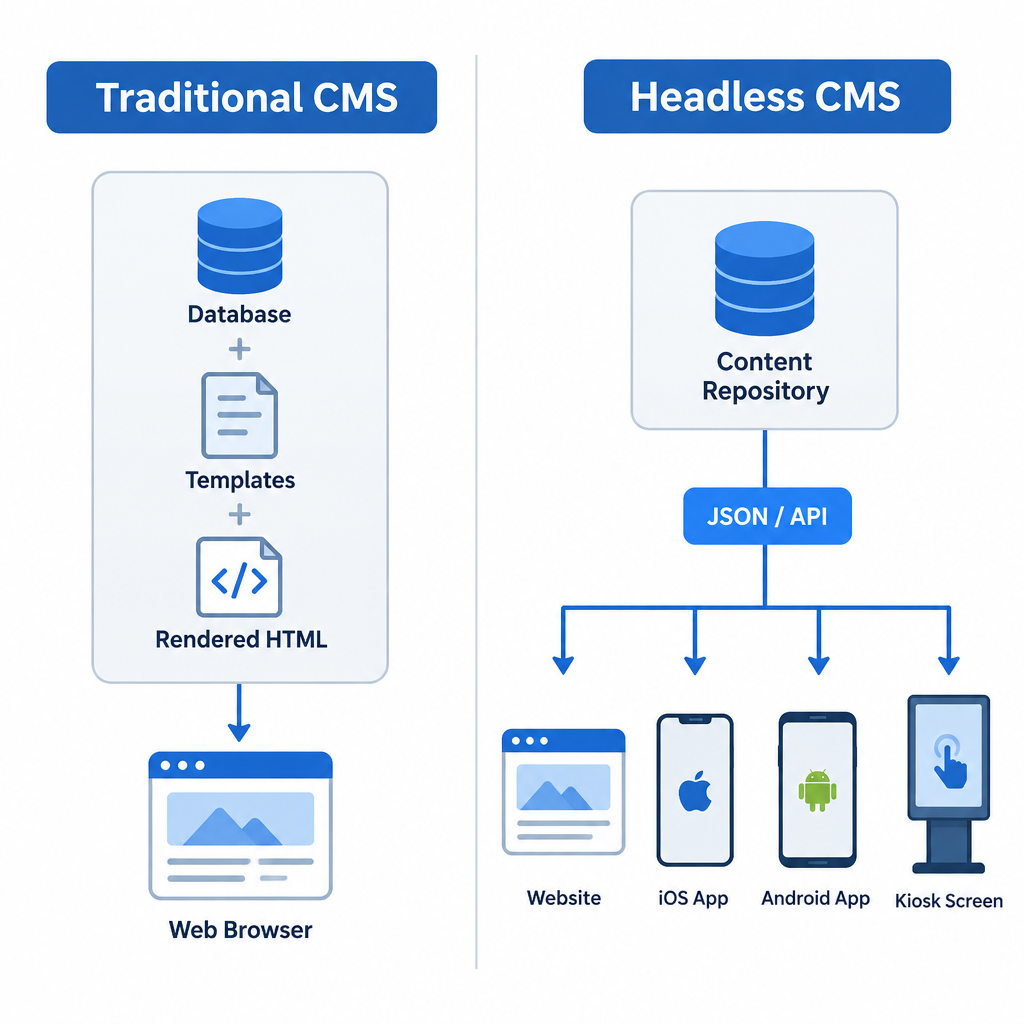
The difference between headless and a full CMS comes down to who owns presentation. Here is how the two models compare on the points that affect budgets and day-to-day work.
| Traditional (coupled) CMS | Headless CMS | |
|---|---|---|
| Front end | Built in (themes, templates) | None; you build it |
| Content delivery | Rendered HTML pages | JSON via REST or GraphQL API |
| Channels | Mainly one website | Websites, apps, kiosks, any device |
| Developer skills | PHP or platform templating | Any frontend framework |
| Editor preview | WYSIWYG by default | Needs preview setup (varies by vendor) |
| Plugins for SEO, forms, etc. | Huge plugin libraries | You build or integrate each feature |
| Hosting | One server or managed host | CMS (often SaaS) plus frontend host |
| Time to launch a simple site | Days | Weeks |
| Best fit | Blogs, brochure sites, small shops | Multi-channel brands, product teams, high-traffic sites |
Neither column is “better”. A coupled system gives you speed and a ready-made ecosystem. A headless system gives you control and reuse at the cost of building more yourself.
How a headless CMS actually works
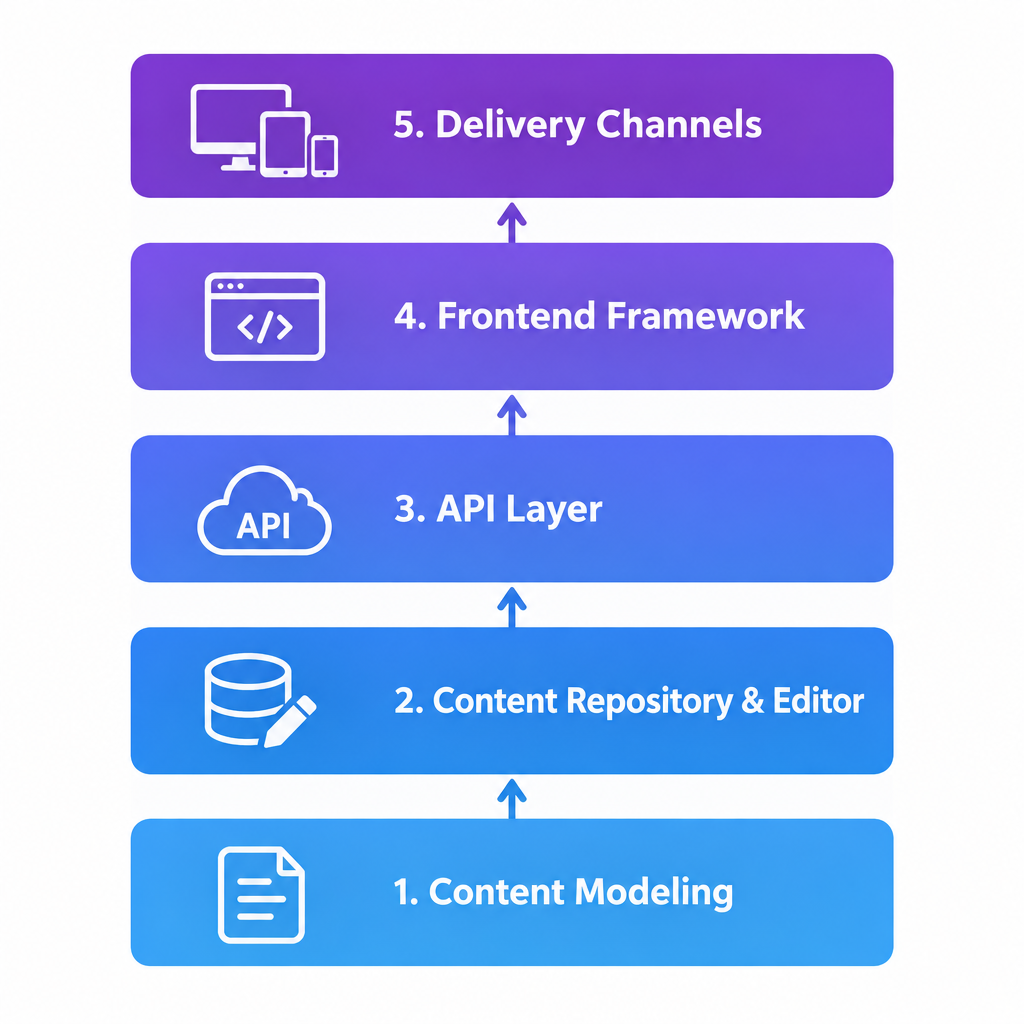
Under the hood, every headless setup has the same five layers. Understanding them makes vendor demos much easier to judge.
1. Content modeling
Before anyone writes a word, you define content types. A content type is a schema: a list of fields with rules. A “Blog Post” type might have a title (short text, required), a slug (unique), an author (reference to an Author entry), a hero image (media), a body (rich text) and SEO fields.
This step is where headless projects succeed or fail. Good models describe what content is, not where it appears. A “Testimonial” type with a quote, name and company can show up on the homepage, a product page and in your app. A field called “homepage right column text” can only ever live in one spot.
2. The content repository and editor
Editors log into a web dashboard, pick a content type and fill in the fields. The CMS stores entries in its database, tracks versions and enforces workflows: draft, in review, scheduled, published. Roles and permissions control who can edit or publish what.
In SaaS products like Contentful, Sanity or Storyblok, the vendor hosts all of this. In open-source tools like Strapi, Payload or Directus, you can run it on your own server with your own database.
3. The API layer
This is the part that replaces templates. When a front end needs content, it makes an HTTP request and gets structured JSON back. Most vendors split their APIs by job:
- Delivery API: read-only, cached on a CDN, returns published content. This is what your live site calls.
- Preview API: returns drafts so editors can see unpublished changes.
- Management API: creates and updates content programmatically, used for imports and automations.
Here is what a delivery request looks like against Contentful’s REST Content Delivery API:
curl "https://cdn.contentful.com/spaces/YOUR_SPACE_ID/environments/master/entries?content_type=blogPost&limit=10"
  -H "Authorization: Bearer YOUR_DELIVERY_TOKEN"
Many platforms also offer GraphQL, which lets the front end ask for exactly the fields it needs in one round trip:
query LatestPosts {
  blogPostCollection(limit: 5, order: publishDate_DESC) {
    items {
      title
      slug
      publishDate
      author {
        name
      }
    }
  }
}
Headless WordPress works the same way. Every WordPress site since 4.7 exposes a REST endpoint you can hit without installing anything:
curl "https://example.com/wp-json/wp/v2/posts?per_page=5&_fields=id,title,slug,date"
Sanity takes a different route with GROQ, its own query language, which is very good at joining referenced documents in a single query.
4. The front end (the head you build)
Your developers write a separate application that calls the API and turns JSON into pages. Popular choices in 2026 include Next.js, Nuxt, SvelteKit, Remix and the Astro framework, which ships very little JavaScript by default and suits content-heavy marketing sites.
Mobile teams do the same thing in Swift or Kotlin. A smart TV app, a voice assistant skill or a digital sign can all pull from the same entries.
5. Delivery and rendering
Your front end decides when to fetch content. There are three common patterns:
| Rendering pattern | When content is fetched | Good for | Trade-off |
|---|---|---|---|
| Static site generation (SSG) | At build time | Blogs, docs, marketing sites | Rebuild needed for updates |
| Server-side rendering (SSR) | On every request | Personalised or fast-changing pages | More server cost, slower than static |
| Incremental or on-demand revalidation | At build, then refreshed per page | Large sites with frequent edits | More moving parts to configure |
The glue between layers is the webhook. When an editor hits publish, the CMS sends an HTTP POST to your hosting platform or app, which rebuilds or revalidates the affected pages. Set this up badly and editors will complain that “publish doesn’t work”, when really the cache never cleared.
Headless vs decoupled vs hybrid
These terms get used interchangeably, and they shouldn’t be.
A decoupled CMS separates the back end from the front end, but still ships a presentation layer you can use. Drupal is the textbook case: it can render pages with its own theme and also serve the same content through an API to an app.
A headless CMS has no presentation layer at all. There is nothing to fall back on. Contentful, Sanity and Hygraph are pure headless.
A hybrid headless CMS is a headless product that adds editor-friendly page building on top. Storyblok’s Visual Editor, Contentstack’s Visual Builder and Contentful Studio let marketers arrange components on a live preview, while developers still own the code.
| Traditional | Decoupled | Headless | Hybrid headless | |
|---|---|---|---|---|
| Built-in front end | Yes, required | Yes, optional | No | No, but visual editing |
| API delivery | Limited or add-on | Yes | Yes, primary | Yes, primary |
| Example | WordPress with a theme | Drupal | Sanity, Hygraph | Storyblok, Contentstack |
For most marketing teams, hybrid headless is where the market has settled. Pure headless with no visual preview frustrates editors fast.
What “headless” means outside the CMS
“Headless tech” is a broader idea: any software that runs without its own user interface and exposes its functions through an API instead. You will meet the word in a few other places.
- Headless commerce separates the store engine from the storefront. The Shopify ecommerce platform offers this through its Storefront API and its Hydrogen framework, so you can keep Shopify’s checkout and inventory while building a custom front end. If you are new to selling online, our guide to how ecommerce works covers the basics first.
- Headless browsers such as Chrome in headless mode run without a visible window, which is useful for automated testing and rendering.
- Headless WordPress means using WordPress purely as a back end, with a separate JavaScript front end.
In every case the meaning is the same: the engine stays, the built-in display goes.
Benefits worth paying for
Headless earns its cost in specific situations. These are the benefits that hold up in real projects.
Reuse across channels. You write a product spec once and it appears on the website, in the app and in a partner feed. Fix a typo once, and every channel updates. For brands publishing in several places, this saves real editorial time every week.
Frontend freedom. Developers pick the framework that suits the product, not the one the CMS dictates. You can rebuild the website in a new framework without migrating a single piece of content.
Performance. Statically generated pages served from a CDN are hard to beat on load time. There is no PHP rendering or database query on each visit.
A smaller attack surface. In a SaaS headless setup, the public site is often just static files. There is no admin login on your domain and no plugin stack for attackers to probe. Compare that with the steady stream of plugin CVEs on coupled platforms.
Scaling. Traffic spikes hit your CDN, not your content database. Vendors handle the content API’s scaling.
Cleaner team boundaries. Editors manage content, developers manage code, and neither breaks the other’s work. Content changes do not require a deploy, and code deploys do not touch content.
Structured content is ready for AI and search. Content stored as clean, typed fields is far easier to feed into search indexes, personalisation tools and AI assistants than HTML soup.
The drawbacks nobody puts on the pricing page
Vendor sites rarely spell these out. You should hear them before you sign anything.
You are building a website from scratch. A headless CMS gives you an API, not a site. Navigation, search, forms, sitemaps, redirects, image handling, cookie banners and 404 pages are all your developers’ job. On a coupled platform, plugins cover most of that in an afternoon.
You need a developer forever. Editors can’t add a new page layout or a new field to the front end without code. If your developer leaves, you inherit a custom application someone has to maintain.
Preview takes work. Editors expect to see what they’re publishing. In headless, preview is a feature your developers wire up between the CMS and the front end. Some vendors make it easy, others leave it mostly to you.
Two bills, sometimes three. You pay for the CMS, for frontend hosting (Vercel, Netlify, Cloudflare or your own servers), and often for a separate search or image service. Usage-based pricing on API calls, bandwidth or records can surprise you when traffic grows.
The plugin ecosystem shrinks. There is no one-click install for an events calendar, a membership system or an SEO checker. You integrate each function through its own API.
Content modeling is a skill. A poor model built in week one haunts the project for years. Restructuring content types after thousands of entries exist is slow and risky.
When you should not go headless
Headless is the wrong choice more often than its marketing suggests. Skip it in these cases:
- A small business site with under 20 pages and one channel. A coupled CMS or an AI website builder will get you live faster and cheaper, with no ongoing developer dependency.
- A blog run by one person. The WordPress platform or Ghost does this out of the box.
- A team with no developer budget. Headless without a developer is a database with no website.
- A simple online store. Standard Shopify themes handle most small shops well. Go headless commerce only when the theme system genuinely limits you.
- You need to launch next week. Content modeling, front-end build and preview setup take weeks, not days.
Go headless when you publish to more than one channel, when performance or security requirements are strict, when you have (or will hire) frontend developers, or when your front end changes far more often than your content.
How to choose a headless CMS: selection criteria
Score every shortlisted platform against these points. Weight them to your project rather than treating them equally.
- Hosting model. SaaS means no servers to patch but less control over data. Self-hosted open source means full control and full responsibility.
- Editor experience. Ask a real editor to build a page in a trial. Check visual editing, live preview, scheduling, localisation and how rich text behaves.
- API style. REST, GraphQL or a custom query language. Match it to what your developers know.
- Content modeling flexibility. Can you nest components, reference other entries, validate fields and change schemas without downtime?
- Pricing model. Per seat, per usage, flat tiers or enterprise quote. Model your costs at three times today’s traffic and team size.
- Localisation. Field-level vs entry-level translation, and how many locales each plan allows.
- Workflows and permissions. Approval steps, custom roles and audit logs matter more as teams grow.
- Ecosystem. Official SDKs, starter templates for your framework, and integrations with commerce, search and DAM tools.
- Data portability. Can you export all content and assets in a usable format if you leave?
- Compliance. Data residency options, SSO and certifications if you work in regulated industries.
The 10 best headless CMS platforms, ranked
This ranking reflects our editorial view of which platforms suit the widest range of projects, weighing flexibility, editor experience, developer experience and pricing model. Your weighting may move a platform up or down.
Quick-reference comparison
| # | Platform | Type | Open source | APIs | Best for |
|---|---|---|---|---|---|
| 1 | Sanity | SaaS backend, open-source Studio | Studio only (MIT) | GROQ, GraphQL | Flexible custom builds |
| 2 | Storyblok | SaaS | No | REST, GraphQL | Marketers who need visual editing |
| 3 | Strapi | Self-hosted or cloud | Yes (MIT community edition) | REST, GraphQL | Open-source, self-hosted projects |
| 4 | Contentful | SaaS | No | REST, GraphQL | Large enterprises |
| 5 | Payload | Self-hosted, TypeScript | Yes (MIT) | REST, GraphQL, Local API | Next.js developer teams |
| 6 | Hygraph | SaaS | No | GraphQL | GraphQL and content federation |
| 7 | Directus | Self-hosted or cloud | Source-available (BSL) | REST, GraphQL | Existing SQL databases |
| 8 | Prismic | SaaS | No | REST, GraphQL | Marketing sites built from slices |
| 9 | Contentstack | SaaS | No | REST, GraphQL | Enterprise digital experience |
| 10 | Headless WordPress | Self-hosted or managed | Yes (GPL) | REST, GraphQL via plugin | Teams already on WordPress |
1. Sanity (top pick)
Sanity is our top pick because it bends to almost any project without forcing you into an enterprise contract. Content lives in Sanity’s hosted Content Lake, while Sanity Studio, the editing interface, is an open-source React application you configure in code.
That code-first approach means developers define schemas in JavaScript or TypeScript and can customise the editor itself with custom inputs and previews. GROQ makes complex queries across references short and readable. Real-time collaboration lets several editors work on one document at once, and visual editing with live preview is available for popular frameworks.
Watch out for: editors need a developer to set up the Studio properly. Out of the box it is a toolkit, not a finished product.
2. Storyblok
Storyblok is the strongest choice when marketers want to build pages themselves. Its Visual Editor shows a live preview of the real site, and editors click components (“bloks”) to edit them in place. Developers define those components once, and marketing assembles landing pages without tickets.
The component model also makes content reuse natural. Storyblok supports localisation, workflows and both REST and GraphQL delivery, with SDKs for the major frameworks.
Watch out for: if you have no visual front end (a pure app backend, for example), the Visual Editor, its main selling point, matters less.
3. Strapi
Strapi is the most popular open-source headless CMS built on Node.js. You can self-host it for free and connect it to PostgreSQL, MySQL, MariaDB or SQLite, or pay for Strapi Cloud if you’d rather not run servers. Strapi 5, released in 2024, brought a reworked document system and draft and publish handling.
The admin panel includes a visual Content-Type Builder, so non-developers can sketch models during discovery. REST comes by default and GraphQL is available as an official plugin.
Watch out for: self-hosting means you own patching, backups and scaling. Some advanced features, such as SSO and audit logs, sit in paid plans.
4. Contentful
Contentful is the platform that defined the category and remains a default for large organisations. It offers mature APIs (Delivery, Preview, Management and GraphQL), environments for safe schema changes, strong localisation, and a big marketplace of apps and integrations. Contentful Studio adds visual page building for marketing teams.
Watch out for: costs climb steeply once you move beyond the free tier, and usage limits on content types, records and locales shape how you model content. Small teams often outgrow the free plan before they can justify the next tier.
5. Payload
Payload is a TypeScript-first, MIT-licensed headless CMS that installs directly into a Next.js application. Since version 3.0, the admin panel and your front end can run in the same project, which simplifies hosting for many builds. You define collections and fields in code, and get REST, GraphQL and a fast Local API that skips HTTP entirely.
It suits developer teams who want full ownership, version control for schemas and no vendor lock-in.
Watch out for: it is a developer tool first. Without engineers, there is nothing to configure.
6. Hygraph
Hygraph, previously called GraphCMS, is built around GraphQL from the ground up. Its standout feature is content federation: you can pull data from other APIs (a commerce platform, a PIM, a legacy database) into the same GraphQL schema, so your front end queries one endpoint for everything.
Watch out for: if your developers prefer REST, Hygraph’s GraphQL-only approach adds a learning curve.
7. Directus
Directus takes the opposite approach to most headless CMSs. Instead of bringing its own database, it wraps an existing SQL database (PostgreSQL, MySQL, SQLite, Microsoft SQL Server and others) and instantly gives it an admin app plus REST and GraphQL APIs. Your data stays in plain tables you can query directly.
That makes it excellent for internal tools, data-heavy projects and teams modernising a legacy database without migrating it.
Watch out for: Directus uses the Business Source License. Smaller organisations can self-host for free, but larger companies need a commercial licence, so check the current terms against your revenue.
8. Prismic
Prismic is built around “Slices”, reusable page sections that developers create with its Slice Machine tool and editors stack into pages. It works especially well with Next.js, Nuxt and SvelteKit and keeps marketing landing pages consistent with the design system.
Watch out for: it shines for page-based marketing sites. Highly relational content (a large product catalogue, for example) fits less naturally.
9. Contentstack
Contentstack targets enterprise teams with strict governance needs. It offers granular workflows, roles, multiple environments, Live Preview and a Visual Builder, plus Automate for connecting content events to other systems. It is a founding member of the MACH Alliance.
Watch out for: pricing is sales-led and sized for enterprise budgets. Small and mid-sized projects will find more value elsewhere.
10. Headless WordPress
You don’t have to leave WordPress to go headless. Every WordPress install exposes the REST API at /wp-json/, and the free WPGraphQL plugin adds a GraphQL endpoint. Front-end frameworks such as WP Engine’s Faust.js are designed specifically for this setup.
The big advantage is familiarity: editors keep the block editor they already know. It’s a sensible step for teams with years of WordPress content.
Watch out for: many WordPress plugins assume a theme renders the page. SEO plugins, form builders and page builders often need extra work or simply don’t output anything to your headless front end.
Honourable mentions
Decap CMS (formerly Netlify CMS) and TinaCMS are git-based headless CMSs. They store content as Markdown or JSON files in your repository, which suits documentation sites and developer blogs. Ghost has a solid Content API and works well as a headless publishing back end for newsletter-driven sites.
Pricing models compared
Headless CMS pricing changes often, and vendors have reshuffled their tiers several times in the last two years. Rather than quote figures that may already be out of date, this table shows how each platform charges. Confirm current numbers on the vendor’s pricing page before you budget.
| Platform | Free option | How paid plans scale |
|---|---|---|
| Sanity | Free plan | Per seat plus usage allowances; enterprise quote |
| Storyblok | Free Starter plan | Flat monthly tiers; enterprise quote |
| Strapi | Free to self-host | Strapi Cloud tiers; paid enterprise licence |
| Contentful | Free plan | Fixed tiers with usage limits; enterprise quote |
| Payload | Free to self-host (MIT) | You pay for your own hosting; enterprise support available |
| Hygraph | Free plan | Tiered by usage and features; enterprise quote |
| Directus | Free self-hosting for smaller organisations | Directus Cloud plans; commercial licence above BSL threshold |
| Prismic | Free plan | Tiers by users and locales |
| Contentstack | Sales-led | Enterprise contracts |
| Headless WordPress | Free software (GPL) | You pay for hosting and any premium plugins |
Builder tip
Before signing, model your bill at three times today’s API calls, seats and locales. Usage-based limits, not the headline price, decide what headless really costs you.
Best practices for setting up a headless CMS
These habits separate smooth headless projects from painful ones.
Model content before you design pages. Run a content audit, list every content type, and map how they relate. Build the model around meaning (“Event”, “Speaker”, “Venue”), never around layout positions.
Keep presentation out of content fields. No font colours or column widths in the CMS. Give editors controlled choices (a “variant” dropdown with “light” or “dark”) that the front end translates into styles.
Use references, not copies. Link an Author entry to posts rather than typing the author’s name each time. One update then flows everywhere.
Set up preview on day one. Editors judge the whole project by whether they can see their changes. Don’t leave preview for the end.
Use environments or branches for schema changes. Test model changes in a staging environment, then promote them. Changing a live schema can break the front end instantly.
Lock down API tokens. Use read-only delivery tokens in front-end code. Keep management tokens on the server, rotate them, and never commit them to a public repository.
Cache aggressively, invalidate precisely. Serve from a CDN and use webhooks to revalidate only the pages affected by a change.
Document the model. Add help text to every field. Editors who join in two years need to know what “summary” is for and how long it should be.
Security note
Leaked management API tokens give attackers write access to all your content. Store them only in server-side environment variables and rotate them immediately if one is exposed.
How to migrate to a headless CMS
Moving from a coupled CMS to headless is a rebuild, not a plugin swap. Treat it as a project with its own plan and budget.
Migration steps
- Take a full backup of your current site: files, database and media.
- Audit existing content and decide what to keep, merge or retire.
- Design the new content model in the headless CMS.
- Export old content to JSON or CSV and map fields to the new model.
- Write import scripts using the Management API, then test on a sample.
- Build the new front end and wire up preview and webhooks.
- Map every old URL to its new URL as 301 redirects.
- Run the full import, then QA content, links, images and metadata.
- Lower DNS TTLs, switch DNS, and monitor traffic and crawl errors.
A few notes from the migration side:
- Rich text is the hardest part. HTML from WordPress or Drupal often contains shortcodes, inline styles and embeds. Most headless platforms store rich text as structured JSON, so you need conversion scripts and manual cleanup for edge cases.
- Media needs its own pass. Upload assets through the API, then rewrite references in content. Keep alt text.
- Freeze content edits during the final import, or plan a delta import for changes made in the meantime.
- Cutover happens in the domain name system. Lower your DNS record TTLs a day or two before launch so the switch propagates quickly, and keep the old site available for rollback.
- Migrate in phases if you can. Many teams move the blog or one product line first, proxying the rest of the site to the old platform until everything is rebuilt.
Back up before every import run, not only at the start. An import script with a mapping bug can overwrite hundreds of entries in seconds.
SEO in a headless build
Headless sites can rank perfectly well, but nothing happens automatically. On a coupled CMS, an SEO plugin handles titles, sitemaps and canonicals. In headless, your developers build each piece.
What to include in your content model and front end:
- SEO fields on every page-level type: meta title, meta description, canonical URL, noindex toggle and social image.
- Server-rendered or static HTML. Pages that only render content in the browser through client-side JavaScript are slower to index. Use SSG or SSR.
- An XML sitemap generated from the CMS at build time or on request.
- A redirect manager. Model redirects as a content type so editors can add them without a deploy.
- Structured data. Generate JSON-LD (Article, Product, FAQ, Breadcrumb) from your typed fields. Structured content makes this cleaner than on most coupled sites.
- Image optimisation. Use the CMS image API or your framework’s image component for responsive sizes and modern formats.
Get these right and a headless site often outperforms its predecessor, mainly because static pages load so fast.
FAQ
What is headless in CMS?
Headless means the CMS has no built-in front end. It stores and manages content, then delivers it as data through an API. Developers build the website or app that displays it, using whatever framework they choose. “Headless” refers to removing the “head” (the presentation layer) while keeping the “body” (the content back end).
What does headless CMS mean in simple terms?
A headless CMS is a content database with an editing dashboard and an API. Editors write content once, and that content can appear on a website, a mobile app, a smart display or any other channel that asks for it.
What are some headless CMS?
Widely used options include Sanity, Storyblok, Strapi, Contentful, Payload, Hygraph, Directus, Prismic and Contentstack. WordPress and Drupal can also run headless through their APIs. Git-based tools such as Decap CMS and TinaCMS suit developer-led sites that keep content in a repository.
What is the difference between headless and full CMS?
A full (traditional) CMS manages content and renders the web pages itself through themes and templates. A headless CMS only manages content and sends it through an API, so you build the front end separately. Full CMSs are faster to launch and come with plugin ecosystems. Headless CMSs offer more flexibility, multi-channel reuse and performance, but need ongoing developer work.
What are the top 10 headless CMSs?
Our ranking for 2026: 1. Sanity, 2. Storyblok, 3. Strapi, 4. Contentful, 5. Payload, 6. Hygraph, 7. Directus, 8. Prismic, 9. Contentstack, 10. Headless WordPress. Sanity is our top pick for flexibility across project sizes. Storyblok is the best choice for marketer-led visual editing, and Strapi or Payload suit teams that want open source and self-hosting.
Is a headless CMS good for small websites?
Usually not. For a small single-channel site, the extra development, hosting and maintenance outweigh the benefits. A traditional CMS or a website builder gets you online faster and costs less to run. Headless pays off when you publish to several channels or have demanding performance and security requirements.
Do I need to know how to code to use a headless CMS?
Editors don’t. Once the system is set up, writing and publishing content happens in a web dashboard. Someone does need to code the front end, set up content models, configure preview and maintain the integration over time.