
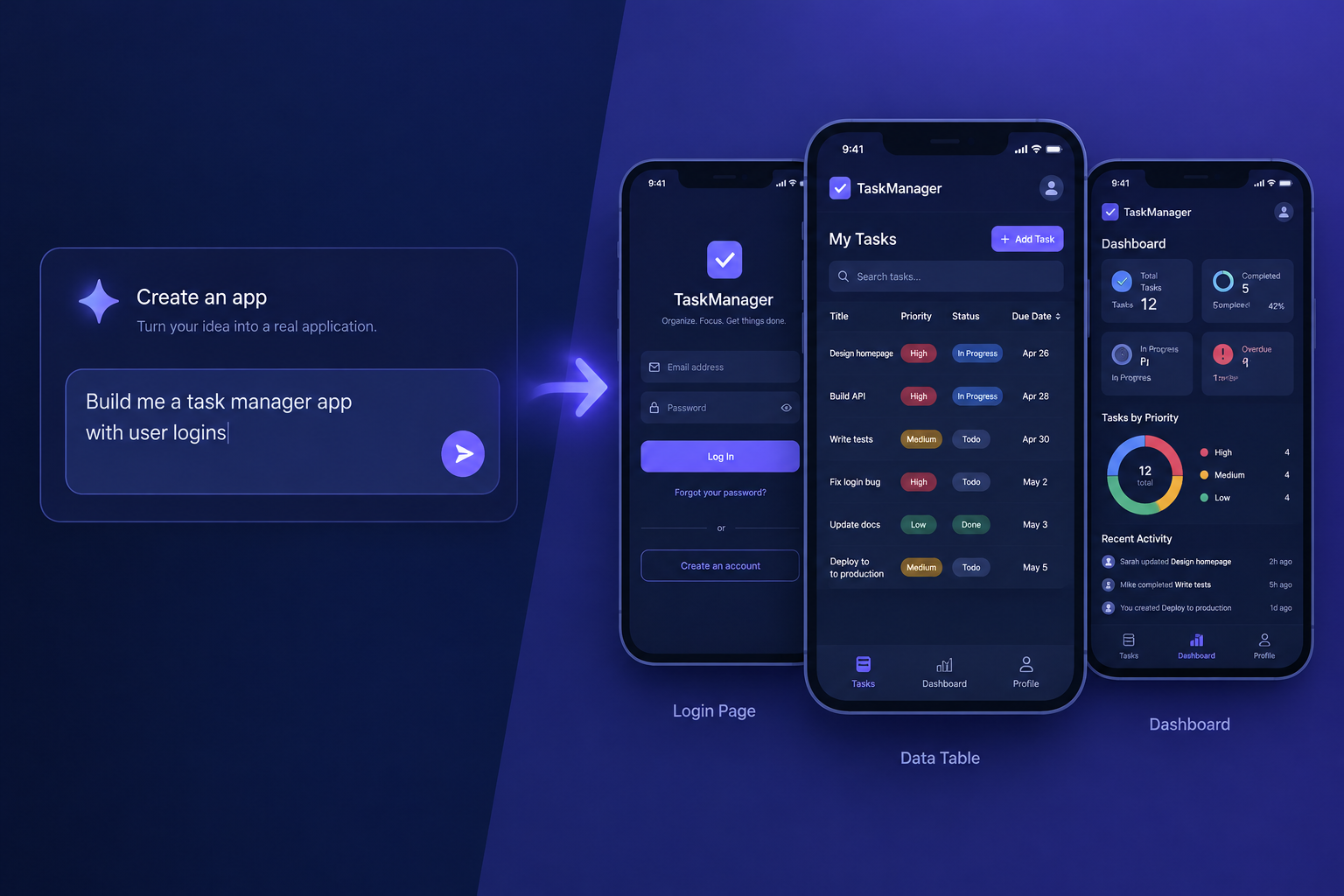
An AI powered app builder turns a written prompt into working software: screens, a database, user logins and the logic connecting them. A website builder publishes pages for people to read. This guide explains where the two overlap, which tools fit which job, and how to build your first app with AI without losing control of your data.
Last updated: October 29, 2026
What an AI powered app builder actually does
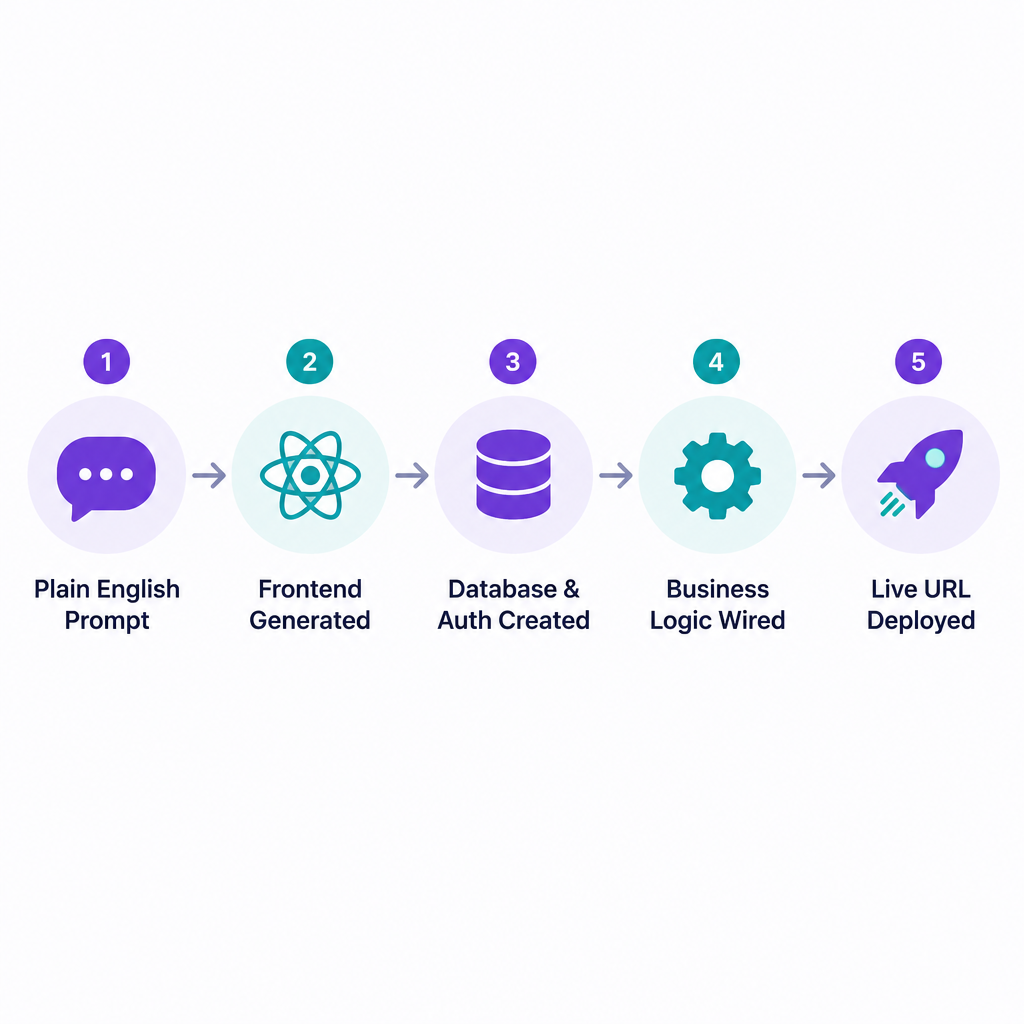
You describe what you want in plain English. The builder reads the prompt, plans the app, and then generates it. Within a few minutes you have a clickable interface, tables to store records, and usually a sign-in screen.
The useful part comes after the first draft. You keep chatting with the tool to change it: “add a status column,” “only managers can delete records,” “send an email when a job is marked done.” Each prompt edits the underlying code or configuration for you.
Under the hood, most tools in this category do some combination of these jobs automatically:
- Generate the frontend. This is usually React with Tailwind CSS, or Flutter for native mobile.
- Create the data model. That means tables, fields and relationships, often in Supabase or a built-in Postgres database.
- Wire up authentication. Email and password, magic links, or Google sign-in.
- Write business logic. Calculations, permissions, form validation and API calls.
- Deploy it. Most tools give you a live URL with hosting included.
The category splits into two camps. Prompt-to-code tools like Lovable, Bolt.new, Replit and v0 write real source code you can read and export. Visual no-code platforms like Bubble, Glide and Softr have added AI generation on top of their own engines, so the app lives inside their runtime.
App builder vs website builder: the 7 differences
A website builder is designed around pages. You pick a template, edit text and images, and publish. Visitors read the content, maybe fill in a form, and leave. If that is what you need, our guide to the best website builders for every kind of site covers the strongest options.
An app builder is designed around data and users. People sign in, create records, change them, and see things other users cannot. That one shift changes almost everything about how the tool works.
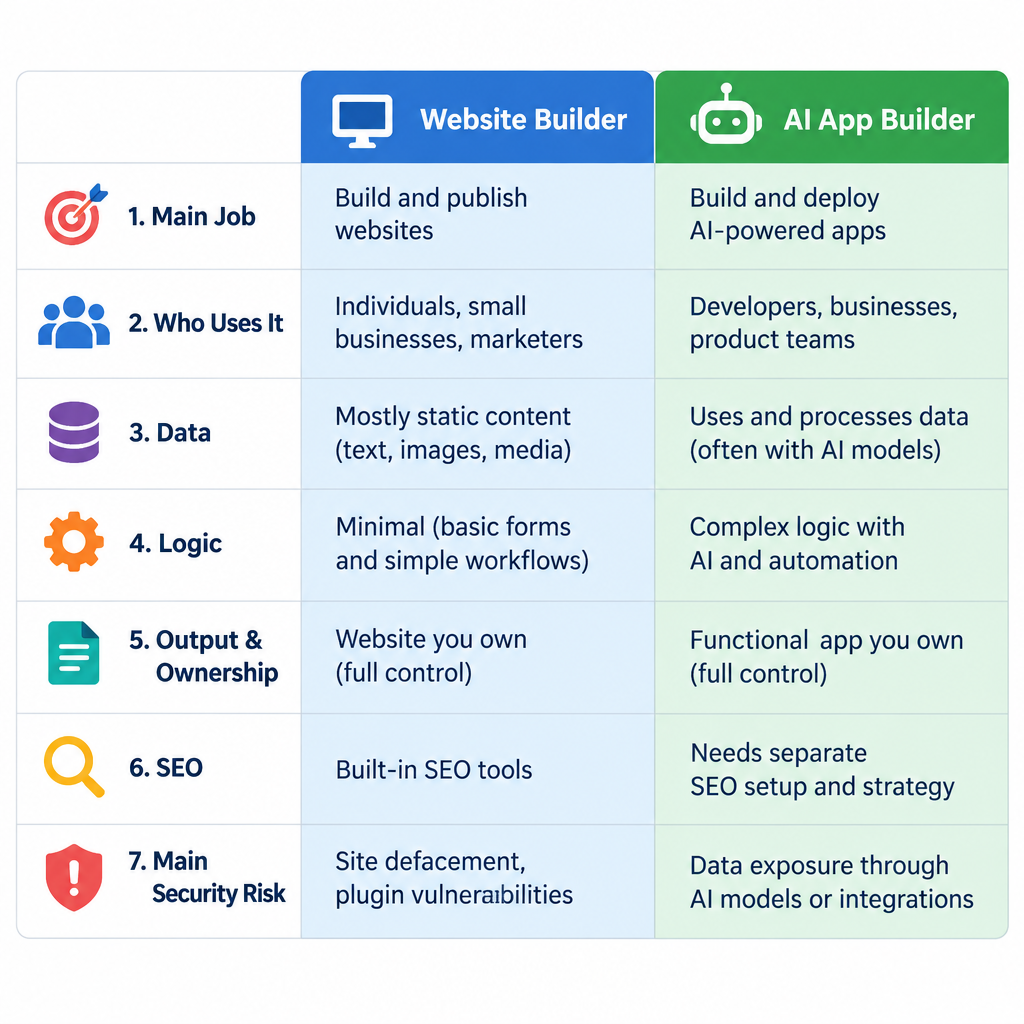
| Difference | Website builder | AI powered app builder |
|---|---|---|
| 1. Main job | Publish pages people read | Run software people use to get tasks done |
| 2. Who uses it | Mostly anonymous visitors | Signed-in users with roles and permissions |
| 3. Data | Content you edit: posts, pages, products | Records your users create and update |
| 4. Logic | Forms, simple automations, checkout | Workflows, calculations, rules, API calls |
| 5. Output and ownership | Hosted on the platform, rarely exportable | Often exportable code, or a hosted no-code runtime |
| 6. SEO | Core feature: metadata, sitemaps, fast pages | Secondary; many apps sit behind a login |
| 7. Main security risk | Outdated plugins, weak admin passwords | Leaked user data from bad permissions |
Why these differences matter in practice
The third and seventh rows cause the most trouble. On a website, the data is yours and it is meant to be public. In an app, the data belongs to your users and must stay private between them. A website builder hides this problem because there is barely any user data to protect. An app builder hands you the problem along with the app.
SEO is the other big gap. Many prompt-to-code tools generate single-page React apps that render in the browser. That is fine for a dashboard behind a login. It is weak for a marketing page that needs to rank on Google. If search traffic matters, keep your public pages on a website builder or a static framework and run the app on a subdomain.
Builder tip
Split the job: put your marketing site on a site builder and the app at app.yourdomain.com. Each tool does what it is good at.
Where the line blurs: AI website and app builders
Searches for an “AI website and app builder” or “AI app and website builder” reflect a real trend. The platforms are converging.
Wix acquired Base44, a prompt-to-app startup, in mid-2025. That put a full app generator under the same roof as one of the biggest website builders. Hostinger runs a regular AI website builder and a separate product, Horizons, aimed at prompt-built web apps. Lovable and Bolt, meanwhile, are often used to build plain landing pages because the output looks polished and ships fast.
So can one AI website app builder do both jobs? Sometimes. The honest answer depends on which side the tool started from:
- Website-first tools with AI (Wix, Squarespace, Framer, WordPress.com) are excellent at pages and SEO. They can fake app features through membership areas, forms and plugins, but custom data logic gets awkward fast.
- App-first tools (Lovable, Bolt, Replit, Bubble) handle data, roles and logic well. Their landing pages look good, but SEO controls, blogging and content editing for non-technical staff are usually weaker.
If you are curious how the page-focused side works, our explainer on what an AI website builder is and how it builds a site walks through the process from prompt to published pages.
The main types of AI app builders
Not every tool marketed as an AI app builder website does the same thing. Before you sign up for anything, sort the options into four groups.
Prompt-to-code builders
You chat, the tool writes code, and you see a live preview. Lovable, Bolt.new, v0 and Replit Agent sit here. You get real source code, typically React and TypeScript, that a developer can take over later. These tools are the fastest way to go from idea to working prototype, and the best of them can carry a small production app.
Visual no-code platforms with AI
Bubble and FlutterFlow started as drag-and-drop builders and added AI generation. The AI gives you a starting point, then you refine visually. You trade some speed for more predictable editing, since you can click on an element and change it directly instead of hoping a prompt lands right.
Internal tool and data app builders
Glide and Softr build apps on top of data you already have, such as Google Sheets, Airtable or their own tables. They shine for business software: inventory trackers, client portals, field service apps. The AI helps you generate screens and workflows from your existing spreadsheet.
Native mobile builders
If you need an app in the Apple App Store and Google Play, your choices narrow. FlutterFlow produces native Flutter apps. Adalo publishes native apps. Bolt and Replit can generate React Native apps through Expo. Most other tools produce web apps, which can be installed as progressive web apps (PWAs) but are not true native apps.
AI app builders compared
The table below compares what each tool builds and what you walk away with. We have left prices out on purpose: these vendors change plans and credit allowances often, sometimes several times a year, and a stale number is worse than none. Check each pricing page on the day you sign up.
| Tool | Type | What it generates | Native mobile | Export your code | Hosting included |
|---|---|---|---|---|---|
| Lovable | Prompt-to-code | React, Tailwind, Supabase backend | No (web/PWA) | Yes, GitHub sync | Yes |
| Bolt.new | Prompt-to-code | JavaScript frameworks; Expo for mobile | Via Expo | Yes, download or GitHub | Yes |
| Replit Agent | Prompt-to-code IDE | Full-stack apps with built-in database | Via Expo | Yes, full workspace | Yes |
| v0 by Vercel | Prompt-to-code | React and Next.js with shadcn/ui | No | Yes | Yes, on Vercel |
| Bubble | Visual no-code with AI | Apps on Bubble’s own runtime | Yes, newer feature | No | Yes, required |
| FlutterFlow | Visual low-code with AI | Flutter (Dart) apps | Yes | Yes, paid plans | Web hosting; stores via your accounts |
| Glide | Data app builder | Web apps from sheets and tables | No (PWA) | No | Yes |
| Softr | Data app builder | Portals and internal tools | No (PWA) | No | Yes |
Which one suits you
- Lovable suits founders and designers who want a polished web app quickly, with a real database behind it. Its Supabase integration makes auth and storage straightforward.
- Bolt.new suits people who want to try different frameworks or start a mobile app through Expo, all inside the browser with no local setup.
- Replit suits anyone who wants zero setup plus full control. It is a complete development environment, so you can drop into the code when the agent gets stuck.
- v0 suits teams already on Next.js and Vercel. It is strongest at interface generation.
- Bubble suits non-developers building a long-term product who prefer visual editing to reading code.
- FlutterFlow suits projects where native iOS and Android apps are the goal from day one.
- Glide and Softr suit operations teams turning spreadsheets into internal apps for staff or clients.
How pricing usually works
Nearly every tool uses a credit or message model. Each prompt, or each chunk of AI work, consumes credits. Free plans give you a small daily or monthly allowance. Paid plans raise the cap and unlock features like custom domains, private projects and code export.
The catch: debugging eats credits fast. A single stubborn bug can burn through a day’s allowance as the AI tries fix after fix. Budget for this, and learn to write precise prompts (more on that below).
Website builders with AI features
For comparison, here is how the main website platforms use AI. They are the right choice when pages, content and search traffic are the point.
| Platform | AI feature | Strongest output | Can it handle app-style data? |
|---|---|---|---|
| Wix | AI site generation; Base44 for apps | Business sites, booking, stores | Partly: members area, Velo code, or Base44 |
| Squarespace | Blueprint AI site setup | Design-led sites, portfolios | Limited: gated member content |
| Framer | AI page and layout generation | Marketing and startup sites | Limited: CMS collections, no user data |
| Hostinger | AI Website Builder; Horizons | Small business sites; web apps via Horizons | Yes, through Horizons |
| WordPress.com | AI site builder | Blogs, content sites, stores | Through plugins for memberships and forms |
The self-hosted WordPress platform deserves a special mention. With plugins it can run memberships, directories, learning platforms and full stores. It is not prompt-built, but it is mature, portable and well understood by thousands of developers. For a content-heavy project with some app features, it often beats an AI builder on long-term cost and flexibility.
What you need before you start
Gather these before you write your first prompt. Ten minutes of preparation saves hours of rework and a lot of credits.
- A one-paragraph description of the app. Who uses it, what they do, and what success looks like.
- A list of user roles. For example: admin, staff, customer.
- A rough data model. The main “things” your app tracks and how they relate. Jobs belong to customers. Invoices belong to jobs.
- Three to five core screens. Sketch them on paper if that helps.
- Accounts for the services you will connect. Common ones are Supabase, Stripe, a transactional email service, and a GitHub account for backups.
- A domain name, if you plan to launch publicly. If you do not have one yet, our step-by-step guide on how to register a domain name for your website covers it.
- Sample data. A small spreadsheet of realistic records makes testing far more honest than placeholder text.
How to create an app with AI: step by step
This walkthrough works for prompt-to-code tools like Lovable, Bolt and Replit. The same thinking applies to visual builders, with clicks replacing some prompts.
Setup steps
- Write a short spec covering users, data and screens.
- Start from a template or a blank project.
- Send one focused first prompt to build the core layout.
- Connect a database and add authentication.
- Build one feature at a time and test after each.
- Lock down permissions and secrets.
- Connect integrations such as payments and email.
- Back up to GitHub, then deploy and add your domain.
Step 1: Write a short spec
Paste your spec into a document first. Keep it to one page. The AI performs best when it understands the whole app before building any part of it.
Step 2: Start from a template or blank project
Many tools offer starter templates: CRMs, booking apps, dashboards, marketplaces. A template gets you started in minutes and shows how the tool likes to structure things. Pick one close to your idea, then customise. If nothing fits, a blank project with a strong first prompt works just as well.
Step 3: Send a focused first prompt
Your first prompt sets the foundation. Describe the app, the users and the main screens, and ask for the layout before any complex logic. Here is an example that works well:
Build a web app for a small cleaning company to manage jobs.

Users:
- Admin: sees all jobs, assigns cleaners, manages customers.
- Cleaner: sees only jobs assigned to them, marks jobs complete.

Data:
- Customers (name, address, phone, notes)
- Jobs (customer, date, time, assigned cleaner, status: scheduled/in progress/done, price)

Screens:
1. Login
2. Admin dashboard: this week's jobs in a calendar view
3. Job detail page
4. Customer list with search
5. Cleaner view: today's jobs as a simple mobile-friendly list

Start with the layout and navigation only, using placeholder data.
Use a clean, minimal design with a blue accent colour.
Notice the last two lines. Asking for layout first keeps the AI from building a tangled backend before you have seen the screens.
Step 4: Connect a database and add authentication
Once the layout looks right, ask the tool to connect a real database. In Lovable that usually means the Supabase integration. Replit and Bolt have their own built-in database options. Then add sign-in and assign roles.
Test this immediately. Create two accounts with different roles and confirm each sees only what it should.
Step 5: Build one feature at a time
Resist the urge to send a giant prompt listing ten features. Add one, test it, then move on. Good follow-up prompts are specific:
On the job detail page, add a "Mark complete" button visible only to the assigned cleaner.
When clicked, set status to "done" and record the completion time.
Do not change any other pages.
That final line matters. AI builders sometimes “improve” unrelated parts of your app while fixing something else. Telling it what to leave alone cuts down on regressions.
Step 6: Lock down permissions and secrets
This step separates a demo from real software. See the security section below for the specific checks, including a code example.
Step 7: Connect integrations
Add payments, email and any outside data last, once the core works. Integrations add moving parts, and debugging them on top of a shaky foundation is miserable.
Step 8: Back up, deploy and add your domain
Connect the project to GitHub so every change is saved outside the builder. Always back up before major changes or migrations, since an AI edit can break things in ways that are hard to reverse. Then hit deploy, point your custom domain at the app, and test the live version on a phone and a desktop.
If you have a public marketing page attached, submit it to Google Search Console and set up Bing Webmaster Tools so both search engines discover it quickly.
Expected result
If you follow the steps above, a simple business app like the cleaning example typically reaches a usable state in an afternoon or two. You should end up with:
- A live URL that works on desktop and mobile browsers.
- Real user accounts with at least two roles that see different data.
- A database holding your records, not placeholder text.
- A GitHub repository with your full code history, if your tool supports it.
- A clear list of what still needs work, since the first version is never the last.
What you will not have is a finished, hardened product. Treat the first build as a strong prototype. It becomes production software once you have tested permissions, handled edge cases and watched real users try it.
A secure app development approach
Security is where AI app builders most often let people down. The tools generate code that works, but working and safe are different standards.
Two incidents from 2025 show the risk clearly. A security researcher reported that a large number of apps built with Lovable had Supabase tables without proper row level security, which left user data readable by anyone who knew where to look. Separately, SaaStr founder Jason Lemkin publicly described Replit’s agent deleting a production database during a code freeze. Replit’s CEO responded by adding safeguards, including separation between development and production databases.
Neither story means these tools are unusable. They mean you must check the AI’s work.
Security note
Many AI-built apps ship without database permissions that keep users apart. Turn on row level security for every table and test with two separate accounts.
Turn on row level security
If your app uses Supabase, every table holding user data needs row level security (RLS) enabled, plus policies that define who can read and write each row. Here is a basic example for a notes table where users should only see their own notes:
alter table public.notes enable row level security;

create policy "Users can read their own notes"
on public.notes for select
using (auth.uid() = user_id);

create policy "Users can insert their own notes"
on public.notes for insert
with check (auth.uid() = user_id);

create policy "Users can update their own notes"
on public.notes for update
using (auth.uid() = user_id);
You can ask the AI to write these policies, but read them yourself. Then log in as two different users and try to view each other’s data. If you can, it is broken.
Keep secret keys out of the frontend
Supabase gives you an anon (public) key and a service role key. The anon key is designed to be visible in the browser, which is exactly why RLS matters. The service role key bypasses all security and must never appear in frontend code. The same rule applies to Stripe secret keys and OpenAI API keys.
Store secrets in your tool’s environment variables or secrets manager. Then search your exported code for strings like sk_ and service_role to confirm nothing leaked.
Separate development from production
Never let the AI experiment directly on your live database. Use a separate development environment where possible, and take a database backup before any major change.
Integrations that make your app useful from day one
An app that stores data but cannot take payments, send emails or connect to other services rarely survives contact with real users. These integrations come up again and again:
- Supabase for the database, authentication and file storage. It is the default backend for Lovable and a common choice elsewhere.
- Stripe for payments and subscriptions. Most prompt-to-code tools can generate a Stripe checkout flow, though webhooks need careful testing.
- Transactional email such as Resend or SendGrid for password resets, confirmations and notifications.
- Google Sheets and Airtable as data sources, especially for Glide and Softr apps.
- OpenAI or Anthropic APIs to add AI features inside your app, like summarising notes or drafting replies.
- Google Maps for location features, delivery zones and route display.
- Zapier or Make to connect your app to hundreds of other services without custom code.
If your app sells products, think carefully before building checkout from scratch. Understanding how ecommerce works, including tax, shipping, refunds and inventory, shows why a dedicated platform like Shopify or WooCommerce is often safer for the store itself.
How to build an app with AI for free
You can get surprisingly far without paying. Most AI app builders offer a free tier with a limited number of daily or monthly credits. Here is how to stretch them.
- Plan outside the tool. Write your spec and prompts in a document first. Every vague prompt you send wastes credits.
- Use a general chatbot for planning. Draft your data model and screen list in a free chat assistant, then paste the result into the builder.
- Combine related small changes into one prompt. Ask for three copy edits together, not three separate requests. Keep logic changes separate, though.
- Edit simple things by hand. Many tools let you change text and colours directly in a visual editor or code view, without spending credits.
- Stop debugging loops early. If the AI fails to fix the same bug twice, stop. Revert to the last working version and describe the problem differently.
- Use free backend tiers. Supabase has a free plan suitable for prototypes and small apps.
The limits of free plans usually show up as public-only projects, no custom domain, a branded badge, or a daily credit cap. For learning and prototyping, that is plenty. For a live business app, expect to pay for at least one plan.
Common mistakes and troubleshooting
These are the problems that come up most often when people build with AI, along with what to do about each.
The AI keeps breaking things it already fixed
This is the most common complaint. As a project grows, the AI loses track of earlier decisions. To fix it, keep prompts narrow, tell the AI what not to touch, and use the version history to roll back. Some tools let you save project-level instructions, such as “always use the existing Button component.” Use that feature.
Stuck in an error loop
The AI tries a fix, it fails, it tries another, and your credits drain. Break the loop by copying the exact error message from the browser console and pasting it into your prompt. Specific errors get specific fixes. If that fails, revert and approach the feature differently.
The app works in preview but not when deployed
This is usually caused by missing environment variables. Secrets set in the preview are not always copied to the live deployment. Check that every API key and database URL exists in the production settings.
Users can see each other’s data
This is a permissions failure, and it is serious. Go back to the security section, enable RLS or the equivalent in your tool, and test with separate accounts before any real user signs in.
The design looks generic
AI builders default to similar layouts. Give the tool a reference: describe a brand colour, font style and the feel you want, or upload a screenshot of a design you like. Many tools accept images as input.
Building too much before testing
People often add a dozen features before showing the app to anyone. Get it in front of one real user after the core feature works. Their confusion will tell you more than any prompt.
Ignoring code ownership
If your app becomes important to your business, you need a way out. Choose a tool that exports code or syncs to GitHub, or accept that you are tied to the platform for good.
Migration notes: moving off an AI builder
Plenty of apps start in an AI builder and later move to a traditional setup with a developer. How easy that is depends on the tool you picked.
- Prompt-to-code tools (Lovable, Bolt, Replit, v0) give you standard code. A developer can clone the GitHub repository, run it locally, and host it on Vercel, Netlify or any Node-capable host. Expect some cleanup, since AI-generated code can be repetitive.
- FlutterFlow exports Flutter code on paid plans, which a mobile developer can continue in a standard IDE.
- Bubble, Glide and Softr do not export app code. Migration means rebuilding. You can export your data, usually as CSV, but the screens and logic stay behind.
Before any migration, back up everything: the code repository, a full database export, uploaded files and your environment variables. Test the new setup on a staging URL before you switch your domain.
Public marketing pages are often worth moving to something purpose-built. A static site using the Astro framework, for instance, loads fast and ranks well, which suits the pages that bring people to your app.
AI app ideas you can start building today
You do not need a startup idea to get value from an AI powered app builder. The best first projects solve a small, real problem you already have.
- Client portal. Clients log in to see project status, files and invoices.
- Job or task tracker. Staff see assigned work and mark it done from their phones.
- Booking tool. Customers pick a slot, and you get notified.
- Inventory tracker. Log stock in and out, with low-stock alerts.
- Internal knowledge base. Searchable answers to the questions your team keeps asking.
- Lead tracker. A lightweight CRM shaped to your sales process.
- Event check-in app. Scan or search attendees at the door.
- Habit or fitness log. A personal project that teaches you the tools with low stakes.
- Quote calculator. Customers enter details and get an instant estimate.
- AI-powered helper. Summarise meeting notes, draft emails or sort support requests using an AI API.
Each of these fits in a single page of spec. That is the right size for a first build.
Learn to write better prompts
Getting better results from AI builders comes down to a few habits:
- Name things consistently. If you call it a “job” in one prompt, do not call it a “booking” in the next.
- Describe behaviour, not code. “When a cleaner marks a job complete, notify the admin by email” beats “add a function that sends email.”
- Give acceptance criteria. Say what “done” looks like so the AI can aim for it.
- One change per prompt for logic. Bundle cosmetic tweaks; separate anything that touches data.
- Read what the AI says it did. Most tools summarise their changes. If the summary mentions files you did not expect, check them.
When a website builder is the better choice
AI app builders get a lot of attention, but they are the wrong tool for plenty of jobs. Choose a website builder or WordPress instead when:
- Your site is mostly content: services, about, blog, contact.
- Search traffic is a main source of customers.
- Non-technical staff need to edit pages every week.
- You are selling products, where dedicated ecommerce platforms handle tax, shipping and payments far better.
- You need a large plugin ecosystem and many developers who can support it.
Choose an AI powered app builder when people need to log in, create data and do work inside your product. If you need both, run both: a website for the public face and an app for the logged-in experience.
FAQ
What is an AI powered app builder?
It is a tool that generates working software from plain-language prompts. You describe the app, and it creates the interface, database, user logins and logic, then lets you refine everything by continuing the conversation.
Can I build an app with AI without coding?
Yes. Tools like Lovable, Bolt, Bubble and Glide let you build working apps without writing code. You will still benefit from understanding basic concepts like databases, user roles and permissions, because those decide whether your app is safe.
Is an AI app builder the same as an AI website builder?
No. An AI website builder creates pages for visitors to read, with strong SEO and content editing. An AI app builder creates software where users sign in and manage their own data. Some platforms now offer both, but most are still stronger at one.
Can AI app builders make mobile apps for the App Store?
Some can. FlutterFlow and Adalo produce native apps, and Bolt and Replit can generate React Native apps through Expo. Publishing requires your own developer accounts: Apple charges $99 per year and Google Play charges a one-time $25 fee. Most other AI builders produce web apps that can be installed as PWAs.
Are apps built with AI secure?
They can be, but not by default. AI tools often skip database permissions, and some have shipped apps that exposed user data. Enable row level security, keep secret keys out of the frontend, separate development from production, and test with multiple accounts before launch.
Do I own the code an AI app builder creates?
With prompt-to-code tools like Lovable, Bolt, Replit and v0, you can export or sync the code to GitHub and host it elsewhere. Visual platforms like Bubble, Glide and Softr keep your app on their runtime, so you can export data but not the app itself. Check each tool’s terms before you commit.
Which AI app builder is best for beginners?
For a web app with a real database, Lovable is the easiest starting point for most beginners. For turning a spreadsheet into an internal tool, Glide or Softr is simpler. For native mobile apps, FlutterFlow is the most established option.