A 302 tells the browser that the page is at another address for now and will come back to the original URL. The original address stays the real one. Most bad advice about the 302 status code comes from forgetting that, as does most of the trouble when a site sends one by mistake. This guide uses RFC 9110, MDN, Google’s two redirect documents and the WordPress, Shopify and Cloudflare docs, all checked in November 2026.
In short
- A 302 means “use the new URL this time, but keep the old URL.” Search engines usually keep the source URL indexed.
- Use a 301 or 308 when a move is permanent. Use a 307 when a temporary redirect must keep POST or PUT.
- A 304 is not a redirect. It tells the browser to reuse its cached copy.
- WordPress’s wp_redirect() and wp_safe_redirect() send a 302 unless you pass a status. Shopify’s native URL redirects are always 301s.
- Run
curl -ILbefore you change anything so you can see every hop.
Fact-checked
We checked these key facts against the sources named, on November 24, 2026:
- The IETF published RFC 9110 (HTTP Semantics) in June 2022 (source: rfc-editor.org)
- The crawler documentation lists 302, 303 and 307 as temporary redirects (source: developers.google.com)
- The 303 and 307 codes exist so developers can choose one behaviour explicitly (source: wikipedia.com)
- A 302 lets the browser turn a POST into a GET, while a 307 has to keep the original method and body (source: http.dev)
- The claims that “a 302 passes no link equity” and “a 301 passes about 99%” do not come from Google’s documentation (source: developers.google.com)
What the 302 status code means
RFC 9110 section 15.4.3 says a 302 Found means the target resource “resides temporarily under a different URI.” The client should keep using the original URI for future requests. The new address is a detour, and the old one stays the main address.
The IETF published RFC 9110 (HTTP Semantics) in June 2022. It replaced RFC 7231 and is still the current standard in November 2026.
302 Found vs the old name “Moved Temporarily”
The code first appeared in HTTP/1.0 (RFC 1945, 1996) as “Moved Temporarily.” The spec said clients should not change the request method on the redirect. Browsers did it anyway: they turned a POST into a GET when they followed a 302. Later specs accepted that behaviour, renamed the code “Found,” and added two stricter codes:
- 303 See Other tells the client to retrieve the result with GET (or HEAD).
- 307 Temporary Redirect prohibits changing the request method.
Did you know?
According to the history of the spec summarised on Wikipedia, RFC 7231 allowed browsers to turn a POST into a GET on a 302 because nearly every browser already did. The 303 and 307 codes exist so developers can choose one behaviour explicitly.
What a 302 response looks like
A 302 is a status line plus a Location header. A body is optional.
HTTP/1.1 302 Found
Location: https://example.com/summer-sale/
Cache-Control: no-store
Content-Length: 0
The Location header says where to go. Cache-Control decides whether the redirect can be stored. Without a Location header, a browser has no address to follow, so it just shows the response body.
How a 302 redirect works, hop by hop
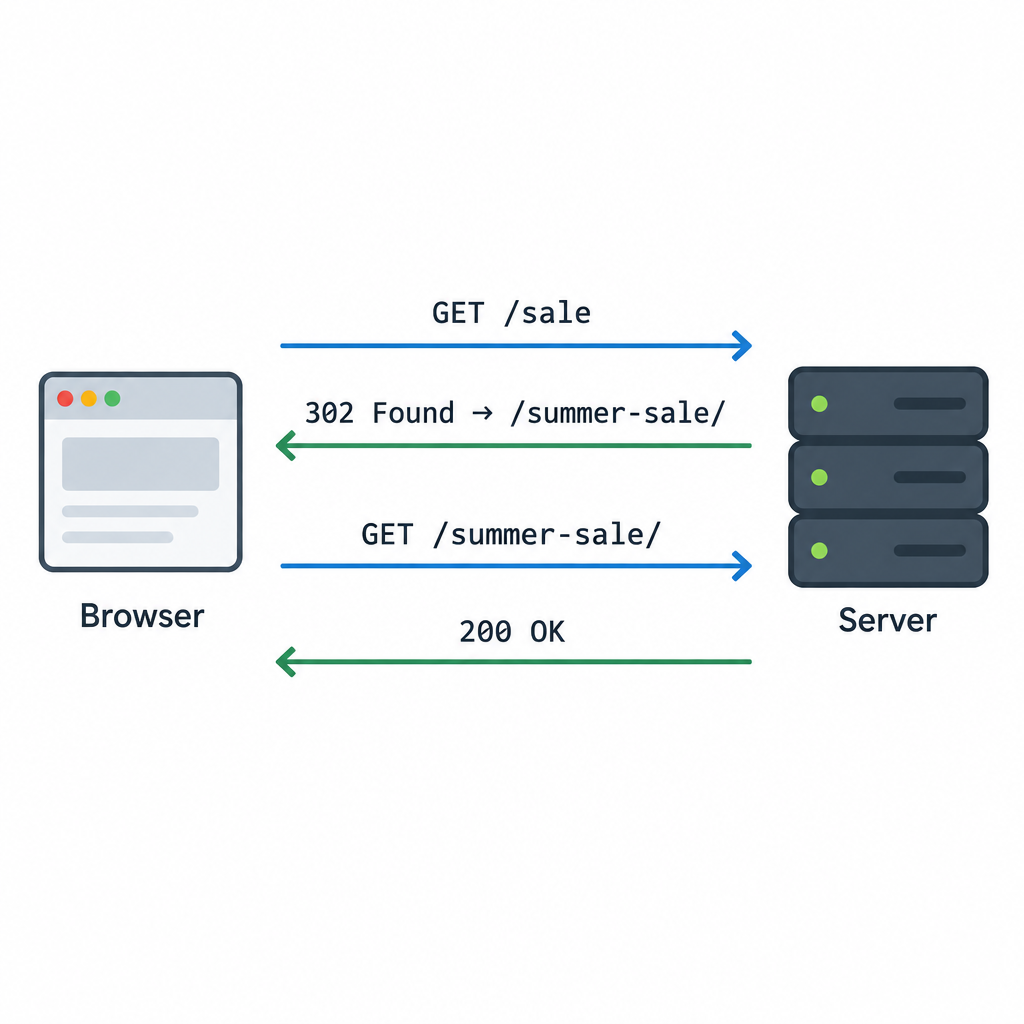
A 302 always takes two round trips. The browser asks for the original URL and gets the 302. Then it requests the Location URL on its own, without asking the user.
- The browser sends
GET /sale. - The server replies
302 FoundwithLocation: /summer-sale/. - The browser sends
GET /summer-sale/. - The server replies
200 OK, and the address bar shows/summer-sale/.
Bookmarks and links still point at /sale, which is what the spec intends. Each redirect adds a full round trip, so three chained redirects cost three extra round trips before any HTML arrives.
What happens to POST form submissions
On a 302, browsers turn POST into GET, and RFC 9110 allows this. Other methods such as PUT and DELETE are generally kept, so it is wrong to say “a 302 always becomes a GET.” MDN advises using 307 if the method must stay the same and 303 if you want a GET.
That rewrite is useful after a form submission. The browser lands on a confirmation page with a GET, so a refresh does not send the form again.
Is a 302 cached by browsers?
Not by default. RFC 9111, the HTTP caching spec, lets caches store a 301 or 308 heuristically, without any explicit instructions. A 302 or 307 is only stored when Cache-Control or Expires gives it a lifetime.
That difference means switching from 302 to 301 is safe. Switching from 301 to 302 is hard. A cached 301 can live in a visitor’s browser for a long time, so they never reach your server to see the new rule.
Is a 302 redirect permanent? 302 vs 301
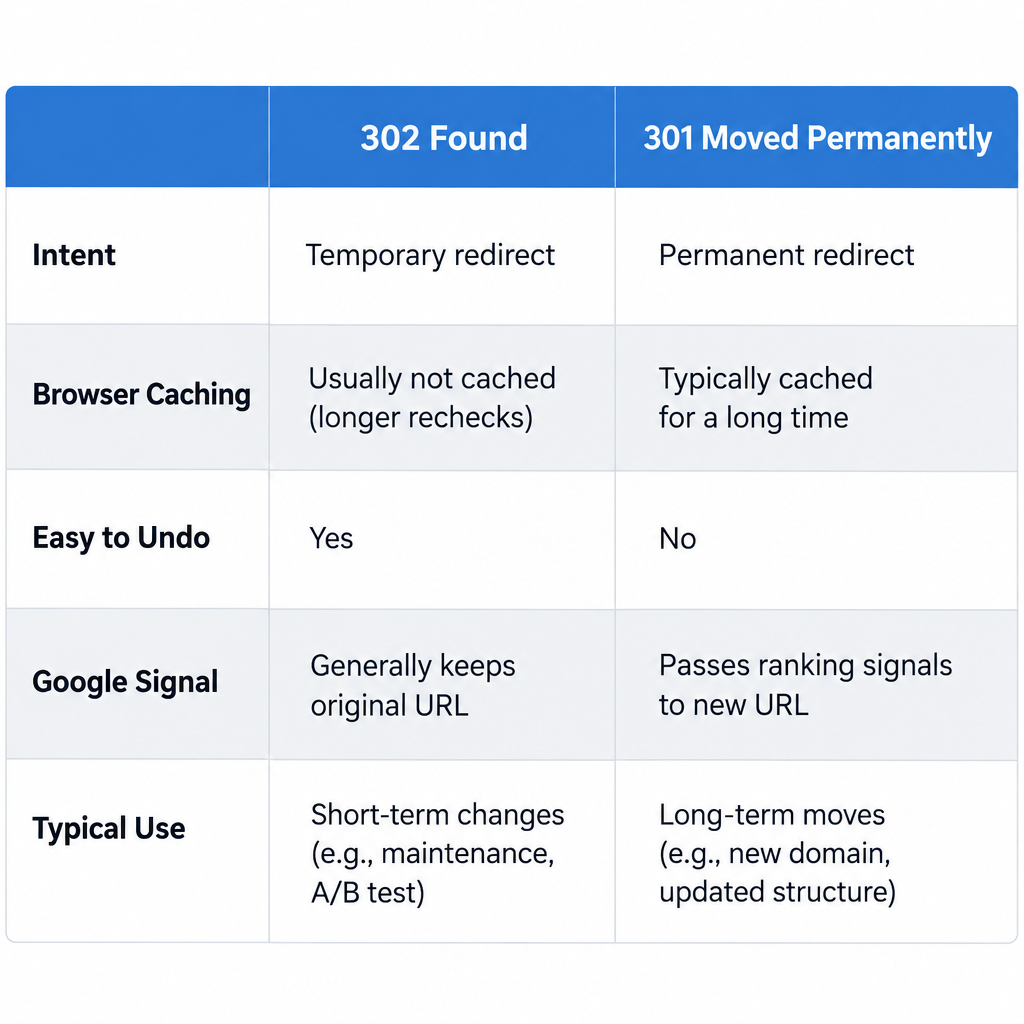
No. A 302 is temporary by definition, and a 301 Moved Permanently is the permanent version. They work the same way mechanically. They differ in how clients cache them and how search engines treat the two URLs.
| Aspect | 302 Found | 301 Moved Permanently |
|---|---|---|
| Intent | Temporary detour | Permanent move |
| Browser caching | Only with explicit Cache-Control or Expires | Heuristically cacheable, often kept for a long time |
| Easy to undo | Yes, remove the rule | Hard, cached copies linger |
| URL Google usually shows | Often the source URL | Usually the target URL |
| Google canonical signal | Weak or none | Strong |
| POST handling | May become GET | May become GET |
| Typical use | Sales, maintenance, A/B tests, logins | Migrations, HTTPS, URL restructures |
What Google actually does with a 302
Google’s documents describe two different stages. The crawler documentation lists 302, 303 and 307 as temporary redirects. It says Google’s crawlers follow them and use them as a “weak signal” that the target should be processed. The Search Central redirects guide covers indexing. It says the indexing pipeline doesn’t use a temporary redirect as a signal that the target should be canonical, although the target can still be indexed if other signals point to it.
The two documents don’t conflict:
- Crawling: Googlebot follows the 302 and fetches the target.
- Canonical choice: the 302 is a weaker canonicalization signal than a 301, so the source URL often stays in results, though Google may still choose a different canonical URL.
Google’s Gary Illyes and Cherry Prommawin explained this further, as reported by Search Engine Journal. Both 301s and 302s help Google group the two URLs together. A 301 is the right choice when you want the target to be the canonical. A temporary redirect tells Google the source URL may be the one you prefer.
Google’s crawlers follow up to 10 redirect hops, and the limit can vary by crawler. Past that, Search Console reports a redirect error.
Does a 302 pass link equity?
The claims that “a 302 passes no link equity” and “a 301 passes about 99%” do not come from Google’s documentation. Google says both redirect types help it group URLs together. In 2016, Gary Illyes said publicly that 30x redirects no longer lose PageRank.
What changes is which URL gets the credit. With a 302, signals tend to stay with the source URL, because that is the one Google keeps. With a 301, they move to the target. For a two-week sale page, a 302 is fine, since you want the original URL to keep its rankings.
When a “temporary” 302 should become a 301
Change it to a 301 once the old URL is never coming back. Common signs:
- The campaign the 302 was created for has ended, but the rule is still there.
- The source page has been deleted. Removing the rule would show a 404 HTTP code.
- Search Console’s URL Inspection tool shows Google has already picked the target as canonical.
- Internal links and the XML sitemap already point at the target.
Google has said for years that a long-running 302 may eventually be treated like a 301. Don’t rely on that. Sending the correct code removes the guesswork.
302 vs 303, 307 and 308: picking the right redirect
Choose a redirect by asking two things. Is the move temporary or permanent? Must the HTTP method stay the same? This table covers every common case.
| Code | Name | Permanent? | Method on redirect | Google treatment | Typical use |
|---|---|---|---|---|---|
| 301 | Moved Permanently | Yes | POST may become GET | Strong canonical signal | Site moves, HTTPS, URL changes |
| 302 | Found | No | POST may become GET | Weak signal, not canonical | Sales, maintenance, login returns |
| 303 | See Other | No | Always GET | Temporary | After a form POST |
| 307 | Temporary Redirect | No | Method kept | Temporary | Temporary API or form endpoints |
| 308 | Permanent Redirect | Yes | Method kept | Strong canonical signal | Permanent API moves, Next.js permanent redirects |
A quick decision rule:
- Permanent page move? Use 301 (or 308 if POST must survive).
- Temporary page detour? Use 302.
- Sending a user from a form POST to a result page? Use 303.
- Temporary move of an endpoint that receives POST, PUT or DELETE? Use 307.
Use 303 after a form POST
A 303 says “the result is over there, fetch it with GET.” It is the cleanest version of the Post/Redirect/Get pattern. A 302 works too, because browsers make the same POST-to-GET switch, but a 303 states the intent clearly.
Use 307 when the method must be kept
If an API client POSTs JSON to /v1/orders and you move it temporarily, a 302 can turn that into an empty GET. A 307 resends the POST with its body.
Use 308 for permanent moves of APIs and forms
A 308 is the permanent version of a 307. Next.js and Vercel use it when a redirect has permanent: true. When permanent is false, they send a 307.
What is the difference between 302 and 304?
A 304 Not Modified is not a redirect. It answers a conditional request that sends If-None-Match (with an ETag) or If-Modified-Since. It tells the browser its cached copy is still current. It has no Location header and sends you nowhere.
| Aspect | 302 Found | 304 Not Modified |
|---|---|---|
| Purpose | Send the client to another URL | Confirm the cached copy is still valid |
| Location header | Required | Not used |
| Triggered by | Server rules or app logic | Conditional request headers |
| Response body | Optional, usually empty | Never has a body |
| Address bar changes | Yes | No |
| SEO effect | Affects which URL is indexed | None, it saves bandwidth |
A run of 304s in your logs is a good sign. It means caching works.
When to use a 302 (and when not to)
Use a 302 when you expect the original URL to come back and want it to keep its search presence. If the move is permanent, use a 301.
Good uses
- Maintenance pages: send visitors to a status page during work. A 503 with
Retry-Afteron the original URL is often better for crawlers, though. - Limited-time promotions: point
/dealsto this month’s campaign page. - A/B tests: Google’s guidance on testing recommends temporary redirects for redirect-based variants.
- Post-login return URLs: send the user back to the page they asked for.
- Out-of-stock swaps: point a seasonal product to a replacement while stock is coming back.
- Device or condition redirects: route by cookie, session or feature flag.
Uses that should be a 301 instead
- Domain migrations and rebrands.
- HTTP to HTTPS, and www to non-www.
- Changes to the permalink or category structure.
- Merging duplicate posts or products.
Geo and language redirects: the Googlebot problem
Googlebot crawls mostly from US IP addresses. If you 302 every US visitor from / to /en-us/, Google may never see your other language versions. Use hreflang annotations and a visible country picker. Don’t force geo redirects. If you must redirect, leave crawlers a crawlable path to each version.
Why am I getting a 302 instead of a 200?

When you expect a 200 and get a 302, the server is almost always sending you somewhere on purpose. Usually it’s a login page, the canonical host, or a bot challenge. Find the hop first, then fix its cause.
| Symptom | Likely cause | How to confirm | Fix |
|---|---|---|---|
| AJAX returns login page HTML | Session expired, redirect followed silently | res.redirected is true in fetch |
Return 401 or 403 to API and AJAX requests |
| curl gets 302, browser gets 200 | Missing cookies or session | Compare with curl -b cookies.txt |
Send the auth cookie or token |
| 302 to home page with a mobile user agent | Device or geo redirect rule | curl -A "Mozilla/5.0 (iPhone...)" -I URL |
Exclude API paths from the rule |
| 302 or 301 to https or www | Host or protocol rule | Location header in curl output |
Request the final URL directly |
| 302 to an added slash | Trailing-slash normalisation | Location differs by one / |
Link to the canonical form |
| 302 or 403 for curl and bots | WAF or bot protection challenge | Response headers from the CDN | Allowlist your service in the WAF |
| Whole site 302s to one page | Maintenance-mode plugin left on | X-Redirect-By header |
Turn off maintenance mode |
| “Too many redirects” after enabling SSL | Cloudflare Flexible SSL plus an origin HTTPS redirect | Chain loops http to https to http | Set SSL/TLS mode to Full (strict) |
fetch(), axios and AJAX: the hidden redirect
fetch() follows redirects by default, so res.status === 302 never fires. The browser reads Location, requests it, and gives you the final response. That’s why a login redirect shows up as a 200 with HTML. axios in the browser uses XHR, which behaves the same way.
Detect it like this:
const res = await fetch('/api/orders', { headers: { Accept: 'application/json' } });
if (res.redirected || !res.headers.get('content-type')?.includes('application/json')) {
  // Session probably expired: send the user to log in
  window.location.href = '/login?return=' + encodeURIComponent(location.pathname);
}
redirect: 'manual' doesn’t let you read the 302 either. The browser returns an opaqueredirect response with status 0 and no readable Location. That’s why the “status 0” question comes up so often. redirect: 'error' makes the fetch reject instead.
The real fix belongs on the server. Return 401 or 403 to AJAX and API requests, and keep the 302 for normal page loads. In Laravel, send Accept: application/json. The auth middleware then returns a 401 JSON response instead of redirecting. Spring Security can do the same with a custom authentication entry point for XHR paths.
Login and session redirects
WordPress sends logged-out users from /wp-admin/ to wp-login.php with a 302. WooCommerce sends guests to the My Account login when a page needs an account, and it redirects through checkout and payment steps. These are correct. Problems only start when a caching layer serves the redirect to everyone, or when a script calls a protected URL without cookies.
CDN, WAF and bot-protection redirects
CDNs and security plugins can answer automated clients with a challenge or redirect. If your monitoring or webhook tool gets 302s that browsers don’t, look at the response headers for the CDN’s markers. Then add an allow rule for that client. Never weaken protection for everyone.
302 redirects in WordPress, WooCommerce and Shopify

Each platform has its own default. WordPress code sends a 302 unless told otherwise. Shopify’s admin can only create 301s. Know which one you’re working with before you add a rule.
WordPress: wp_redirect() defaults to 302
The WordPress developer reference lists the signature as wp_redirect( $location, $status = 302, $x_redirect_by = 'WordPress' ). wp_safe_redirect() has the same 302 default. Since WordPress 5.4.0, passing a non-3xx status triggers wp_die(). The wp_redirect_status filter, added in WordPress 2.3.0, lets you change the code on the fly:
add_filter( 'wp_redirect_status', function ( $status, $location ) {
    if ( 302 === $status && str_contains( $location, '/new-shop/' ) ) {
        return 301;
    }
    return $status;
}, 10, 2 );
Did you know?
According to the WordPress developer reference, both wp_redirect() and wp_safe_redirect() default to 302. Any custom redirect coded without a status argument is temporary, even when it was meant to be permanent.
Finding which plugin issued a redirect (X-Redirect-By)
Since WordPress 5.1.0, redirect functions send an X-Redirect-By header, which defaults to WordPress. Many plugins set their own value, so curl -I often tells you exactly which plugin sent the redirect.
Builder tip
Always pass an explicit status and a label: wp_safe_redirect( $url, 301, 'Client theme: old shop' ). The label shows up in X-Redirect-By, so anyone auditing the site later can trace the rule in seconds.
Security note
wp_redirect() doesn’t check the destination host, so passing a user-supplied URL creates an open redirect. Use wp_safe_redirect(), which only allows your own host and hosts added through the allowed_redirect_hosts filter.
Shopify: why you can’t create a native 302
Shopify’s URL redirects are permanent 301s. The Admin API Redirect resource is documented as managing 301 redirects, and the admin offers no temporary option. Find them under Online Store > Navigation > URL redirects. Shopify’s current help article reaches them through Settings > Apps and sales channels > Online Store > Navigation. Third-party guides report limits of 100,000 redirects on standard plans and 20,000,000 on Shopify Plus.
For a temporary sale, the cleanest option on the Shopify ecommerce platform is usually no redirect at all. Change the menu link, banner and ad URLs to the sale collection, then change them back afterwards.
Two community questions come up often:
- “301 instead of 307 on Shopify”: Chrome DevTools labels an http to https upgrade from HSTS as a “307 Internal Redirect.” The browser makes that hop, not Shopify’s server.
curl -Ishows the real server response. - Double redirects from a secondary domain: the domain hop to your primary domain happens before the URL redirect, and you can’t merge the two natively. Point links, ads and sitemaps at the final URL on the primary domain.
Headless and Next.js/Vercel-style redirect configs
Framework configs choose a code for you:
- Next.js and Vercel:
permanent: falsesends 307 andpermanent: truesends 308. - Netlify
_redirects: the default is 301, so add302explicitly, for example/blog/* /news/:splat 302. If a splat rule seems to do nothing, a real file at that path is probably taking priority. Add a!(302!) to force the rule.
How to set up a 302 redirect: 6 methods ranked

The best place for a 302 is the earliest layer that can make the decision. An edge or server rule runs before PHP or Node, survives plugin changes, and is easy to audit. Back up your config files and database before you change any of them.
Selection criteria
The methods below are ranked on four points, drawn from each vendor’s documentation:
- How early it runs: before the application is faster and cheaper.
- Resilience: whether it survives theme, plugin or CMS updates.
- Auditability: whether you can see every rule in one place.
- Conditional logic: whether it can depend on login state, cookies or query strings.
Speed and resilience count most for simple URL detours. Conditional logic only wins when the redirect depends on the user.
| Rank | Method | Runs before app | Conditional logic | Best for |
|---|---|---|---|---|
| 1 | Cloudflare Redirect Rules | Yes, at the edge | Expressions, regex on Business and above | Sites already proxied by Cloudflare |
| 2 | Nginx return 302 |
Yes | Moderate | VPS and managed Nginx hosts |
| 3 | Apache .htaccess |
Yes | Moderate with mod_rewrite | Shared hosting |
| 4 | WordPress redirect plugin | No | Low to moderate | Editors without server access |
| 5 | Application code | No | Full | Login, session and A/B logic |
| 6 | Meta refresh or JavaScript | No | Full | Last resort on locked platforms |
Top pick: a Cloudflare Redirect Rule if the site already runs through Cloudflare. Otherwise, a server-level rule in Nginx or Apache.
1. Cloudflare Redirect Rules
Cloudflare’s Single Redirects work on every plan. As of November 2026, the documented limits are 10 rules on Free, 25 on Pro, 50 on Business and 300 on Enterprise, counted per zone. Wildcards work on all plans. Regex needs Business or Enterprise. The default status is 301, so pick 302 by hand.
Setup steps
- Export your current rules or note them down as a backup.
- In the Cloudflare dashboard, open the zone, go to Rules and create a Redirect Rule.
- Match the path, for example URI Path equals /sale.
- Set the target URL and change the status code from 301 to 302.
- Deploy, then check it with curl -I.
2. Nginx
location = /sale {
    return 302 https://example.com/summer-sale/;
}
Run nginx -t before reloading so a typo doesn’t take the site down.
3. Apache .htaccess
Redirect 302 /sale /summer-sale/


RewriteEngine On
RewriteRule ^sale/?$ /summer-sale/ [R=302,L]
WordPress keeps its own rewrite block in .htaccess. Place your rules above # BEGIN WordPress so WordPress doesn’t overwrite them.
4. WordPress redirect plugins
Redirection by John Godley reports around 2 million active installs on WordPress.org. It lets you choose 301, 302, 303, 307 or 308 for each rule and logs hits. Rank Math includes a redirections module, and Yoast’s redirect manager comes with Yoast SEO Premium.
Builder tip
Sort your plugin’s redirect list by code and creation date. Any 302 older than the campaign it was made for should probably be a 301 now.
5. Application code (PHP, WordPress, Node.js / Express)
// Plain PHP
header( 'Location: https://example.com/maintenance/', true, 302 );
exit;
// WordPress, in a plugin or theme
add_action( 'template_redirect', function () {
    if ( is_page( 'sale' ) ) {
        wp_safe_redirect( home_url( '/summer-sale/' ), 302, 'Sale rule' );
        exit;
    }
} );
// Express: res.redirect() defaults to 302
app.get('/sale', (req, res) => res.redirect('/summer-sale/'));
app.get('/old-shop', (req, res) => res.redirect(301, '/shop/'));
Always call exit after a PHP redirect. Otherwise the rest of the page keeps running.
6. Meta refresh or JavaScript
<meta http-equiv="refresh" content="5; url=https://example.com/summer-sale/">
According to Google’s redirects guide, a meta refresh with a delay of 0 counts as permanent. Any delay above 0 seconds counts as temporary. Google recommends server-side redirects whenever your platform allows them.
How to check a redirect’s status code
Use curl to see what the server really sends. Use the browser DevTools Network tab to see what a real visit does. Use Search Console to see what Google saw.
Reading a redirect chain with curl
curl -IL http://example.com/sale
Example output, trimmed:
HTTP/1.1 301 Moved Permanently
Location: https://example.com/sale

HTTP/2 302
location: https://example.com/summer-sale/
x-redirect-by: WordPress

HTTP/2 200
This example has two hops. The first is a permanent protocol fix and the second is a temporary detour from WordPress. -I sends HEAD requests, which some apps answer differently. To see GET headers instead, use curl -sSL -D - -o /dev/null URL.
For a one-line summary:
curl -sL -o /dev/null -w "%{http_code} %{num_redirects} %{url_effective}\n" https://example.com/sale
In Chrome or Firefox DevTools, open the Network tab and tick “Preserve log” before you load the page. Without it, the log is cleared on each navigation and the 302 disappears. In Google Search Console, the URL Inspection tool shows the canonical Google chose. Bing Webmaster Tools has a similar URL inspection for Bing.
Run curl first
Run curl -IL on the URL before and after every redirect change. If the output shows more than one hop, link straight to the final URL.
Fixing redirect loops
A loop happens when two rules undo each other. Typical pairs are http to https and back, www to non-www and back, or a slash added and then removed. Browsers show “too many redirects” or “The page isn’t redirecting properly.” To fix one:
- Read the chain with curl and find the two URLs that alternate.
- Check that WordPress’s Site Address and WordPress Address both use
https://. - On Cloudflare, use Full (strict) SSL rather than Flexible.
- Remove the duplicate rule so only one layer handles host and protocol.
- Clear the browser cache. A cached 301 can keep the loop going after the fix.
302 redirect checklist
Back up before you change anything, then work through the list:
- Export every redirect rule from the server config, CDN and plugins.
- List every 302 with its creation date and reason.
- Change permanent moves to 301 or 308.
- Flatten chains so each old URL goes straight to its final target.
- Update internal links, menus and the XML sitemap to point at final URLs.
- Check that canonical tags on target pages point at themselves.
- Make sure your WordPress robots.txt doesn’t block the source or target URLs.
- Return 401 or 403, not 302, to API and AJAX requests.
- Replace any
wp_redirect()call that takes user input withwp_safe_redirect(). - Check key URLs again in URL Inspection a week after the changes.
The best habit is to give every 302 an end date. Write it in the rule’s note or the X-Redirect-By label, and review it when the campaign ends. A short audit then shows which rules are leftovers.
FAQ
What is a 302 status code used for?
It sends visitors to another URL temporarily, while the original URL stays the real address. Common uses are sales, maintenance, A/B tests and returning users to a page after login.
Is a 302 redirect permanent?
No. RFC 9110 defines it as temporary. Clients and search engines should keep using the original URL.
Why am I getting 302 instead of 200?
Usually the server is sending you to a login page, a canonical host or URL, or a bot challenge. In a browser, fetch follows the redirect silently, so you see a 200 with the wrong HTML. Check res.redirected and have the server return 401 to AJAX requests.
What is the difference between status codes 302 and 304?
A 302 sends the client to another URL. A 304 is not a redirect. It says the cached copy is still current, so the browser should use it.
What is the difference between 301 and 302 redirects?
A 301 is permanent. Browsers can cache it, and Google treats it as a strong sign the target should be canonical. A 302 is temporary, isn’t cached by default, and usually leaves the source URL in search results.
Does a 302 redirect hurt SEO?
Not when the move is really temporary. It only hurts when it stands in for a permanent move, because Google may keep showing the old URL.
Does Google pass PageRank through a 302?
Google says both 301s and 302s help it group URLs. It does not describe the 302 as losing value. The difference is which URL Google picks as canonical.
What is the difference between 302 and 307?
Both are temporary. A 302 lets the browser turn a POST into a GET, while a 307 has to keep the original method and body.
When should I use 303 instead of 302?
Use a 303 after a form submission, when you want the browser to load a result page with GET. It states that intent clearly.
How long can a 302 redirect stay in place?
Keep it as long as the reason lasts, whether that’s a sale, a test or maintenance. Once the old URL is never coming back, change it to a 301.
About this article
- Fact-checked by Moira Hensley against the sources listed below before publication.
- Published
Sources (8)
- RFC 9110: HTTP Semantics (datatracker.ietf.org)
- 302 Found - MDN Web Docs (developer.mozilla.org)
- HTTP 302 - Wikipedia (Wikipedia.com)
- Redirects and Google Search (developers.google.com)
- How HTTP status codes affect Google's crawlers (developers.google.com)
- Google Explains How Redirects Affect Ranking Signals (searchenginejournal.com)
- wp_redirect() - WordPress Developer Reference (developer.wordpress.org)
- wp_safe_redirect() - WordPress Developer Reference (developer.wordpress.org)