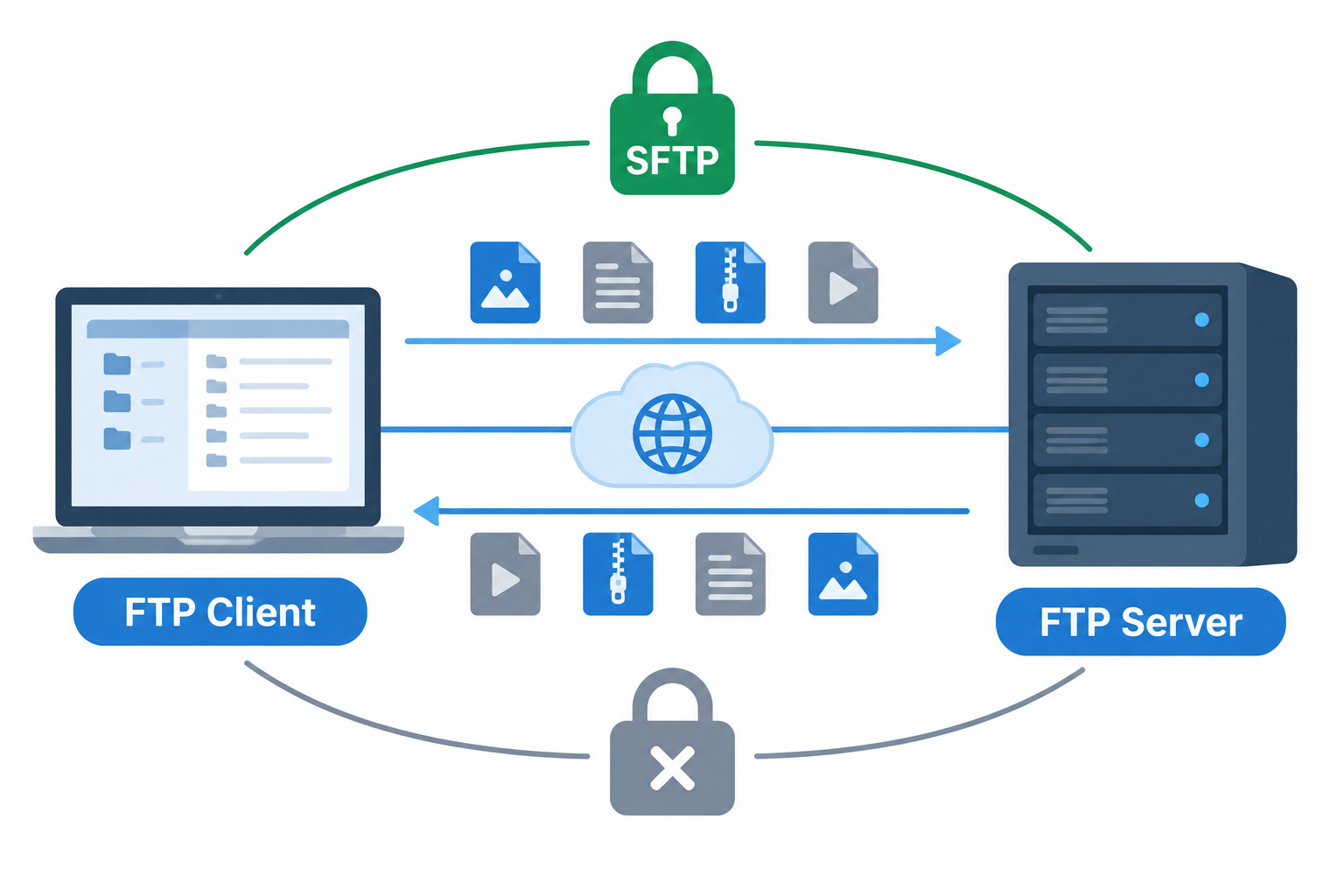
FTP (File Transfer Protocol) is the 1970s-era standard for moving files between a client and a server over TCP. A control connection on port 21 carries the commands and a separate data connection carries the files. It still runs on about 5.95 million internet-facing hosts, according to Censys in April 2026. Plain FTP sends your password unencrypted, though, so most web hosts now want you to use SFTP on port 22.
In short
- FTP uses two connections: commands on port 21, files on a separate data channel.
- Passive mode is the default in modern clients because it gets through firewalls and NAT.
- Plain FTP sends usernames, passwords and files in clear text, and about 2.45 million servers showed no TLS in 2026.
- SFTP is a different protocol built on SSH. It uses one connection on port 22 and encrypts everything.
- Browsers stopped supporting FTP in 2021, so you need a client such as FileZilla, WinSCP or Cyberduck.
Fact-checked
We checked these key facts against the sources named, on November 26, 2026:
- RFC 4217 (2005) standardised this approach, and it’s the one to choose (source: rfc-editor.org)
- Implicit FTPS assumes encryption from the first packet and listens on port 990, so it can’t fall back to plain FTP (source: rfc-editor.org)
- RFC 959 has no encryption, so your username, your password and every file you transfer cross the network as readable text (source: rfc-editor.org)
- The first digit tells you the category: 1xx means wait, 2xx success, 3xx more input needed, 4xx temporary failure, 5xx permanent failure (source: rfc-editor.org)
- In March 2017 the FBI issued Private Industry Notification 170322-001 warning that criminals were targeting anonymous FTP servers at medical and dental practices to steal patient data (source: ic3.gov)
What is FTP? (the 30-second answer)
FTP is an application-layer, client-server protocol that lets one computer list, upload, download, rename and delete files on another. The current specification is RFC 959, published in October 1985 by Jon Postel and Joyce Reynolds and designated Internet Standard STD 9.
FTP in one sentence
An FTP client logs in to an FTP server with a username and password (or anonymously), sends text commands over one TCP connection and moves the actual files over a second one.
That split between commands and data explains most of FTP’s quirks. It’s why firewalls trip it up, why “passive mode” exists and why encrypting it took extra standards.
Looking for cycling FTP or another meaning?
Other meanings of FTP
Cycling: Functional Threshold Power, the highest power in watts you can roughly sustain, used to set training zones.
Cricket: the ICC Future Tours Programme, the international fixture schedule.
Finance: funds transfer pricing in banking. FTP is also an anti-police slang abbreviation.
In cycling, TrainerRoad describes Functional Threshold Power as an approximation of maximal lactate steady state, measured in watts. Coaches and training apps use it to set your power zones. The rest of this page covers the computing meaning, which is the one most people searching “what is FTP” are after. Plain FTP is unencrypted, and most hosting companies now offer or require SFTP instead.
How FTP works: two connections, two modes

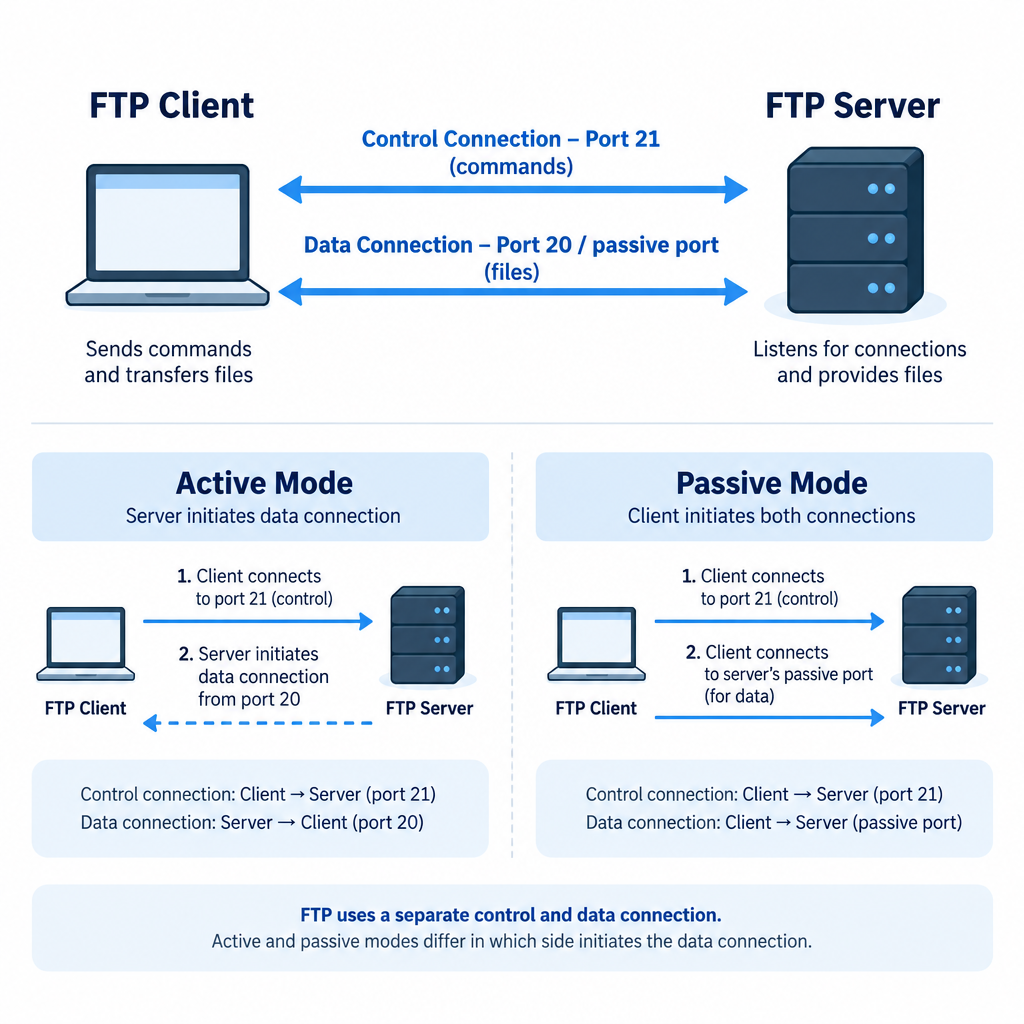
Every FTP session opens a control connection to the server’s port 21. Each file transfer or directory listing then opens a separate data connection. Who opens that second connection, and on which port, depends on whether the session is in active or passive mode.
Control connection vs data connection
The control connection stays open for the whole session. It carries plain-text commands such as USER, PASS and RETR, plus the server’s numbered replies. The data connection opens for each transfer and closes when the transfer is done.
CLIENT                                   SERVER
high port  ----- control (commands) ----> port 21
high port  <---- data (active mode) ----- port 20
high port  ----- data (passive mode) ---> high port chosen by server
HTTP works differently: it sends requests and file contents over the same connection. FTP keeps them separate, and that design is the source of nearly every FTP firewall headache.
Active vs passive mode
In active mode, the client tells the server which port it’s listening on (the PORT command). The server then connects back to the client from port 20. In passive mode, the client sends PASV (or EPSV on IPv6, from RFC 2428), the server replies with a port number, and the client opens both connections itself.
Passive mode wins on modern networks. Home routers using NAT and most corporate firewalls block unexpected inbound connections, and active mode relies on exactly that kind of connection to reach the client. FileZilla and most other clients default to passive for this reason. The catch is that the server’s firewall has to allow the passive port range.
| Port | Used by | Mode | What to open on a firewall |
|---|---|---|---|
| 21 | FTP control channel (also explicit FTPS) | Both | Inbound TCP 21 on the server |
| 20 | FTP data channel, sent from the server | Active only | Outbound TCP 20 from the server; client must accept inbound |
| Passive range (admin-defined, e.g. 50000-51000) | FTP data channel | Passive only | Inbound TCP range on the server, matching the daemon’s config |
| 990 | Implicit FTPS control channel | Both | Inbound TCP 990 on the server |
| 989 | Implicit FTPS data channel | Active | Outbound TCP 989 from the server |
| 22 | SFTP (and SSH, SCP) | Single connection | Inbound TCP 22 only |
| 2222 (or host-specific) | SFTP on a non-standard SSH port | Single connection | Whatever port your host lists |
Builder tip
If transfers hang at “Retrieving directory listing…”, you most likely have an active vs passive problem. Switch the site to passive in FileZilla’s Site Manager (Transfer Settings tab), or ask the host whether its passive port range is open.
ASCII vs binary transfers
RFC 959 defines several data types. The two that matter today are ASCII (type A) and Image, better known as binary (type I). In ASCII mode, line endings get converted between operating systems, for example from Windows CRLF to Unix LF. In binary mode the file is copied byte for byte.
That conversion is harmless for a .txt or .php file and fatal for a JPEG, ZIP or database dump. The converted bytes corrupt the file. Leave your client on “Auto” or force binary for anything that isn’t plain text.
RFC 959 also defines three transmission modes: stream, block and compressed. Almost everything uses stream mode, where the file is sent as one continuous flow and the end of the file is marked by closing the connection. Block and compressed modes exist mostly as history.
Builder tip
Send images, ZIPs, fonts and other non-text files in binary mode, or leave your client on auto. ASCII mode can corrupt them silently.
FTP commands and reply codes you’ll actually see
The commands you type in a command-line client (get, put, ls) are friendly wrappers. Behind each one sits a short protocol command defined in RFC 959. That’s what shows up in your client’s message log.
Common commands
| What you type | Protocol command(s) behind it | What it does |
|---|---|---|
open host / login |
USER, PASS |
Sends username, then password (in clear text on plain FTP) |
ls or dir |
LIST (or NLST) |
Lists the current directory over the data connection |
cd folder |
CWD |
Changes working directory |
pwd |
PWD |
Shows the current directory |
get file |
RETR |
Downloads one file |
mget *.jpg |
Repeated RETR |
Downloads multiple files |
put file |
STOR |
Uploads one file |
mput *.php |
Repeated STOR |
Uploads multiple files |
mkdir name |
MKD |
Creates a directory |
delete file |
DELE |
Deletes a file |
rename a b |
RNFR, RNTO |
Renames a file |
binary / ascii |
TYPE I / TYPE A |
Sets the data type |
passive |
PASV / EPSV |
Switches to passive mode |
bye |
QUIT |
Ends the session |
Reply codes and what they mean when you’re stuck
Every server reply starts with a three-digit code. The first digit tells you the category: 1xx means wait, 2xx success, 3xx more input needed, 4xx temporary failure, 5xx permanent failure. A healthy login looks like 220 (ready), 331 (send password), then 230 (logged in).
| Code | Meaning | Likely cause | Fix |
|---|---|---|---|
| 331 | Username OK, need password | Normal step in login | Nothing, the client sends the password next |
| 530 | Not logged in | Wrong username or password, or FTP disabled for that account | Recheck credentials in your hosting panel; cPanel FTP usernames often take the form [email protected] |
| 421 | Service not available, closing connection | Too many connections from your IP, idle timeout, or the server shutting down | Lower simultaneous connections in your client and reconnect |
| 425 | Can’t open data connection | Active/passive mismatch or a blocked passive port range | Switch to passive mode, or open the passive range on the server firewall |
| 426 | Connection closed, transfer aborted | Network drop or a firewall killing the data channel mid-transfer | Retry; check for a firewall or VPN interfering |
| 550 | Requested action not taken | File doesn’t exist, or you lack permission | Check the path and the file permissions on the server |
| 227 | Entering passive mode | Normal reply to PASV |
Nothing; if the listing still hangs, the advertised port is blocked |
One common error isn’t a server code at all. FileZilla’s “Connection timed out after 20 seconds of inactivity” means the client gave up waiting. That usually comes down to three causes: the wrong protocol (plain FTP against an SFTP-only host), the wrong port, or your IP being blocked by the host’s firewall after too many failed logins. Fix the protocol and port first. If it still fails, ask your web host whether your IP has been blocked.
Is FTP safe? The 2026 reality
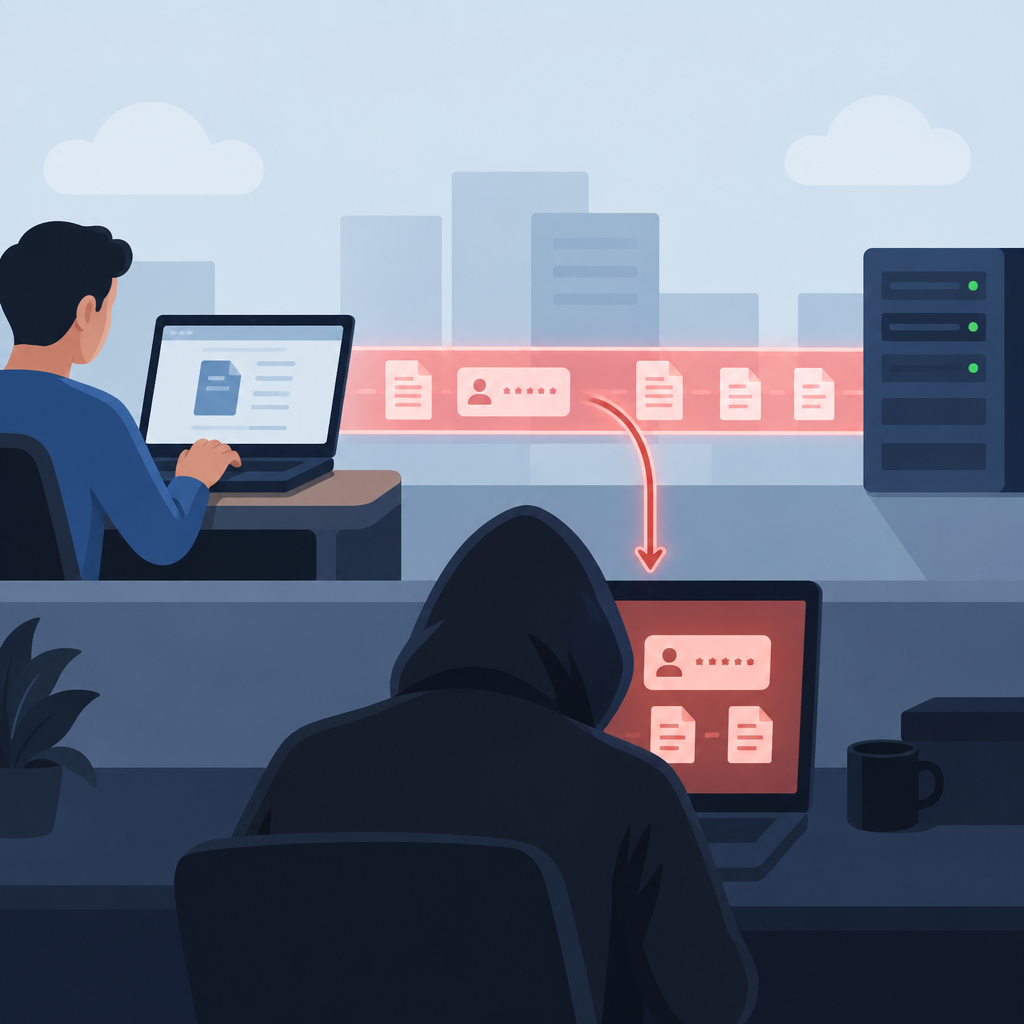
Plain FTP is not secure. RFC 959 has no encryption, so your username, your password and every file you transfer cross the network as readable text. Anyone sitting on the network path can capture them.
Why plain FTP leaks passwords
Look at the USER and PASS commands in the table above. On plain FTP those strings travel exactly as you typed them. A packet capture on shared Wi-Fi, a compromised router or a malicious hotspot can read them.
So is it safe to use FTP on public Wi-Fi? No. Use SFTP, or FTPS with “Require explicit FTP over TLS”, or wait until you’re on a trusted network.
Anonymous FTP adds another risk. Anonymous mode lets anyone log in with the username “anonymous” or “ftp” and no real password. In March 2017 the FBI issued Private Industry Notification 170322-001 warning that criminals were targeting anonymous FTP servers at medical and dental practices to steal patient data. The same notification warned that servers with anonymous write access could be used to store malicious tools.
What the latest internet scans show
The newest large-scale measurement is Censys’s FTP Exposure Brief from April 2026. It found FTP shrinking fast and still badly configured on a large share of servers.
| Metric | Value | Period | Source |
|---|---|---|---|
| Internet-facing hosts running FTP | 5,949,954 (about 5.95M) | April 2026 | Censys FTP Exposure Brief |
| Same figure in 2024 | Over 10.1M (about a 40% drop since) | 2024 | Censys FTP Exposure Brief |
| Hosts completing a TLS handshake | About 58.9% | April 2026 | Censys, via SecurityWeek |
| Hosts with no observed TLS | About 2.45M | April 2026 | Censys, via SecurityWeek |
| Pure-FTPd services | About 1.99M (roughly a third) | April 2026 | Censys |
| ProFTPD services | About 812,000 | April 2026 | Censys |
| vsftpd services | About 379,000 | April 2026 | Censys |
| Hosts on backdoored vsftpd 2.3.4 | 1,744 | April 2026 | Censys |
| Share of deprecated TLS 1.0/1.1 FTP servers in Japan | 71% | April 2026 | Censys, via VPNCentral |
Did you know?
Censys’s April 2026 brief links Pure-FTPd’s lead, about a third of all FTP services, to cPanel, which offers Pure-FTPd and ProFTPD as its default FTP servers on Linux web hosting.
For website owners, the takeaway is that a lot of this FTP runs on shared hosting. If your host runs cPanel, it almost certainly has an FTP daemon listening. The protocol you pick when you connect decides whether your password crosses the network encrypted.
Recent FTP server vulnerabilities
Old protocols attract attackers, and FTP server software has recent entries in CISA’s Known Exploited Vulnerabilities (KEV) catalog.
| CVE | Product | Severity | Affected | Patched | KEV status |
|---|---|---|---|---|---|
| CVE-2025-47812 | Wing FTP Server | CVSS 10.0, remote code execution | Before 7.4.4 | 7.4.4 (May 14, 2025) | Added July 2025 |
| CVE-2025-47813 | Wing FTP Server | CVSS 4.3, installation path disclosure | Up to 7.4.3 | 7.4.4 | Added March 16, 2026; federal deadline March 30, 2026 |
According to The Hacker News, the path leak in CVE-2025-47813 can help attackers exploit CVE-2025-47812, the more serious bug. Exploiting the leak requires an authenticated session, which turns weak or shared FTP accounts into a stepping stone.
Security note
Wing FTP Server below 7.4.4 has two actively exploited flaws, including a CVSS 10.0 remote code execution bug. Back up your configuration, update to 7.4.4 or later now, and replace any vsftpd 2.3.4 install outright.
What should you do about it? If you’re a site owner, connect with SFTP and stop using any plain FTP account your host created by default. If you run servers, use the hardening checklist further down.
FTP vs FTPS vs SFTP (and where HTTP and MFT fit)
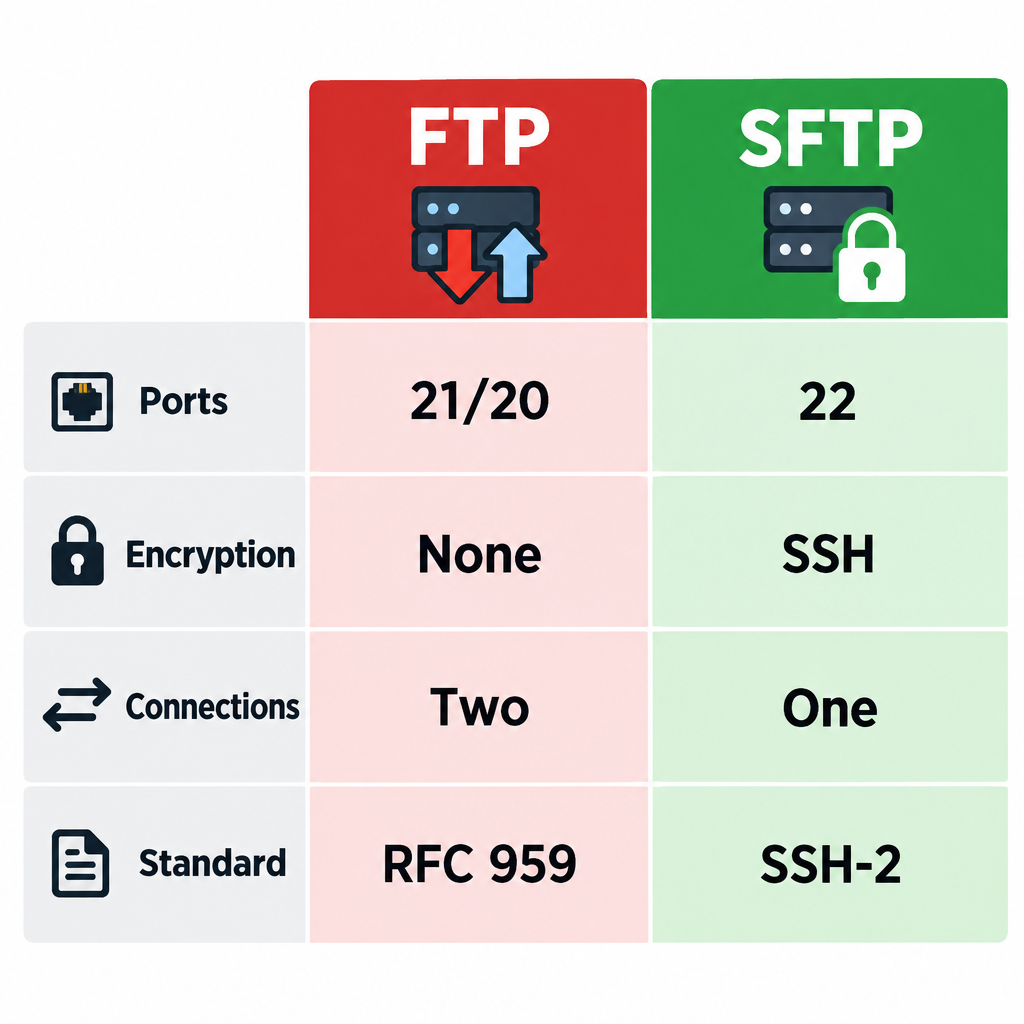
FTPS is FTP with TLS encryption added. SFTP is a separate protocol that runs inside SSH. Both encrypt your credentials and files. SFTP uses a single port, which makes it far easier to get through firewalls.
| Protocol | Encryption | Default port(s) | Connections | Firewall-friendly? | Best for |
|---|---|---|---|---|---|
| FTP | None | 21 control, 20 active data, passive range | Two (control + data) | Poor | Legacy internal systems, public read-only mirrors |
| FTPS explicit (FTPES) | TLS, upgraded via AUTH TLS |
21, plus passive range | Two | Poor (firewalls can’t inspect encrypted commands) | Hosts that only offer FTP-family access |
| FTPS implicit | TLS from the first byte | 990 control, 989 data | Two | Poor | Older enterprise setups |
| SFTP | SSH (encrypted session) | 22 (hosts may use 2222 or a custom port) | One | Good | Website files, server admin, automation |
| HTTPS | TLS | 443 | One | Excellent | Downloads, web uploads, cloud storage links |
FTPS: implicit vs explicit
Explicit FTPS, often called FTPES, starts as a normal FTP session on port 21. The client then sends AUTH TLS to upgrade the connection to encryption before logging in. RFC 4217 (2005) standardised this approach, and it’s the one to choose.
Implicit FTPS assumes encryption from the first packet and listens on port 990, so it can’t fall back to plain FTP. It’s the older approach, never formally standardised, and it’s mostly found on legacy systems today.
Pros of FTPS: encrypts credentials and data, works with existing FTP accounts and daemons, and supports certificate-based server trust. Cons: it still needs a separate data channel and a passive port range. Firewalls and NAT devices can’t read the encrypted PASV replies to help, which is why FTPS through strict firewalls is often painful.
Builder tip
If your host only offers FTP, set Encryption to “Require explicit FTP over TLS” in FileZilla’s Site Manager. Never pick “Only use plain FTP (insecure)”, especially on public Wi-Fi.
SFTP: FTP-like, but built on SSH
SFTP (SSH File Transfer Protocol) shares a purpose and a few command names with FTP, but nothing else. It’s a subsystem of SSH, designed by the IETF’s Secure Shell working group, and it’s commonly served by OpenSSH. Authentication, commands and file data all travel inside one encrypted SSH connection on port 22.
Pros of SFTP: one port to open, strong encryption, support for SSH key authentication, and it’s already present on almost every Linux server. Cons: whoever has SFTP access usually has SSH-level trust on the box, so permissions need care. Some cheap shared plans also only provide FTP.
So which works through a firewall, SFTP or FTPS? SFTP, almost every time. It’s one TCP port with no side channels.
FTP vs HTTP and MFT
HTTP (and HTTPS) also moves files, but it’s built for serving content to many anonymous readers, not for managing a remote directory. You can’t rename or chmod a file over a normal website. HTTPS is the right choice for public downloads and browser uploads.
Managed File Transfer (MFT) is a category of commercial platforms that wrap SFTP, FTPS and HTTPS. They add audit logs, scheduling, retries and compliance reporting. Banks, healthcare and supply chains use MFT where partners exchange files on a schedule. It costs far more than a free client, and that’s justified only when you need the audit trail.
Which one should you use?
Use SFTP whenever your host or server offers it. That covers almost every WordPress, WooCommerce and VPS setup. Use explicit FTPS if plain FTP is the only alternative. Use plain FTP only for public, read-only data on a network you control.
There’s a fair counter-argument. On an isolated internal network, such as a scanner dropping files to a NAS, plain FTP is simple and widely supported by old hardware. That’s acceptable only if nothing sensitive crosses the link and the server isn’t reachable from the internet.
Is FTP dead, then? Not dead, but shrinking. Censys’s 40% drop since 2024 shows the trend. For sending big files to people, cloud storage share links over HTTPS have mostly replaced FTP. For server-to-server jobs, SFTP and rsync over SSH have taken over.
How to use FTP/SFTP today (browsers can’t)
You need a dedicated client, a command-line tool or your operating system’s file manager. Web browsers no longer speak FTP at all.
Why ftp:// links stopped opening in your browser
Google turned FTP off by default in Chrome 88 in January 2021 and removed FTP URL support entirely, as announced in the Chrome 95 deprecations. Google cited low usage and the fact that Chrome’s FTP client had no FTPS or proxy support.
Mozilla disabled FTP by default in Firefox 88, though users could re-enable it through a preference, and removed FTP support in Firefox 90, so it can no longer be restored with a setting. Clicking an ftp:// link in either browser now hands it off to an external app, if you have one installed.
Did you know?
According to Google’s Chrome 95 deprecation notes, FTP was removed partly because usage was too low to justify fixing a client that never supported encrypted FTPS.
GUI clients
| Client | Platforms | Protocols | Price (as of Nov 2026) |
|---|---|---|---|
| FileZilla (3.72.x) | Windows, macOS, Linux | FTP, FTPS, SFTP | Free, open source |
| FileZilla Pro | Windows, macOS, Linux | Adds cloud storage, WebDAV | Paid; official pricing page lists 19.99 EUR per year |
| WinSCP | Windows | SFTP, SCP, FTP, FTPS, WebDAV, S3 | Free, open source |
| Cyberduck | macOS, Windows | FTP, SFTP, WebDAV, S3, cloud | Free download (donation-supported); $29.99 on the Mac App Store |
FileZilla’s newest client build is 3.72.1, listed November 16, 2026, and FileZilla Pro 3.72.0 added SSH proxy support with SFTP changes. FileZilla is the default recommendation in most hosting documentation. WinSCP suits Windows users who want an Explorer-style or Norton Commander-style interface and built-in scripting. Cyberduck fits Mac users who also connect to S3 or other cloud storage.
Download clients only from the official project sites. Bundled installers from third-party mirrors have a history of adware.
Command line
All three major operating systems can run SFTP from a terminal:
sftp -P 22 [email protected] sftp> cd public_html/wp-content/plugins
sftp> get -r broken-plugin
sftp> put fixed-file.php
sftp> bye
Windows also still ships the legacy ftp.exe for plain FTP, but it has no passive mode, so it often fails behind NAT. Apple removed the ftp command from macOS years ago. On Linux you can install lftp, which handles FTP, FTPS and SFTP.
You can also browse servers from your file manager. On Linux, GNOME Files accepts sftp:// addresses directly. Windows File Explorer and macOS Finder (Go > Connect to Server) can open ftp:// addresses, but only as plain, unencrypted FTP, and Finder’s access is read-only.
FTP for website owners: WordPress, WooCommerce and other CMSs

Most hosts that run WordPress or WooCommerce give you SFTP credentials, and many give FTP as well. If your host offers both, use SFTP. It’s encrypted, it uses one port and it’s what managed hosts’ support teams expect.
Finding your credentials
Where to look depends on your host’s control panel:
- cPanel: Files > FTP Accounts lists the FTP users and the server name. Your main cPanel username and password usually work for SFTP too, if the host has enabled SSH access (Security > SSH Access).
- Managed WordPress hosts: look in the site’s dashboard for an “SFTP/SSH” or “SFTP users” section. WP Engine, for example, uses port 2222 for SFTP, and other managed hosts assign a custom port per site.
- WordPress.com: SFTP is only offered on higher-tier plans with plugin support.
- Hosted builders: the Shopify ecommerce platform, Wix and Squarespace don’t give file-level access. You work through their admin and theme editors instead.
How do you tell which protocol you’ve been given? An address starting with sftp://, or a port of 22 or 2222, means SFTP. Port 21 means FTP or explicit FTPS. Many managed hosts block plain FTP entirely, which is why choosing “FTP” in your client produces a timeout.
Builder tip
If your host’s details start with sftp:// or list port 22 or 2222, pick SFTP in FileZilla’s Site Manager. Choosing plain FTP is the most common reason a connection to these hosts times out.
Connect with FileZilla over SFTP, step by step
Setup steps
- Install the current FileZilla client from the official project site.
- Open File > Site Manager and click New site.
- Set Protocol to “SFTP – SSH File Transfer Protocol”.
- Enter the Host and Port exactly as your host lists them.
- Set Logon Type to “Normal” or “Ask for password”.
- Enter your SFTP username and password, then click Connect.
- Confirm the server’s host key fingerprint matches your host’s documentation, then tick Trust.
- Open your web root (often public_html or a site folder) in the right-hand pane.
If your host uses SSH keys instead of passwords, set Logon Type to “Key file” and point it at your private key. For an FTP-only host, choose “FTP – File Transfer Protocol” and set Encryption to “Require explicit FTP over TLS”.
5 fixes you can only do with file access
Back up before you touch anything. Download a copy of wp-content and wp-config.php first, so you can put things back if an edit goes wrong.
- White screen after a plugin update: open
wp-content/pluginsand rename the plugin’s folder (for examplewoocommerce-addontowoocommerce-addon-off). WordPress deactivates it, and you can log back in. - Turn on debugging: edit
wp-config.phpand setdefine( 'WP_DEBUG', true );withdefine( 'WP_DEBUG_LOG', true );to write errors towp-content/debug.log. Turn both off again afterwards. - Stuck in maintenance mode: delete the
.maintenancefile in the site root that an interrupted update left behind. - Upload a theme or plugin manually: unzip it locally and upload the folder to
wp-content/themesorwp-content/pluginsin binary mode. - Reset a broken
.htaccess: rename it and let WordPress regenerate it from Settings > Permalinks. This is a common fix when a bad rule causes a 403 Forbidden error.
File access won’t fix every error. A 502 bad gateway or 504 gateway time-out usually points to the server or PHP process, not your files, so start with your host’s error logs there.
When WordPress asks for FTP details
WordPress shows a “Connection Information” form asking for an FTP host, username and password when PHP can’t write to your site’s files directly. Behind it is usually a file ownership mismatch between the web server user and the account that owns the files.
The proper fix is correct ownership on the host, which support can sort out. A common workaround is adding this line to wp-config.php:
define( 'FS_METHOD', 'direct' );
WordPress’s own documentation warns this can open security issues on poorly configured hosts. Never “fix” the prompt by setting permissions to 777. On managed hosting you may need your host to make the change.
If you must run an FTP server: a hardening checklist
The safest FTP server is one you’ve replaced with SFTP. If legacy devices, partners or software force you to keep FTP, harden it like this:
- Back up the server configuration before changing anything.
- Enable explicit TLS and require it. Censys notes this is a configuration change, not a protocol upgrade, and Pure-FTPd and vsftpd both support it natively. Disable TLS 1.0 and 1.1.
- Turn off anonymous login unless you deliberately host a public, read-only mirror with no sensitive data, as the FBI’s 2017 notification advised.
- Set a fixed passive port range in the daemon and open only that range on the firewall.
- Patch the daemon. Update Wing FTP Server to 7.4.4 or later, and replace any vsftpd 2.3.4 install entirely.
- Chroot each user to their own directory so one compromised account can’t browse the server.
- Scan non-standard ports, not only 21. FTP daemons often get moved to other ports and forgotten.
- Rate-limit failed logins with fail2ban or the hosting panel’s equivalent, and use unique passwords per account.
A short history of FTP
FTP is older than the TCP/IP internet itself. The protocol was rewritten several times before RFC 959 fixed it in 1985.
| Year | Milestone |
|---|---|
| April 1971 | RFC 114, the first FTP proposal, by Abhay Bhushan of MIT Project MAC, for the ARPANET |
| June 1971 | RFC 172 revises the File Transfer Protocol |
| 1980 | RFC 765 moves FTP onto TCP |
| October 1985 | RFC 959 (Postel and Reynolds) obsoletes RFC 765 and becomes STD 9 |
| 2005 | RFC 4217 standardises explicit FTP over TLS |
| 2021 | Chrome (88, then 95) and Firefox (88, then 90) drop FTP |
| 2024 → 2026 | Censys counts fall from over 10.1M to about 5.95M internet-facing FTP hosts |
The core of RFC 959 has stayed in place for four decades. Later extensions bolted on security (RFC 2228), IPv6 (RFC 2428) and TLS, but never changed the two-connection design.
FAQ
What is FTP used for?
Uploading and managing website files, exchanging data feeds between businesses, distributing firmware and public software mirrors, and receiving files from devices such as scanners and IP cameras. Most website work has moved to SFTP.
What is FTP on a computer?
It’s the protocol your file transfer client (FileZilla, WinSCP, Cyberduck) uses to talk to a remote server. It shows the server’s folders next to your own so you can drag files between them.
What is an FTP port? Is FTP port 21 or 20?
Both. Port 21 carries commands and is always used. Port 20 is the server’s data port in active mode only. In passive mode, data goes over a high port the server chooses. SFTP uses port 22.
Is FTP secure?
No. Plain FTP sends usernames, passwords and files unencrypted. FTPS (with TLS) and SFTP (over SSH) are the secure options.
What is the difference between FTP, FTPS and SFTP?
FTP has no encryption. FTPS is FTP with TLS added, still using two connections. SFTP is a separate protocol built into SSH that uses one encrypted connection, normally on port 22.
Is FTP still used in 2026?
Yes. Censys counted about 5.95 million internet-facing FTP hosts in April 2026, but that’s down roughly 40% from over 10.1 million in 2024.
How do I open an FTP link now that Chrome doesn’t support it?
Copy the address into an FTP client such as FileZilla, WinSCP or Cyberduck. You can also paste it into Windows File Explorer or macOS Finder’s Connect to Server for plain FTP.
What is an FTP server?
Software that accepts FTP connections and serves files, such as Pure-FTPd, ProFTPD, vsftpd or Wing FTP Server. On web hosting, it’s usually installed alongside the web server by the control panel.
What is anonymous FTP?
A mode where anyone can log in with the username “anonymous” or “ftp” and no real password. It suits public download mirrors. On any server holding private data, it’s a serious risk.
What is passive mode in FTP?
The client opens both the control and data connections, after the server tells it which port to use. It works far better than active mode behind home routers and firewalls, and it’s the default in FileZilla.
Do I use FTP or SFTP for my WordPress site?
SFTP. If your host gives you both, the SFTP credentials protect your password and files, and they’re what support will expect. Your next step: open your hosting dashboard, find the SFTP details, and save them as a site in your client before you need them in an emergency.
Summary: FTP moves files over two connections: commands on port 21, and file data on port 20 (active mode) or a server-chosen high port (passive mode). Plain FTP is unencrypted. In April 2026, Censys found about 2.45 million of roughly 5.95 million internet-facing FTP hosts with no TLS. For a WordPress or WooCommerce site, connect over SFTP (port 22, or 2222 and other custom ports on some managed hosts) using FileZilla, WinSCP or Cyberduck, since Chrome and Firefox dropped FTP in 2021. If you have to keep an FTP server running, require explicit TLS, turn off anonymous login and patch Wing FTP Server to 7.4.4 or later.
About this article
- Fact-checked by Moira Hensley against the sources listed below before publication.
- Published
Sources (8)
- FTP Exposure Brief: Examining the 55-Year-Old Protocol Used by Millions (Censys) (censys.com)
- Half of the 6 Million Internet-Facing FTP Servers Lack Encryption (SecurityWeek) (securityweek.com)
- Censys warns 6 million public-facing FTP servers exposed (GBHackers) (gbhackers.com)
- Nearly 6 million internet-facing FTP servers remain exposed in 2026, Censys warns (VPNCentral) (vpncentral.com)
- CISA Adds One Known Exploited Vulnerability to Catalog (CISA) (cisa.gov)
- CISA Flags Actively Exploited Wing FTP Vulnerability (The Hacker News) (thehackernews.com)
- U.S. CISA adds a flaw in Wing FTP Server to its KEV catalog (Security Affairs) (securityaffairs.com)
- Deprecations and removals in Chrome 95 (Chrome for Developers) (developer.chrome.com)