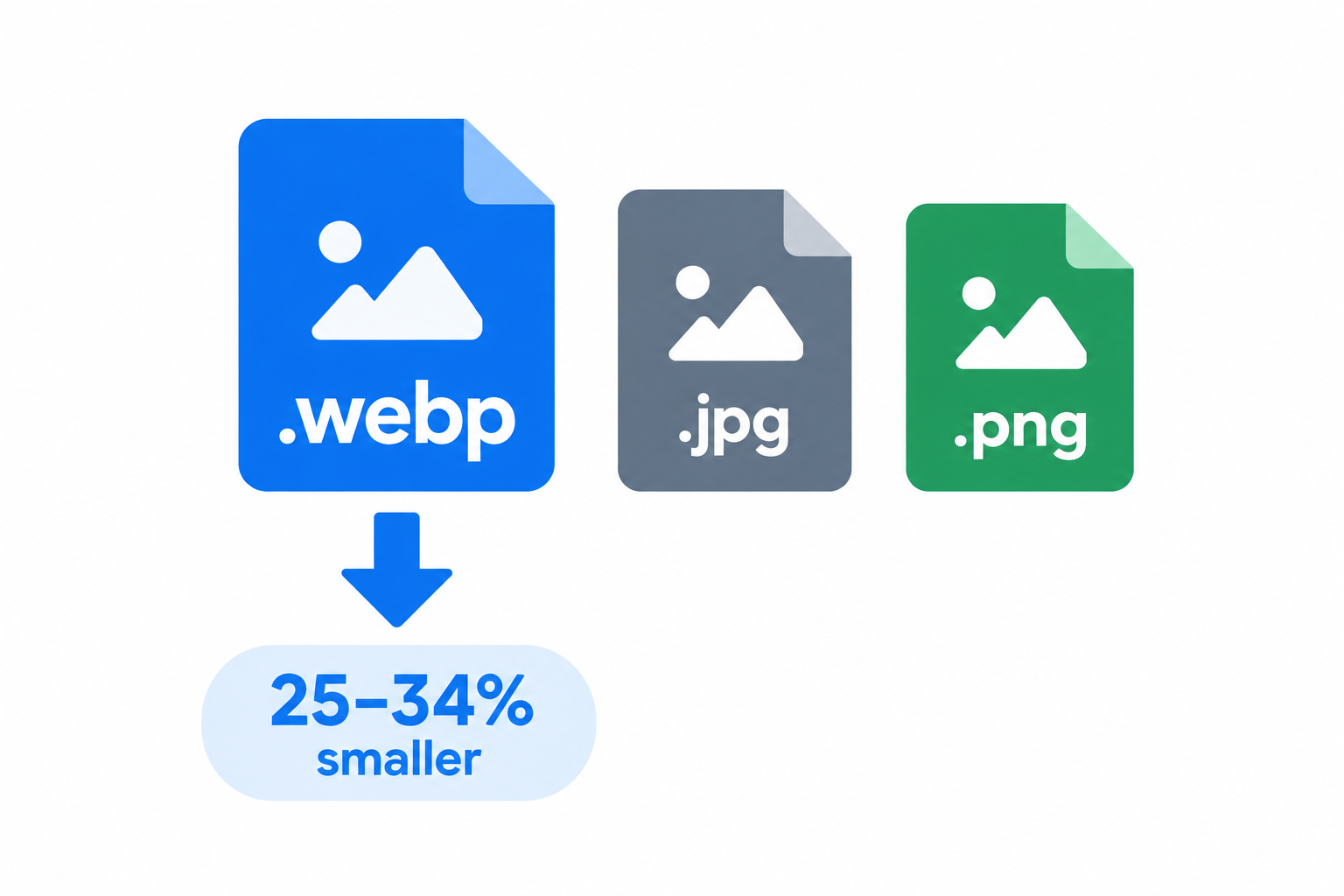
WebP is Google’s image format for the web. It makes photos and graphics smaller than JPEG or PNG at the same visual quality, and about 97% of browsers in use can display it. If a downloaded .webp file won’t open in some app, start with the sections on why everything saves as WebP and how to convert it. If you run a website, the platform section further down covers WordPress, WooCommerce, Shopify and hand-coded pages.
In short
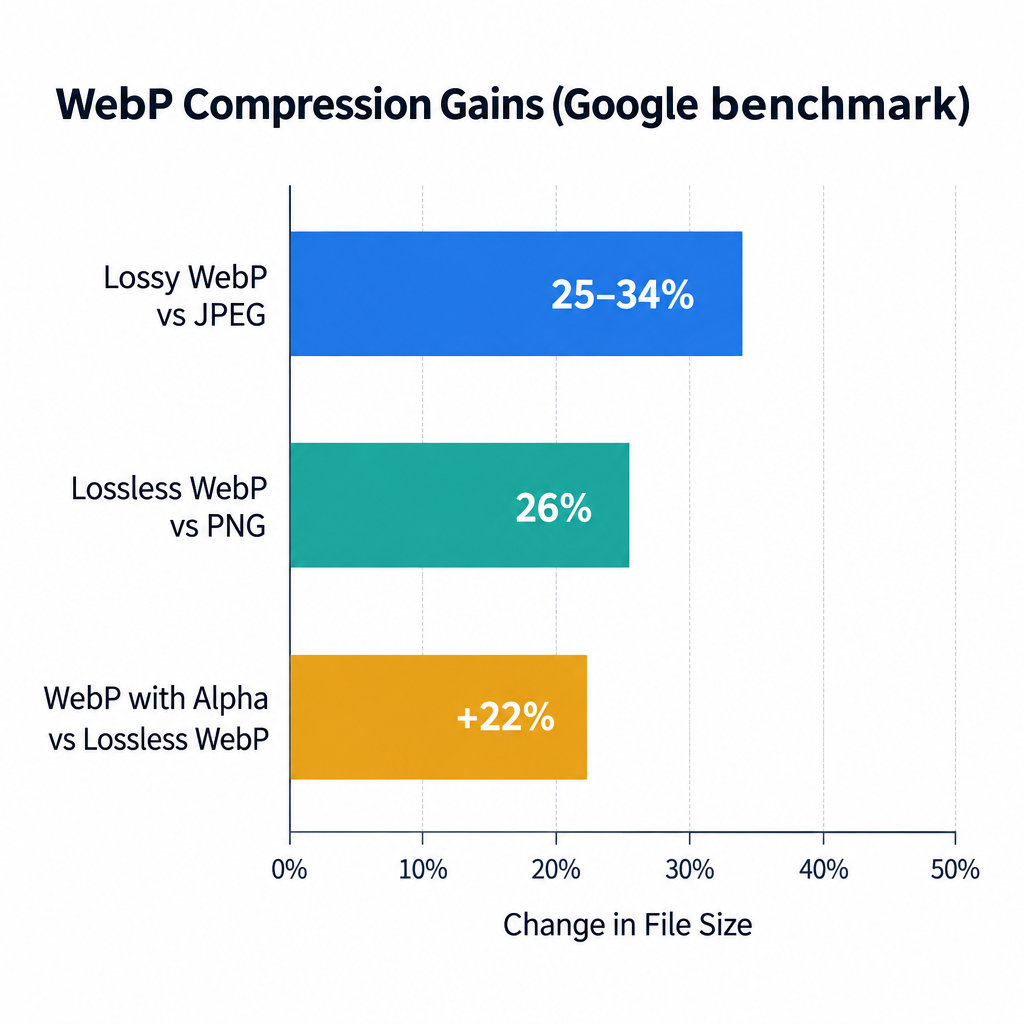
- Google’s studies show lossy WebP runs 25-34% smaller than JPEG and lossless WebP 26% smaller than PNG.
- Every current major browser displays WebP. For photos, AVIF usually compresses better, but it has a much smaller footprint on the web so far.
- Renaming .webp to .jpg does not convert it. Use Paint, Preview, Photoshop 23.2+ or Google’s dwebp tool.
- WordPress has accepted WebP uploads since 5.8, and Shopify’s CDN has converted images automatically since July 2019.
- Keep libwebp and your server’s image libraries patched. CVE-2023-4863 was exploited in the wild.
Fact-checked
We checked these key facts against the sources named, on November 26, 2026:
- In September 2023, CVE-2023-4863 exposed a heap buffer overflow in libwebp’s lossless decoding (source: access.redhat.com)
- Shopify’s October 2022 changelog says converting GIFs to animated WebP cuts delivered bytes by up to 50% (source: changelog.shopify.com)
- The current upstream release is libwebp 1.6.0, released on 30 June 2025, and it’s the only branch the project treats as current (source: chromium.googlesource.com)
- In November 2024 the IETF published RFC 9649, “WebP Image Format”, by Google engineers James Zern, Pascal Massimino and Jyrki Alakuijala (source: rfc-editor.org)
- The IETF published RFC 9649 in November 2024 and registered the image/webp media type at the same time. Google has never given an official expansion (source: rfc-editor.org)
What is WebP?
WebP is a raster image format that Google announced in 2010. It grew out of the VP8 video codec Google got when it bought On2 Technologies. One format covers lossy compression for photos, lossless compression for graphics, transparency (an alpha channel) and animation. That lets it stand in for JPEG, PNG and GIF. Files end in .webp and are served with the MIME type image/webp.
The format was a de facto standard for over a decade. In November 2024 the IETF published RFC 9649, “WebP Image Format”, by Google engineers James Zern, Pascal Massimino and Jyrki Alakuijala. It defines the bitstream and the container, registers the image/webp media type, and covers optional Exif and XMP metadata.
How you approach WebP depends on why you’re here. Someone who just right-clicked an image and got a .webp needs the sections on format negotiation, opening and converting. A site owner needs the comparison table, the platform section and the security notes.
Did you know?
WebP was 14 years old before it became a formal internet standard document. The IETF published RFC 9649 in November 2024 and registered the image/webp media type at the same time.
WebP full form and pronunciation
Google has never given an official expansion. People usually read it as “Web Picture”, which matches what it was built for. Google’s WebP FAQ says to pronounce it “weppy”.
Is WebP raster or vector?
WebP is a raster format. It stores a grid of pixels, just as JPEG and PNG do. Scale a WebP above its native size and it blurs. For logos and icons that need to stay sharp at any size, SVG is still the right format. The WebP spec also caps width and height at 16,383 pixels each, because each dimension is stored in 14 bits. Tools either throw an error or hang on very long panoramas and full-page screenshots that exceed it.
How WebP works: lossy, lossless, transparency and animation
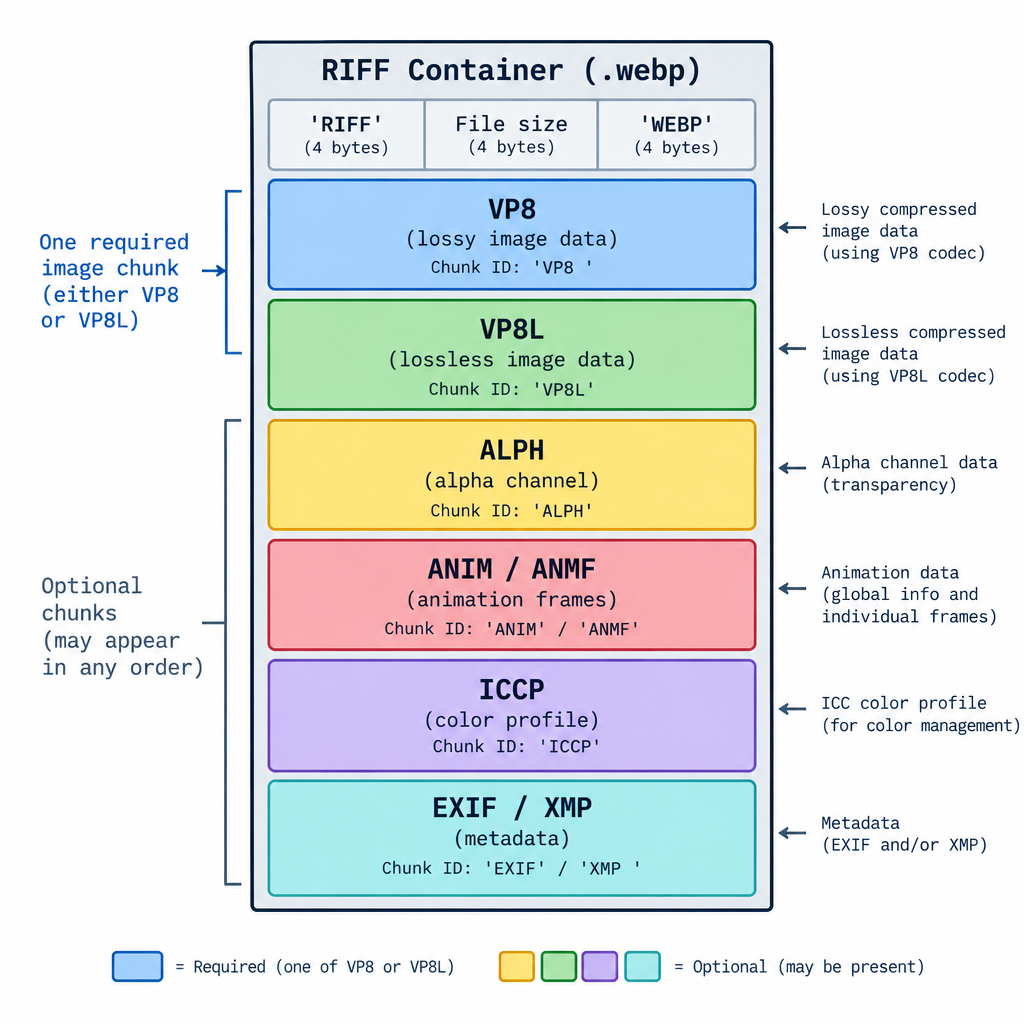
Each WebP file is a RIFF container, a chunked file structure that dates back to WAV and AVI. Inside it sits one of two kinds of image data: VP8 for lossy images or VP8L for lossless ones. Optional chunks carry an alpha channel, animation frames, an ICC colour profile, and Exif or XMP metadata. The reference implementation is Google’s libwebp library. The same project ships the cwebp (encode) and dwebp (decode) command-line tools.
Google’s own published figures are the most widely cited size numbers:
| Comparison | Google’s reported result |
|---|---|
| Lossless WebP vs PNG | 26% smaller |
| Lossy WebP vs JPEG (equal SSIM quality) | 25-34% smaller |
| Cost of adding transparency to lossless WebP | about 22% more bytes |
| Maximum dimensions | 16,383 × 16,383 px |
SSIM (structural similarity) is a metric that scores how close a compressed image looks to the original. “Equal SSIM” means the files were compared at the same measured quality, which is a fairer test than comparing at the same quality slider value.
Lossy WebP (photos)
Lossy WebP uses predictive coding taken from VP8 keyframes. The encoder splits the image into blocks and predicts each block from pixels it has already encoded. It then stores only the difference between prediction and reality and quantises that difference. Quantising is where data is thrown away, which is why you get a quality setting. For photographs this beats JPEG’s older block transform at the same perceived quality.
There’s one constraint you should know about. Lossy WebP always stores colour at half resolution (4:2:0 chroma subsampling) and only at 8 bits per channel. Most photos hide this well. Saturated red text and thin coloured lines can pick up soft edges. The cwebp -sharp_yuv option reduces the effect, but it can’t remove it.
Lossless WebP (graphics, screenshots)
Lossless WebP (VP8L) reconstructs every pixel exactly. It uses spatial prediction, colour-space transforms, a cache of recently used colours, and back-references to repeated pixel runs. That makes it strong on screenshots, UI graphics and flat illustrations, where the same colours repeat a lot. It’s the format to compare against PNG, and Google measures it at 26% smaller.
Transparency without PNG weight
Transparent images were PNG territory for a long time, because JPEG has no alpha channel. WebP supports alpha in both modes. In lossless mode, Google’s study puts transparency at about 22% extra bytes. The more interesting option is lossy WebP with a lossless alpha channel. This suits cut-out product photos on online stores, where it can come out smaller than the equivalent PNG.
Animated WebP vs GIF
GIF is limited to 256 colours per frame and compresses poorly. Animated WebP supports full colour and alpha, and each frame can be lossy or lossless. Shopify’s October 2022 changelog says converting GIFs to animated WebP cuts delivered bytes by up to 50%. For anything longer than a short loop, a muted MP4 or WebM video in a <video> element is usually smaller again.
Is WebP better than JPEG? WebP vs JPEG vs PNG vs AVIF
For web delivery, yes. WebP beats JPEG on file size at equal quality, and it adds transparency and animation that JPEG lacks. It isn’t the best at everything, though. AVIF usually produces smaller photos. JPEG is still the safer choice for print, email and sharing, and SVG beats every raster format for logos.
| Format | Typical size | Support | Compression | Transparency | Animation | Best for |
|---|---|---|---|---|---|---|
| WebP | 25-34% smaller than JPEG; 26% smaller than PNG (Google) | ~97.4% of browsers (Can I Use) | Lossy and lossless | Yes | Yes | General web delivery |
| AVIF | Usually smaller than WebP for photos | All current major browsers | Lossy and lossless | Yes | Yes | Large photos, hero images |
| JPEG | Baseline for photos | Universal | Lossy | No | No | Sharing, print, email, archives |
| PNG | Large for photos; baseline for lossless | Universal | Lossless | Yes | No (APNG aside) | Editing masters, pixel-exact graphics |
| GIF | Largest; animated WebP up to 50% smaller (Shopify) | Universal | Lossless, 256 colours | 1-bit only | Yes | Legacy compatibility |
| SVG | Tiny for simple shapes | Universal | Vector (text-based) | Yes | Yes (CSS/SMIL) | Logos, icons, diagrams |
WebP vs JPEG
WebP wins on size, transparency and animation. JPEG wins on compatibility outside the browser. Print shops, older desktop software, some email clients and plenty of upload forms still expect JPEG. JPEG also supports progressive loading, where a blurry full image appears first and sharpens. WebP doesn’t offer that.
So use JPEG as your master and sharing format, and WebP as the delivery format. That combination gives you most of the benefit and avoids the friction.
WebP vs PNG
Lossless WebP is roughly a quarter smaller than PNG for the same pixels. Lossy WebP with alpha can be smaller again. PNG keeps two advantages. Every image editor reads and writes it, and it supports 16 bits per channel, which matters for editing workflows. Keep PNG for source files and anything you’ll keep editing. Serve WebP to visitors.
WebP vs AVIF in 2026
AVIF comes from the AV1 video codec. For photos it generally gets smaller files than WebP at the same quality, and it supports higher bit depths and HDR. WebP can’t do either. The trade-offs are slower encoding, newer browser support (Safari only added AVIF with version 16) and far lower deployment. W3Techs’ May 2026 snapshot found AVIF on 1.5% of websites against 20.9% for WebP.
The practical answer for most sites: serve AVIF where your platform or CDN can produce it automatically, and keep WebP and JPEG as fallbacks. Hand-encoding three versions of every image isn’t worth it for a small site. Letting WordPress or a CDN do it is.
Which format to use for each image type
For a longer treatment of the classic choice, see the guide on PNG or JPEG. The rule below adds the modern formats.
| Image type | Recommended format | Fallback | Why |
|---|---|---|---|
| Photo (blog, hero, gallery) | AVIF or lossy WebP | JPEG | Biggest byte savings on the largest images |
| Logo, icon, simple illustration | SVG | PNG or lossless WebP | Vector stays sharp at any size |
| Screenshot with text | Lossless WebP | PNG | Lossy compression blurs small text |
| Transparent product cut-out | Lossy WebP with alpha | PNG | Usually smaller than PNG |
| Short animation | Animated WebP or MP4/WebM video | GIF | GIF is the least efficient option |
| File visitors download, print or email | JPEG or PNG | None needed | Works in every app without conversion |
| Editing master you keep | Original JPEG, PNG, TIFF or RAW | None | Avoids repeated lossy re-encoding |
Why is every image I save a WebP now?
Most of the time the website didn’t store a WebP at all. The site’s CDN looked at what your browser said it accepts and converted the original JPEG or PNG on the fly. Chrome, Edge, Firefox and Safari all advertise WebP support, so they get WebP, and “Save image as” saves exactly what arrived.
How CDNs swap formats behind the scenes
Browsers send an Accept request header listing the image types they can decode, such as image/avif,image/webp,*/*. Image CDNs read that header and return the smallest format the browser supports. The URL often still ends in .jpg while the response says Content-Type: image/webp.
Shopify is the best-documented case. Its changelog shows automatic WebP for JPG and PNG files from July 2019, AVIF from August 2022, and animated WebP for GIFs from October 2022. Cloudflare’s image resizing service and other image CDNs offer the same kind of automatic format selection.
That explains a common complaint about Reddit and other big platforms. They convert uploads to WebP for delivery, but their chat or upload tools sometimes refuse a WebP back. Delivery pipelines and upload validators are often separate systems and don’t always accept the same formats.
Getting the original JPG or PNG
The original file is still on the server. You just aren’t being sent it. In order of reliability:
- Use the site’s own download button, if it has one. Stock libraries, Google Drive and most photo hosts deliver the original file that way.
- Open the image in a new tab and look at the URL. Some sites serve a resized preview, and the full-size link sits elsewhere on the page.
- Save the WebP and convert it locally (steps below). If the CDN produced the WebP from a JPEG, this gives you a near-identical copy. It’s re-encoded, though, so it isn’t the original.
People also ask how to stop Firefox or Chrome saving images as WebP. Neither browser has a supported setting for it, because the format is decided by the server’s response. Extensions that offer “Save as JPG” just convert the WebP after download. They don’t fetch the original.
Converting on Windows
To turn a WebP into a JPG on Windows, open it in Paint and choose File → Save as → JPEG picture. Renaming the extension does not convert the file.
Why doesn’t renaming work? A WebP file starts with the bytes “RIFF”, a size field and then “WEBP”, as RFC 9649 defines. Changing the name to .jpg leaves that data untouched. Apps that check the file’s contents still see WebP, and apps that trust the extension try to read it as JPEG and fail.
How to open a WebP file
Every current browser opens WebP. Drag the file into a Chrome, Edge, Firefox or Safari window and it displays. Built-in viewers on Windows, macOS, iOS and Android handle it too. Problems usually come from older desktop software, upload forms and some chat apps.
| Device / app | Opens WebP? | Convert how | Notes |
|---|---|---|---|
| Any modern browser | Yes | Not a converter | Fastest way to view a file |
| Windows 11 Photos / Paint | Yes | Paint: Save as → JPEG or PNG | Windows 10 may need Microsoft’s WebP Image Extensions from the Microsoft Store |
| macOS Preview | Yes (Big Sur and later) | File → Export → JPEG or PNG | Same OS release that brought Safari 14 |
| iPhone / iPad | Yes (iOS 14 and later) | Share to an editing app, or screenshot | Some third-party apps still reject the file |
| Android | Yes (native since Android 4.0) | Gallery or editor “save as” | Support depends on the gallery app |
| Photoshop 23.2+ | Yes, natively | Save a Copy → JPEG/PNG/WebP | 23.1 and earlier need the WebPShop plug-in |
| GIMP | Yes | File → Export As | Choose the extension in the export dialog |
| cwebp / dwebp (libwebp) | Yes | Command line | Best for batches and servers |
Windows
Double-click the file to open it in Photos. If Windows asks which app to use, choose Photos or Paint. On older Windows 10 builds, Microsoft’s free WebP Image Extensions package adds support to Photos and File Explorer thumbnails.
Mac
Preview opens WebP on macOS Big Sur and later. Use File → Export and pick JPEG or PNG to make a copy that works everywhere. Quick Look (select the file and press Space) previews it without opening an app.
iPhone and Android
Both systems display WebP natively in current versions: iOS 14 and later, and Android since 4.0. Trouble usually comes when you share the image into an app that checks the file type. Long before Microsoft retired Skype in May 2025, users were stuck saving, converting to JPEG, sharing and then deleting the copy. If an app refuses WebP, convert it once in a photo editor, or take a screenshot if the quality doesn’t matter.
Photoshop and other editors
Adobe says Photoshop 23.2 (February 2022) opens, creates, edits and saves WebP with no plug-in. The save dialog offers Lossless or Lossy compression. Versions 23.1 and earlier need Google’s WebPShop plug-in. Some older guides still say “you may need a plug-in” without mentioning the version, and for current Photoshop that’s out of date. GIMP, Affinity Photo and most modern editors also read WebP.
Exporting from Photoshop
In Photoshop 23.2 or later, export WebP with File → Save a Copy. Some users don’t see WebP in plain Save As, depending on the document and settings.
How to convert WebP to JPG or PNG (and JPG/PNG to WebP)
The quickest private method is the app you already have: Paint on Windows, Preview on Mac or Photoshop. Online converters work but upload your file to someone else’s server. For whole folders or server workflows, Google’s cwebp and dwebp tools are the most reliable option.
Convert without installing anything
Convert a WebP with built-in apps
- Windows: open the file in Paint, choose Save as, pick JPEG or PNG.
- Mac: open in Preview, choose File → Export, set Format to JPEG or PNG.
- Photoshop 23.2+: open the file, choose File → Save a Copy, pick the format.
- Going the other way: in Photoshop, choose Save a Copy → WebP and select Lossy or Lossless.
Online converters are fine for public images. Free tiers usually cap file size or daily conversions. Don’t upload client files, personal photos or anything under an NDA to a service whose retention policy you haven’t read.
Batch conversion with cwebp/dwebp
libwebp’s command-line tools are free, run on Windows, macOS and Linux, and don’t phone home. cwebp encodes to WebP, and dwebp decodes WebP to PNG and other formats. dwebp doesn’t write JPEG directly, so decode to PNG first if you need a JPEG.
cwebp -q 80 photo.jpg -o photo.webp


cwebp -lossless logo.png -o logo.webp

# Reduce colour fringing on red text or fine colour detail
cwebp -q 80 -sharp_yuv banner.png -o banner.webp

# WebP back to PNG
dwebp photo.webp -o photo.png

# Batch: every JPEG in a folder (macOS/Linux shell)
for f in *.jpg; do cwebp -q 80 "$f" -o "${f%.*}.webp"; done
The same package includes gif2webp for animated GIFs. The current upstream release is libwebp 1.6.0, released on 30 June 2025, and it’s the only branch the project treats as current. If your package manager offers something much older, check for security backports before relying on it.
Avoiding quality loss when converting
A lossy WebP made from a JPEG has already lost data twice: once when the JPEG was made and again when it was re-encoded. Converting it back to JPEG adds a third round. Each round compounds blockiness and colour smearing. Converting to PNG stops further loss but can’t restore what’s gone, and the file gets bigger.
Keep your masters
Keep original JPEG, PNG or RAW files as masters and generate WebP from them. Converting lossy WebP to JPEG and back loses quality each time.
Disadvantages of WebP
WebP’s weak points are mostly outside the browser: compatibility, editing and the colour limits of the lossy mode. These are the ones that actually cost people time:
- Sharing friction. Upload forms, older desktop apps and some messaging tools still reject .webp. That’s behind most of the frustration people post online.
- Lossy-on-lossy degradation. WebP files on the web are often re-encodes of JPEGs. Every save in a lossy format loses more detail.
- 8-bit, 4:2:0 lossy mode. There’s no HDR or high bit depth, and fine colour detail can bleed. AVIF and PNG handle both better.
- No progressive rendering. Large WebP images appear top to bottom instead of sharpening in place like a progressive JPEG.
- Metadata gets stripped. The format supports Exif and XMP, but many converters and CDNs drop them. Photographers can lose copyright and camera data.
- Beaten by AVIF on photos. For large photographic images, AVIF usually produces smaller files at the same quality.
- Decoder security history. CVE-2023-4863 showed how many apps bundle libwebp, and how much depends on that one library being patched.
Then there’s the honest counter-argument to all the WebP hate: most of it is about workflow, not image quality. On a website, visitors never notice the format. They notice the page loading faster.
Browser and software support in 2026
WebP works in about 97.4% of browsers in use, according to Can I Use figures cited in 2026. The remaining gap is mostly old Internet Explorer and legacy mobile browsers. Safari 14 (September 2020) was the turning point. Before it, global support stood at 79.4% (KeyCDN, July 2020).
Browsers
| Browser | WebP support since | Notes |
|---|---|---|
| Google Chrome | Chrome 17 (lossy); 23 (lossless, alpha); 32 (animation) | Google’s own browser, first to ship |
| Opera | Opera 11.10 | Early adopter |
| Microsoft Edge | Edge 18 | Chromium-based Edge supports everything Chrome does |
| Mozilla Firefox | Firefox 65 (January 2019) | Full support, including animation |
| Apple Safari | Safari 14 (iOS 14, macOS Big Sur) | Can I Use marks 14-15.6 as partial and 16+ as full |
| Internet Explorer | Never | Retired; the main remaining gap |
Operating systems and apps
Android has decoded WebP natively since 4.0. Apple added it system-wide with iOS 14 and macOS Big Sur. Windows 11 handles it in Photos and Paint. Among editors, Photoshop 23.2+, GIMP and most modern tools read and write it. The weak spots are older office suites, some print workflows and some third-party upload validators.
How widely WebP is actually used
Browsers support WebP far more widely than websites use it. W3Techs’ May 2026 snapshot shows the share of websites using each format:
| Image format | Share of websites (W3Techs, May 2026) |
|---|---|
| PNG | 77.8% |
| JPEG | 71.5% |
| SVG | 68.8% |
| WebP | 20.9% |
| GIF | 13.3% |
| AVIF | 1.5% |
The HTTP Archive Web Almanac 2024 shows the trend by image count. JPEG fell from 40% of all images in 2022 to 32% in 2024. Over the same period WebP gained about three percentage points and AVIF almost one. W3Techs counts sites, so a store whose CDN converts on the fly may not show up as a WebP site even though most visitors receive WebP.
Did you know?
WebP works in about 97% of browsers, yet W3Techs found it on only 20.9% of websites in May 2026, while JPEG appears on 71.5%.
So why isn’t adoption higher? Mostly inertia. Millions of sites run on themes, plugins and upload workflows that never converted their media libraries, and WebP only matters to owners who measure page weight.
Using WebP on your website: WordPress, WooCommerce, Shopify and others
On most platforms you no longer need to create WebP files by hand. WordPress accepts and can generate them, Shopify’s CDN converts automatically, and hand-coded sites can serve WebP with a JPEG fallback using the <picture> element. If the content management system concept is new to you, the CMS explained guide covers how media libraries fit in.
| Platform | WebP since | AVIF | Automatic conversion? | Requirements / caveats |
|---|---|---|---|---|
| WordPress / WooCommerce | 5.8 (2021) uploads | 6.5 (2024) | With the Modern Image Formats plugin or a filter | Server needs Imagick or GD with WebP; lossless needs Imagick |
| Shopify | July 2019 (auto-serve) | August 2022 | Yes, per browser, at the CDN | Upload high-quality JPG/PNG; GIFs become animated WebP (Oct 2022) |
| Image CDNs (e.g. Cloudflare image resizing) | Varies | Yes | Yes, via Accept-header negotiation | Usually a paid add-on or plan feature |
| Hand-coded / static sites | Any | Any | No | Use <picture> and set the MIME type |
WordPress and WooCommerce
WordPress 5.8 added WebP uploads to core with no plugin. WordPress then creates the usual thumbnail sizes in WebP, as long as the server’s image library supports it. Lossless WebP output requires the Imagick library. WordPress 6.5 added AVIF, which likewise depends on Imagick or LibGD having AVIF support. WooCommerce product images go through the same media library, so the same rules apply.
Before you install anything, go to Tools → Site Health → Info → Media Handling. It shows which image editor WordPress is using (Imagick or GD) and which formats it supports.
Builder tip
On WordPress, check Tools → Site Health → Info → Media Handling to confirm Imagick and WebP/AVIF support before you install a conversion plugin. A plugin cannot fix a server library that lacks WebP.
To turn your JPEG uploads into WebP sub-sizes, the WordPress Performance Team’s Modern Image Formats plugin (slug: webp-uploads) generates WebP or AVIF versions of uploaded images. If you’d rather not add a plugin, core has a filter, available since 5.8, that changes the output format for generated sizes:
// In a small custom plugin or your child theme's functions.php
add_filter( 'image_editor_output_format', function ( $formats ) {
    $formats['image/jpeg'] = 'image/webp';
    return $formats;
} );
Back up your site and media library before bulk-converting existing images or switching conversion plugins. Bulk tools rewrite thousands of files and database references, and a failed run can leave broken image URLs that turn up as 404 errors. Avoid “pro” image-optimisation plugins from unofficial download sites. Nulled plugins are a common way malware gets onto WordPress installs.
Shopify
Shopify has converted JPG and PNG files to WebP since July 2019 and added AVIF in August 2022. It picks a format per request based on the shopper’s browser, so in most cases you shouldn’t upload WebP at all. Upload a high-quality JPG or PNG and let the CDN produce the smaller versions. If you upload a heavily compressed WebP, that becomes the best quality the CDN has to work from, and the lost detail can’t be recovered.
Two questions come up a lot on Shopify’s community forum. First, “Is it normal that my images are delivered as JPEG in Safari?” Yes. Negotiation happens per browser and per image, and merchants have reported Safari getting JPEG or GIF where Chrome gets WebP or AVIF. That’s the CDN choosing, not a broken store. Second, “Why aren’t my JPEG images converting to WebP?” They usually are. The URL keeps the .jpg ending. Open your browser’s developer tools, go to the Network tab, click the image and check the Content-Type response header.
Builder note
Shopify converts uploaded GIFs to animated WebP for supporting browsers. Merchants on the community forum have complained about visible compression. If a looping product animation matters, consider a short MP4 instead.
Hand-coded sites: the picture element and fallbacks
The <picture> element lets the browser choose the first format it supports, with a plain <img> as the fallback for everything else:
<picture>
  <source srcset="/img/hero.avif" type="image/avif">
  <source srcset="/img/hero.webp" type="image/webp">
  <img src="/img/hero.jpg" alt="Product on a workbench"
       width="1200" height="800" fetchpriority="high">
</picture>
Keep the width and height attributes so the browser reserves the space and the layout doesn’t jump. Add loading="lazy" to images below the fold, but never to the main hero image.
Your server also has to send the right MIME type. Nginx’s default mime.types file already includes WebP. On older Apache setups, add this to .htaccess:
AddType image/webp .webp
AddType image/avif .avif
If you rewrite image URLs to WebP based on the Accept header, also send Vary: Accept. Otherwise a shared cache can hand a WebP to a client that asked for JPEG.
Does WebP help SEO and Core Web Vitals?
WebP isn’t a ranking factor in itself. It helps because smaller images load faster, and the hero image is often the Largest Contentful Paint element. Google’s “good” LCP threshold is 2.5 seconds. Lighthouse and PageSpeed Insights flag images that could be smaller in a modern format.
Search engines index WebP normally. Google Images and Bing both handle it, and you can confirm indexing in Search Console or in Bing Webmaster Tools. Smaller images also cut bandwidth, which matters on metered hosting and for every crawler fetching your pages.
Is WebP safe? The libwebp vulnerability explained
WebP files are safe to open on patched software. The risk was never the format itself. It came from a bug in the decoder that nearly everything uses. In September 2023, CVE-2023-4863 exposed a heap buffer overflow in libwebp’s lossless decoding. A crafted image on a web page could write outside allocated memory. It was exploited in the wild and added to CISA’s Known Exploited Vulnerabilities catalog, and reports linked it to the BLASTPASS exploit chain used to deliver NSO Group’s Pegasus spyware.
Security note
CVE-2023-4863 affects libwebp before 1.3.2 and Chrome before 116.0.5845.187. Update browsers, apps and server packages that bundle libwebp. The current upstream release is 1.6.0.
The fix arrived in libwebp 1.3.2 and Chrome 116.0.5845.187, and Firefox, Electron-based desktop apps and operating systems followed with patches. Because libwebp is embedded so widely, the cleanup has taken years. Linux vendors were still shipping libwebp CVE fixes in 2026: TuxCare errata for Oracle Linux 6 extended support fixed two CVEs on 17 April 2026 and six more on 5 May 2026.
What site owners should do:
- Update the server’s libwebp package through your OS package manager, or ask your host which version is installed.
- Update PHP’s Imagick and GD extensions and ImageMagick itself. WordPress uses them to process every upload.
- Update image-optimisation plugins, and any desktop apps your team uses that bundle their own copy of libwebp.
- Back up your site before server or plugin updates, then check that uploads still create thumbnails afterwards.
FAQ
Is WebP better than JPEG?
For web pages, yes. Google measures lossy WebP at 25-34% smaller than JPEG at equal SSIM quality, and it supports transparency and animation. For printing, email attachments or sending to people with older software, JPEG is still more practical.
What are the disadvantages of WebP?
Some apps and upload forms reject it, and lossy WebP is limited to 8-bit colour with half-resolution chroma. It has no progressive rendering, converters often strip metadata, and AVIF usually compresses photos better. Repeated lossy conversions also pile up quality loss.
What opens a WebP file?
Any modern browser, Windows 11 Photos and Paint, macOS Preview (Big Sur and later), and iOS 14+ and Android devices. Photoshop 23.2 and later and GIMP open it too. Windows 10 may need Microsoft’s WebP Image Extensions.
How do I convert a WebP file to JPEG?
On Windows, open it in Paint and use Save as → JPEG picture. On a Mac, open it in Preview and use File → Export → JPEG. For many files, decode with dwebp file.webp -o file.png, then convert the PNG.
What does WebP stand for?
Google never published an official expansion. It’s commonly read as “Web Picture”, and Google’s FAQ says it’s pronounced “weppy”.
How do I convert PNG to WebP?
Run cwebp -lossless image.png -o image.webp for an exact copy, or cwebp -q 80 for a smaller lossy version. In Photoshop 23.2+, use Save a Copy → WebP. WordPress 5.8+ and Shopify can also create WebP from your PNG uploads.
Can Photoshop open and save WebP?
Yes. Since Photoshop 23.2 (February 2022) it opens, edits and saves WebP natively, with Lossy and Lossless options. Versions 23.1 and earlier need the WebPShop plug-in.
Is WebP better than AVIF?
Not on compression. AVIF usually makes smaller photo files and supports HDR. WebP encodes faster, is supported by more browsers, and W3Techs found it on 20.9% of websites in May 2026 against 1.5% for AVIF. Serve AVIF where your platform automates it and keep WebP as the fallback.
Does WebP lose quality?
Only in lossy mode, and the quality setting controls how much. Lossless WebP keeps every pixel. Converting an already-lossy file again, for example JPEG to WebP and back to JPEG, loses quality each time.
Does WebP support transparency and animation?
Yes, both. Lossless transparency costs about 22% extra bytes. Lossless WebP is 26% smaller than PNG on average, according to Google, and animated WebP replaces GIF at a fraction of the size.
Where to start
If you run a site, spend five minutes on two checks. In WordPress, open Site Health’s Media Handling panel. On any platform, look at the Content-Type of your homepage hero image in the browser’s Network tab. If WebP or AVIF is already being served, your platform is doing the work, and your job is to upload good masters and keep libwebp patched. If it isn’t, start with your largest images, because that’s where the byte savings and the LCP gains are.
About this article
- Fact-checked by Moira Hensley against the sources listed below before publication.
- Published
Sources (8)
- WebP | Google for Developers (developers.google.com)
- WebP Frequently Asked Questions | Google for Developers (developers.google.com)
- RFC 9649: WebP Image Format (rfc-editor.org)
- WebP format description, Library of Congress (loc.gov)
- libwebp NEWS (chromium.googlesource.com)
- CVE-2023-4863 - OSV (osv.dev)
- CPO Magazine on the libwebp flaw and BLASTPASS (cpomagazine.com)
- TuxCare errata: libwebp security fixes 2026 (errata.tuxcare.com)